Smartcat AI Agents in 2026: What Do They Actually Automate?
Smartcat AI agents in 2026 explained: what each agent automates, where they save time, and what still needs human judgment in translation workflows.
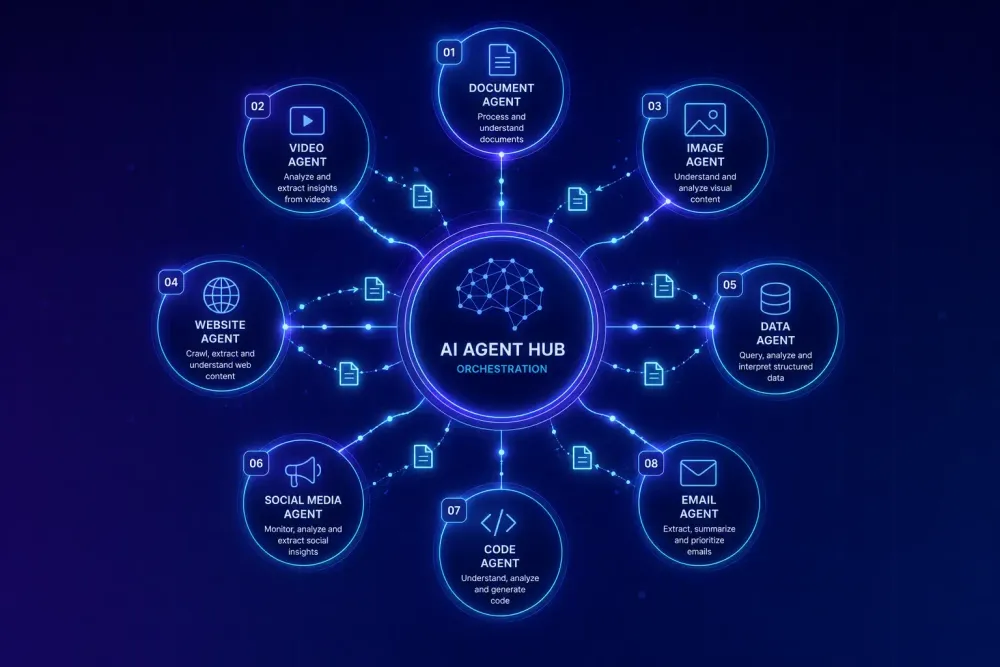
The term "AI agents" gets thrown around so loosely in the translation industry that by now it's hard to know what anyone actually means. When Smartcat talks about its AI agents, they mean something specific: specialized automated processes built into the platform that handle distinct content types end-to-end, from file upload through to a translated output. Not general-purpose chatbots, not a translation memory with a prettier interface. Purpose-built workflows, each tuned to a content type, interacting through a conversational interface.
We've spent time talking with agencies and translators who use Smartcat as their primary platform, and the agents question comes up constantly — which ones actually save meaningful time, and which are still more promise than practice? This is our honest answer for Smartcat AI agents 2026, including where we think the real limits are.
How Smartcat's agent system is structured
Smartcat describes its AI layer as a multi-agent system: specialized agents handle file preparation, translation execution, formatting, and project coordination. Users interact through the Smartcat AI chat interface — you upload a file or describe a task in plain language, and the right agent picks it up.
This is a real departure from how most CAT tools have handled AI integration. Rather than adding machine translation suggestions and TM lookups to an existing segment editor, Smartcat built a separate conversational layer where the agents operate. The CAT editor is still there for translators working segment by segment, but the agents are designed to reduce how often you need to open it at all.
As of 2026, Smartcat's prebuilt agents cover eight content types:
- Document Translator (DOCX and other text documents)
- PDF Translator
- Website Translation Agent
- Media Translator (video and audio: subtitles, voiceovers, dubbing)
- Image Translator
- Software Localizer (JSON, YAML, XLIFF, PO files)
- Learning Content Agent (SCORM e-learning packages)
- Course Translator Agent (Articulate Rise courses specifically)
Each agent is specialized, and that specificity matters. A Document Translator and a Media Translator have fundamentally different output pipelines — one rebuilds a formatted DOCX, the other coordinates subtitles and voiceover tracks. Merging them into a single "translate anything" interface would mean compromising the specifics each content type requires. The agent structure is what makes the automation useful rather than generic.
One thing to understand before relying on any of these: the agents work with what you give them. The setup you bring to a run — your TM, your glossary, your Translation Quality Score configuration — determines most of what you get out.
What the Document Translator and PDF Translator actually do
These are the two agents most agencies reach for first, and also the ones where the expectations gap shows up most clearly.
The Document Translator handles DOCX files. It runs each document through Smartcat's full translation pipeline: segmentation into sentence-level units, TM lookup where exact matches are confirmed automatically at zero Smartwords cost, AI translation for unmatched segments, QA checks for tag errors, number inconsistencies, and glossary violations, then a glossary-term correction pass using OpenAI's models for any flagged terms. The output is a translated document with the original formatting preserved.
The pipeline works well when you've built the right context into it. In our experience talking with agencies who use Smartcat regularly, the ones getting the most consistent quality are those with strong TM coverage in the relevant domain. When 60–70% of segments already have exact TM matches, the agent handles a much smaller volume of new content, and the output quality reflects that gap. Run the same agent cold against a first-time client's content in an unfamiliar technical domain and you get a workable draft, not a controlled one. Those are different things.
The PDF Translator adds an upstream OCR step: text gets extracted from the PDF first, then translated, then the layout gets reconstructed. For simple reports with straightforward formatting, this works cleanly. For dense regulatory documents, multi-column layouts, or scanned PDFs, the reconstruction step introduces real risk. That's not specific to Smartcat — it's inherent to PDFs as a format for translation workflows. Knowing when to convert a PDF to DOCX before processing versus running it directly through the agent is a judgment call worth making before the agent touches the file, not after.
Both agents work best when a glossary and a relevant TM are attached before you start. Running either one without that context is using a capable tool at partial capacity.
The Website Translation Agent: when full automation makes sense
The Website Translation Agent takes a URL and a language pair, then adapts the visible text content for the target language — no connector setup, no content type mapping required.
For agencies managing clients with ongoing multilingual site needs, the better long-term answer is usually a proper CMS integration. Smartcat has native integrations with WordPress, Contentful, Webflow, Figma, and others, designed for continuous localization — content gets pushed and pulled as it changes. A client whose site updates every week needs that kind of infrastructure, not an agent run triggered manually each time something changes.
Where the Website Translation Agent makes obvious sense is for scoped, one-time work: a campaign landing page, an event microsite, a pricing page that needs to go multilingual fast. You don't need to configure anything. Give it a URL, get translated content. The time savings for this use case are real and immediate.
The limit to name clearly: the agent handles visible text. JavaScript-rendered content — anything that loads dynamically in the browser after the initial page request — may not be captured at all. This is a common gotcha for agencies who try the agent on a client site and find chunks of content missing from the output. Static pages are the sweet spot. Complex dynamic sites need a different approach.
Media, Image, and the specialist agents
The Media Translator handles video and audio localization: subtitles, voiceovers, dubbing. Smartcat charges for AI voiceover at 10 Smartwords per word, compared to 1 SW per word for standard text translation. That pricing reflects the compute involved, and it's worth modeling against your expected volume before committing.
For agencies whose clients are moving toward video content, having multilingual media production inside the same platform as document and text translation work reduces a real coordination burden. Maintaining separate vendor relationships for subtitling, voiceover, and document translation means more handoffs, more file management, more invoice reconciliation. Whether the Smartcat pricing makes sense depends on your volume and your current toolchain costs.
The Image Translator addresses a genuine problem: text baked into graphics, infographics, and slide decks sits outside what any standard CAT tool or document agent can reach. The agent uses OCR to detect text inside images, translates it, and re-embeds the translated text. Smartcat charges a flat 1,000 Smartwords per image for the re-embedding step, making it cost-effective for image-heavy deliverables rather than occasional single images.
The Software Localizer handles developer-format strings in JSON, YAML, XLIFF, and PO files. Combined with Smartcat's API, this creates a usable path to automated localization for agencies with software clients who need translation integrated into a development pipeline. It's not the flashiest agent in the lineup, but for shops doing regular software localization, having this inside the platform removes a step that typically requires separate tooling.
The Learning Content Agent and Course Translator Agent cover SCORM packages and Articulate Rise courses respectively. E-learning localization has historically required niche tooling and separate vendor relationships. Having these workflows inside Smartcat means an agency can offer multilingual training content production without additional licenses or a new vendor category to manage.
What "autopilot" actually means in Smartcat's agent context
Smartcat uses the word "autopilot" in its marketing. Let's be specific about what that covers and what it doesn't.
The agents automate translation and formatting. They don't automatically handle review, approval, or delivery. Those steps still require human decisions — the automation reduces how much of the translation itself a human needs to touch, not how much the human needs to think.
What makes partial automation realistic is the Translation Quality Score (TQS): segments above a defined quality threshold get auto-confirmed, while segments below threshold get flagged for human review. An agency can configure a workflow where high-confidence output goes straight to a delivery package and lower-confidence segments get a targeted post-editing pass. That's meaningfully different from reviewing every segment, and it's where the real time savings show up in practice.
What stays manual: setting the TQS threshold at a level that actually matches each client's risk tolerance (what's acceptable for marketing copy isn't acceptable for a regulatory submission), keeping the glossary current so the agent's term-correction pass is working with approved terminology, and managing any revision workflow where the client or a senior reviewer expects sign-off before delivery. Smartcat's marketplace of 500,000+ vetted linguists is accessible from within the platform, so the escalation path from agent output to human review is built into the architecture. But someone has to configure when it triggers and how the handoff works.
For agencies setting this up for the first time, the complete guide to Smartcat for translation agencies covers the platform setup decisions that actually affect output quality.
Where the agents don't replace human judgment
The agents handle execution well. Where they consistently fall short is judgment.
Terminology decisions on new domains are one clear boundary. The glossary-term correction pass catches what's already in the glossary. A new client domain — a novel pharmaceutical compound, a new regulatory category, technical vocabulary the agency hasn't encountered before — won't have glossary entries yet. Someone has to build that glossary before the agent runs, and that person needs actual domain knowledge. The agent can't substitute for that upstream step.
Register and audience calibration is another. A Document Translator produces accurate, fluent output. It doesn't adjust register for a specific audience. Legal content translated for a German consumer needs different register than the same content translated for a B2B procurement team. Getting the agent to handle that distinction requires deliberate setup at the glossary level and the translation prompt level — it doesn't happen by default.
For layout-critical deliverables — investor presentations, regulatory filings, published annual reports — the reconstructed document needs a human review of the assembled layout, not just the translated text. Formatting reconstruction is reliable for standard document structures and unpredictable for anything outside that range.
The QA report surfaces error categories, but it doesn't know what matters most to a given client. A medical translation team and a marketing team operate at different acceptable error rates, and calibrating the agent workflow to those tolerances is a decision that has to come from someone who understands the actual stakes.
If you're preparing a Smartcat project for an AI translation run and want a concrete list of what to configure before the agents touch the files, this preparation checklist covers the specifics.
Getting the most out of Smartcat's agent system
The agencies getting the best results from these agents are the ones who invest in the setup that makes agents reliable before pressing start.
A well-maintained TM with strong match rates reduces what the agent needs to translate from scratch and also reduces the direct cost per run — exact TM matches cost zero Smartwords. A domain-specific glossary ensures consistent terminology across the project and activates the term-correction pass properly.
The practical starting point for any new client workflow: map out your TM coverage before the first run, build or import a glossary that reflects the client's approved terminology, and run a test batch on a small file to calibrate your TQS threshold before committing it to a full project. An hour of that setup consistently saves multiple hours of post-editing afterward, and it's what turns an agent run from a one-time experiment into something you can repeat reliably.