The complete guide to Smartcat for translation agencies
How translation agencies can get real value from Smartcat — workspace setup, TM strategy, bilingual DOCX exports, marketplace use, and the workflow mistakes to avoid.
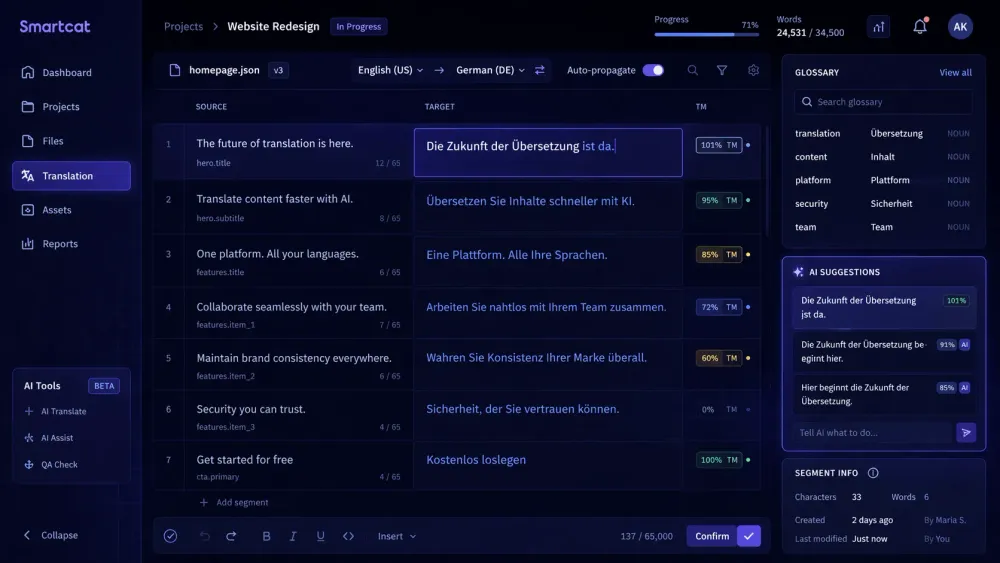
Smartcat is one of the most widely used platforms in professional translation, and also one of the most underused. Agencies sign up, use it as a file exchange and billing tool, and miss most of what makes it worth the investment. This guide covers the full picture: what Smartcat actually does, which parts matter most for agency workflows, and how to use it in a way that builds long-term value rather than just moving files around.
What Smartcat is (and what it isn't)
Smartcat describes itself as an AI-driven translation and localization platform that combines a CAT editor, AI translation engines, a marketplace of vetted linguists, and workflow automation. That's accurate, but it obscures the fact that these are four genuinely different products that happen to share an interface.
The CAT editor is a full browser-based Computer-Assisted Translation tool — source and target text side by side, translation memory suggestions in a panel, glossary matches surfaced in context, real-time collaboration, QA checks, and revision history. For translators, this is the primary working environment.
The AI translation engine is a multi-step pipeline. According to Smartcat's documentation, it runs segmentation, then TM lookup (exact matches are auto-confirmed), then AI translation using the best available engine for the language pair, then automated QA checks for missing tags and glossary violations, then a glossary-term correction step, and a fallback translation if the primary engine fails.
The marketplace connects project managers to 500,000+ vetted freelance linguists, with AI-powered matching that considers language pair, subject expertise, rates, and availability.
The workflow automation layer handles routing, notifications, project status tracking, and integration with external systems — CMS platforms, design tools, project management tools.
Most translation agencies use Smartcat for some of these and not others. The agencies getting the most value use the TM and glossary infrastructure consistently, pre-translate with AI before sending to human translators, use the marketplace selectively for specialist domains, and let workflow automation handle routing. That combination is what makes Smartcat a system rather than a tool.
Setting up your workspace for agency use
The organizational unit in Smartcat is the Workspace — a company or team account containing projects, TMs, glossaries, and users. Getting the workspace set up correctly before the first project saves significant time on every subsequent one.
The most consequential setup decision is TM architecture. A single TM for all projects works poorly — TM suggestions from unrelated clients surface in the wrong projects, and match rates are lower than they should be. The standard approach is one TM per client, with optional domain-specific TMs for clients with multiple distinct content types. Every project from that client reads from and writes to their TM.
Glossaries follow the same logic. One glossary per client, referenced on every project. Not created fresh each time — maintained and updated over time so that terminology knowledge compounds rather than restarting.
User roles are worth setting up deliberately. Translators, revisors, and project managers have different access levels and workflow capabilities. Roles configured correctly mean team members can do what they need without PMs manually gating every step.
Project templates eliminate per-project configuration for recurring project types. If you run the same language pairs, workflow steps, and QA settings repeatedly, build a template once and use it every time. The configuration is identical; only the source files change.
Agencies that skip workspace setup spend time manually configuring every project and build fragmented TM and glossary coverage that never accumulates the leverage it should.
The bilingual DOCX export and why it matters
The Smartcat bilingual DOCX is the format that moves translation content between Smartcat and external tools. It's a structured Word document with source and target text side by side in a table format, with metadata linking segments back to the original project.
Understanding what it is — and what it isn't — matters for any agency that uses external tools in their workflow.
The bilingual DOCX is not a final deliverable. It's an intermediate working file. The target-language column contains the current translation state of the project at export time: fully translated, partially translated, or empty cells where no translation exists yet. Importing a modified bilingual DOCX back into Smartcat updates the project's translation state.
For agencies running AI translation on Smartcat bilingual exports, the file structure is the source of the translation-ready content. SnapIntel accepts Smartcat bilingual DOCX as the entry format for its AI translation workflow. The language pair comes from the bilingual export's header rather than a separate selection step — no manual language configuration, no risk of mismatch from incorrect setup. Users prepare domain analysis, glossary, and prompt context, approve everything before the job runs, and download translated output with a QA report.
The practical implication for agencies: the bilingual export is a handoff point, not a dead end. It's how content moves from Smartcat into downstream AI workflows and back.
Translation memory: the asset most agencies underinvest in
Translation memory is the part of Smartcat that compounds in value over time. It's also the part most agencies manage least deliberately.
Here's how TM savings work in practice. According to Smartcat's documentation, Smartwords (their credit unit for AI translation) follow a tiered cost structure: 100% TM matches cost 0 Smartwords. Fuzzy matches cost roughly 40% of full translation. AI translation of unmatched segments costs 1 Smartword per word.
For a client with significant repeat content — regular reports, software updates, form-based documents — a well-maintained TM means a growing percentage of each new project is handled by the TM at low or zero cost. The first project might have no TM leverage. A year later, the same content type might have 40-60% coverage. The economics shift substantially.
The catch: TM quality only compounds if confirmed segments are actually accurate. Segments confirmed incorrectly or with outdated terminology propagate into future projects. A periodic TM audit — reviewing the most-reused segments for accuracy — is worth doing once or twice a year on high-volume clients.
Smartcat's Translation Quality Score (TQS) is a 0-100 automated quality metric per segment. Segments above a defined threshold are auto-confirmed; below it, they go to human review. This quality gate helps prevent low-quality AI output from accumulating in the TM — only segments that meet the bar get confirmed automatically.
The marketplace: when to use it and when not to
The Smartcat marketplace is most useful in two situations: specialist content requiring domain expertise your internal team doesn't have, and volume spikes where you need additional capacity quickly.
The AI matching algorithm considers language pair, subject expertise, rates, availability, reviews, and a content fingerprint that matches the project's characteristics against the linguist's history. For agencies accustomed to manually searching for translators, AI-driven matching is faster and more relevant than a directory search.
Payment through the marketplace consolidates what can otherwise be fragmented. Multiple freelancers, one invoice.
Where the marketplace is less useful: clients with strong style and terminology preferences, where onboarding a new linguist is costly. For those clients, the value is in a roster of vetted translators who already know the client — and using the marketplace for overflow, not primary sourcing. The marketplace optimizes for matching quality to task. It doesn't replace the relationship value of a translator who has worked with a client for two years and knows their preferences without being told.
Workflow mistakes that cost agencies time and money
We've seen agencies use Smartcat for years without getting much value from TM, glossaries, or automation — not because the tools don't work, but because they were never set up correctly.
The most consistent gap is running projects without loading a glossary. AI translation without glossary context produces output that's linguistically correct but terminologically inconsistent with the client's established vocabulary. This is entirely preventable and accounts for the majority of "inconsistent terminology" complaints agencies receive from repeat clients.
A related problem: creating a new TM for every project instead of accumulating into a client TM. Fragmented TMs mean no leverage across projects and no compounding savings over time. The architecture that works is one client TM that every project from that client writes to and reads from, maintained continuously.
Not reviewing QA flags before delivery is a third gap. Smartcat's QA pipeline flags missing tags, number errors, and glossary violations automatically. Delivering without reviewing these flags means sending output that the tool already identified as potentially problematic.
Finally: using the marketplace for all projects regardless of client familiarity requirements. The marketplace is efficient for new content from clients without strong style preferences. For clients with established terminology, the cost of onboarding a new linguist often exceeds the cost of using a known translator at a slightly higher rate.
For more on how the bilingual DOCX export fits into an AI translation workflow, see the SnapIntel docs — they cover the handoff from Smartcat export to AI translation run in detail.