How to set up an AI pre-translation step that works with any CAT tool
A practical guide to setting up an AI pre-translation step that works with any CAT tool — output formats, TM import, glossary, and when it's worth it.
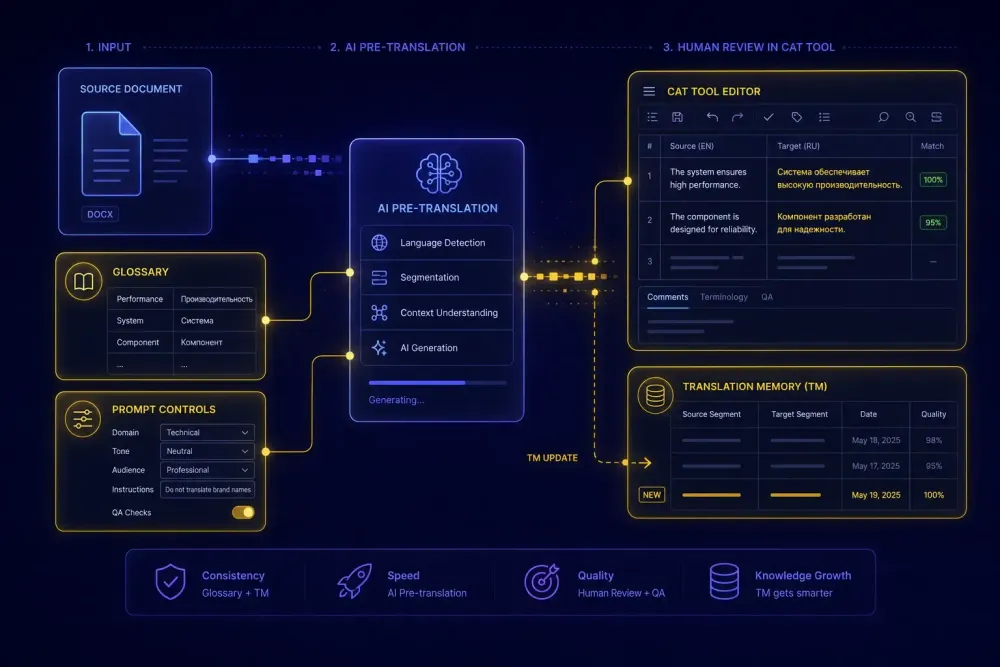
Most translation teams we work with have already started using AI somewhere in their workflow. The gap isn't AI adoption — it's the connection between AI output and the CAT tool where editors actually do their work. We see setups where someone runs a document through ChatGPT or DeepL, copies the result into a Word file, and hands it to an editor with no structure and no link back to the translation memory. That's not an AI pre-translation step. A real AI pre-translation step means the output feeds the TM, the editor works in a familiar environment, and reviewed segments go back into the memory for future projects. When the chain works, the second project from the same client takes noticeably less time than the first. This guide walks through how to get there.
What an AI pre-translation step actually involves
Pre-translation in CAT tool terms means the target field gets filled before a human translator or editor opens the file. That's not new — CAT tools have been doing this with translation memories for decades. What's changed is that AI can now fill those target fields even when there are no TM matches.
A real AI pre-translation step has three parts: input preparation, translation, and output formatting. The input is a structured source file, ideally in a format the translation engine can handle segment by segment rather than a block of text pasted into a chat window. The translation step produces a bilingual result where source and target segments correspond. The output step formats that result in a way your CAT tool can consume.
The difference between pasting text into ChatGPT and running a structured pre-translation step is entirely in parts one and three. ChatGPT can translate a paragraph. It can't produce a TMX file or a bilingual XLSX you can import into memoQ. And it doesn't know where the segment boundaries are, so you lose all the per-segment granularity that makes post-editing tractable.
This also means: if you want AI to feed your CAT tool, you need to think about file format from the start, not as an afterthought once you have translated text.
One more thing worth separating out: AI pre-translation is not the same as translation memory pre-translation. TM pre-translation fills segments with confirmed previous translations for exact or fuzzy matches. AI pre-translation fills segments the TM has no match for, or fills everything when TM coverage is low. The two work together — run TM lookup first, then run AI on the unmatched segments. Running them in the other order wastes AI translation on content you already own.
Choosing the right output format for CAT tool import
Every CAT tool has a preferred way to receive pre-translated content. Getting the format wrong means you'll have a correctly translated file and no clean way to get it into your editing environment.
TMX is the most portable. It's the standard format for translation memory exchange, and every major CAT tool — Trados, memoQ, Phrase, Smartcat, and most others — can import a TMX file. If your AI translation tool can produce a TMX, that's the cleanest path. The pre-translated segments go directly into your TM, and the next time you open a project with matching content, you get TM hits.
The problem is that most AI translation tools don't produce TMX natively. They produce translated documents.
The next best option is a neutral XLSX: a spreadsheet with source and target columns, one segment per row. This format is almost universally accepted. memoQ, Trados, and Smartcat can all import a bilingual spreadsheet as TM content. It's not as elegant as TMX, but it works across tools without any conversion step. For agencies running mixed-tool environments where different freelancers use different CAT software, a neutral XLSX export is often the most practical choice.
The third option is a bilingual document format specific to your CAT tool. Smartcat exports bilingual DOCX files. Trados uses SDLXLIFF. memoQ uses MQXLIFF. These are more direct but less portable — a Smartcat bilingual DOCX won't open cleanly in Trados without conversion.
The recommendation we give most teams: check what TM import format your CAT tool prefers, then work backwards from there when choosing or configuring your AI translation step.
How the AI pre-translation step connects to your CAT tool
The actual integration depends on your CAT tool, but the general pattern is the same.
You prepare the source file, run it through your AI pre-translation step, get back a bilingual output, and import that output into your CAT tool as either a TM update or a bilingual file for review. The editor then opens the file in their normal CAT environment and sees pre-filled target segments to refine rather than blank source segments to translate.
In Trados: import a TMX or bilingual XLS as a TM feed. Once the AI-translated segments are in the TM, open the source file, run pre-translation from the TM, and the AI output fills the target fields. The editor works through the file checking and correcting.
In memoQ: import the neutral XLSX as TM content, open the source project, and let the TM fill the segments. memoQ also supports Exported Bilingual Documents for structured bilingual import where you want editors reviewing the AI output directly rather than through TM matching.
In Smartcat: Smartcat has its own AI pipeline built in, but you can also work with external AI output by importing a bilingual DOCX into the CAT editor. Segments from the bilingual file appear in the editor for review, alongside any existing TM or glossary suggestions.
The manual work lives in the import step, and it's not much — maybe 10 minutes the first time you set it up per CAT tool. After that, the process is repeatable.
One practical detail that matters: match percentages. If you import AI-translated content at 100% TM match status, editors may auto-confirm segments without reviewing them. For AI output, we recommend importing at a fuzzy match percentage (typically 75–84%) so the editor knows these segments need a human look, even if they're mostly correct.
Glossary and prompt — the two inputs that control output quality
A pre-translation step without a glossary is a model guessing at your client's preferred terminology. We've worked with agencies that sent legal translation jobs to AI and got back three different terms for the same contractual concept because nobody gave the model a term list. Every inconsistency took time to correct in the editing pass, and fixing them consumed more time than the pre-translation step had saved.
Two inputs determine the quality of AI pre-translation output more than anything else.
A glossary is a structured list of source-target term pairs for the client and domain. Feed it into the AI prompt and the model will apply those terms during translation. The glossary doesn't need to be exhaustive — a list of 40 to 80 terms covering the most domain-specific or client-specific vocabulary will do more to improve consistency than any model upgrade.
A translation prompt is context about the document: type, tone, audience, register constraints. "This is a formal legal contract between two companies" produces different output than "translate this document" with no additional context, even with the same model and the same source text. The more specific the prompt, the less cleanup the editors do on tone and register.
For agencies handling recurring clients, keeping a per-client glossary file and a per-domain prompt template means the pre-translation setup gets faster over time. The first time takes an hour. The tenth time takes five minutes.
This works best when the client relationship is ongoing and the content type is consistent. It doesn't apply as well to one-off projects in unfamiliar domains where you'd need to build the glossary from scratch for each job.
What to do with AI-translated content once it's in your CAT tool
Once the AI output is in your CAT tool as pre-translated segments, the editing workflow shifts. Editors are checking and refining rather than translating from scratch. That's a different task than full translation — usually faster, but not trivially so.
Where to focus review effort: numbers and proper nouns are the most common AI pre-translation errors. Dates, figures, currency amounts, company names, and person names all require a look. Terminology is the second category — even with a glossary, edge cases come through. Fluency issues in long or complex sentences are third, but often the easiest to catch because they sound off when you read them aloud.
A practical approach: sort segments by length. Short segments (under 10 words) are usually fine. Longer segments (over 30 words) are where AI output most often needs adjustment. For documents with consistent sentence structure — legal contracts, product specifications, technical manuals — this pattern holds reliably. For documents with varied or complex syntax, the error rate goes up.
For more on what the post-editing process looks like in practice, including time estimates by document type, we've covered this in detail in our guide to post-editing AI translations efficiently.
After review, make sure the confirmed segments go back into your TM. This is the step most teams skip, and it's where the compound value of the pre-translation setup comes from. If you review 8,000 German segments in memoQ and confirm them, and those segments never get written back to your TM, you start from scratch on the next project. Write them back, and the next contract from the same client gets substantially higher TM match rates before AI has to fill anything.
We go into this in more depth in our piece on how to maximize TM match rates across projects.
File types and what to watch for: DOCX, XLSX, and PPTX
DOCX, XLSX, and PPTX files each have structural quirks that affect how reliably AI pre-translation works.
For DOCX files, most AI tools handle standard paragraph text well. Watch for tables, text boxes, footnotes, and headers and footers. Content in those containers often gets dropped or corrupted if the AI tool doesn't handle them explicitly. Before committing to a pre-translation workflow on a new document type, run a test file through and compare the structure of the output against the source.
For XLSX workbooks, the important constraint is that only visible text cells should be translated. Formulas, hidden cells, named ranges, and any structured data outside of human-readable text content should be left alone. An AI tool that translates cell contents indiscriminately will corrupt the workbook structure and break formulas. If a cell's value feeds a formula or drives a lookup, it should not be in scope for translation.
For PPTX presentations, the complexity goes up. Slide text, speaker notes, text in grouped shapes, and content inherited from slide masters and layouts all need to be in scope. If the tool only handles main slide text and misses speaker notes or master layout elements, the delivered file will have gaps that editors won't catch unless they check every view.
If you translate across all three formats and want a tool that handles the document structure faithfully and returns a neutral XLSX for TM import along with a QA report, SnapIntel supports DOCX, XLSX, and PPTX and is built around exactly this pre-translation workflow.
When a pre-translation step helps — and when it doesn't
An AI pre-translation step delivers value when the source content is consistent, the domain is known, the glossary is ready, and editors have capacity for a post-editing pass. It saves time most reliably on corporate documents with structured, repetitive text — contracts, specifications, policies — and on high-volume projects where the setup cost is spread across many files.
It doesn't deliver reliable value on creative marketing copy where AI output requires heavy rewriting. It also struggles on documents with dense, nested clause structures in the source — the kind of sentence that takes a skilled translator 15 minutes to unpack. In those cases, AI pre-translation sometimes produces output that looks reasonable at first but is subtly wrong in ways that take longer to catch than translating fresh.
The honest position: a pre-translation step is a bet that the AI output will be good enough to make editing faster than translating from scratch. For clean source content in a known domain, that bet pays off consistently. For complex or creative content, it sometimes doesn't, and you'll know that after one or two test runs.
One concrete example to close with: an agency we know handles recurring legal contracts from English to German and French. They set up a pre-translation workflow with a 60-term legal glossary and a formal-register prompt. The first project was 40 pages, roughly 8,200 words. Editors spent 4.5 hours on post-editing. The second project from the same client (similar content) took 3.2 hours, because the TM had absorbed the confirmed segments from the first run. The third project came in under 2.5 hours. The pre-translation step didn't change between projects. The TM did.
Actionable takeaway
Pick one file type and one language pair to test first. Set up the glossary before you run AI — even 30 terms covering the most client-specific vocabulary makes a visible difference in output consistency. Run the file through your AI step, import the output into your CAT tool at a fuzzy match percentage rather than 100%, and have an editor work through it as a post-editing task. Track the time. Compare it to a full translation on a document of similar size. You'll know within two projects whether the pre-translation step is saving real time or adding overhead that eats the savings.