How to Post-Edit AI Translations Efficiently: A Practical Guide for Professionals
How to post-edit AI translation efficiently: practical MTPE strategies, error patterns, speed techniques, and rate advice for professional translators.
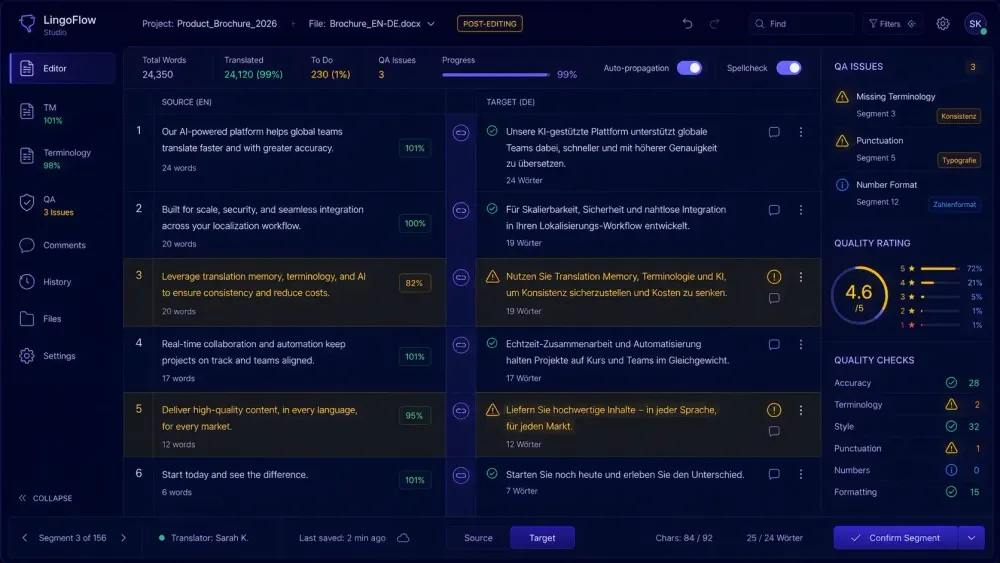
If you've spent any time with AI translation output, you know the skill gap is real. Modern LLMs produce fluent text — sometimes too fluent. Segments that sound right in isolation drift quietly from the source, or carry terminology errors that arrive sounding like correct answers. Learning to post-edit AI translation efficiently isn't just about editing faster. It's about knowing where to look, what level of scrutiny a document actually needs, and how to build a process you can repeat. This is what we've seen working with translators and agencies across a range of document types and language pairs.
What it means to post-edit AI translation today
MTPE predates LLMs by decades, but post-editing AI translation is a different job from post-editing earlier MT output.
Statistical MT in the early 2010s broke sentences mechanically — reversed word order, split idioms, fractured syntax. Post-editing was repair work. Neural MT improved fluency but introduced a new problem: confident-sounding output that wasn't grounded in the source. The task shifted from syntax to meaning.
LLM output moves this further. Grammar is usually fine. Fluency is often high. The errors go into subtler territory: meaning drift, context inconsistency, terminology substitution where the model swaps a precise technical term for a general equivalent that reads naturally but loses precision. A medical device document can come out of an LLM sounding like a product brochure. A legal contract can have its conditions softened in translation without any single sentence reading obviously wrong.
This changes where attention goes during post-editing. Earlier MT required close reading to catch bad grammar. AI translation requires close reading to catch accurate-sounding errors — a harder problem, because the text doesn't signal that something is wrong.
Domain matters more than it did before. In general content, fluency errors are the main risk. In technical, legal, or medical translation, terminology drift and meaning errors are far more serious than a clunky sentence. A contract clause that reads well but changes the interpretation of an obligation creates real liability. A pharmaceutical instruction that's correct except for a dosage qualifier is genuinely dangerous. These aren't edge cases — they're why post-editing in regulated content requires more deliberate engagement with the source.
The productivity gain from AI comes with a corresponding responsibility shift. Post-editors absorb a greater share of quality accountability than they did when errors were obvious. We covered this in more detail in our overview of how AI translation tools are changing the way translators work.
Deciding on MTPE level before you open the file
The most time-saving choice in any MTPE job happens before you look at a single segment: deciding which level of post-editing the document actually needs.
ISO 18587 defines two levels. Light post-editing targets output that is comprehensible and free from critical errors — fit for its purpose, but not equivalent to what a human translator would produce. Full post-editing targets that equivalence.
In practice: light PE means scanning for errors that would confuse or mislead a reader, fixing them, and leaving fluent passages alone even if you'd phrase them differently. Full PE means working source-to-target, checking glossary compliance, verifying terminology, and treating the document as you would a revision job.
The trap we see most often is applying full PE attention to content that needed light PE. Translators spend two hours refining style in a document going to internal review, then rush through technically demanding sections at the end. The time allocation ends up inverted from what the document required.
Clarifying the level before you open the file also determines appropriate billing. Light and full PE can differ by 30–50% in time. If the client hasn't specified, ask — it protects both parties and produces better work because the post-editor is working to the right standard throughout.
The exception: when a document is clearly regulated or client-facing, full PE is the default. The question is how to structure the review pass, not whether to do one.
How to triage AI output before you start editing
Starting a cold edit on a long document is slow regardless of MT type. A triage pass of ten to twenty minutes changes the shape of the whole job.
In a CAT tool like memoQ or Trados Studio, run automated QA checks before you start editing. Glossary violations, tag errors, number mismatches, missing segments — these surface through automated checks without requiring judgment. Clear them first. They're cheap to catch programmatically and expensive to find mid-edit when your attention is elsewhere.
After QA, read through the first two or three pages without editing. You're looking for the pattern: does the AI consistently mistranslate a specific term? Does it alternate between two target-language equivalents for the same concept? Does it drop parenthetical qualifications? Is the register inconsistent?
Once you've identified the failure pattern in this specific document, the rest of the edit goes faster. You're not discovering errors as you go — you're confirming or clearing something you already spotted.
A concrete example: a post-editor working on a pharmaceutical regulatory submission caught in the triage pass that the AI was rendering a specific ISO-standardized process name as a generic equivalent. That error appeared more than 40 times. Having identified it early, the remaining instances took seconds each to fix. Without triage, some would have been caught and some missed, and resolving the inconsistency would have required a full document re-read before delivery.
This works best when the document has a detectable pattern — which AI translation usually does, because LLMs make systematic errors based on training data and prompt context, not random ones.
The error patterns that appear most often in AI-translated documents
Not all AI translation errors cost the same to catch or the same to miss.
Terminology inconsistency is the most common problem in longer documents. The model translates a term one way in segment 12 and a different way in segment 58. With a working glossary connected to the CAT tool, QA catches this. Without one, it requires careful reading. The longer the document, the more likely the model drifts from its own earlier choices.
Content omission shows up in sentences with nested clauses, lists, or parenthetical conditions. A qualifying clause — "unless the contract specifies otherwise," "except in cases where" — gets dropped because the model optimizes for fluency and treats the qualifier as optional weight. Any segment with more than one dependent clause warrants a source-target comparison.
Register drift is easy to miss because the output reads well. LLM output defaults toward a neutral, slightly informal register. In formal or regulated content, this produces text that is accurate but wrong for the context. French, German, and Spanish all have structural formality markers that AI translation frequently undershoots.
Hallucinated specifics: numbers, dates, proper nouns, cited figures, percentages. The model knows what a plausible value looks like in context and produces one. Every specific value in an AI-translated document needs a direct source check, no exceptions.
Tag and placeholder errors appear when inline formatting codes or variables don't survive AI translation intact. CAT tools surface most of these through QA. In manually handled bilingual documents, they need explicit verification.
Speed strategies that hold up under review
Faster post-editing comes from knowing which segments deserve speed and which deserve attention — not from moving quickly through all of them.
Work with QA checks and terminology flagging active in your CAT tool. When glossary mismatches and tag errors surface as you move through the document, you don't have to hunt for them. Trados Studio, memoQ, and Phrase all support active QA during editing. That removes monitoring overhead while you're focused on meaning.
Keyboard shortcuts matter more than most post-editors expect. In Trados, Ctrl+Alt+L copies the source into the target field — useful when the AI output is far enough off that retranslating from scratch is faster than editing. In memoQ, keyboard navigation between segments means you're rarely reaching for the mouse. Over a 5,000-word document, that adds up.
Don't re-read your edits segment by segment as you go. Make the change, confirm, move forward. A final pass at the end catches what you missed. Reading each segment twice adds overhead without proportionate benefit — your second read on a segment you just edited almost never catches something your first read missed.
The principle that matters most: reserve close reading for segments with numbers, proper nouns, conditional clauses, and technical terms. Move quickly through segments that are fluent and stable. Uniform attention across a document isn't the goal — proportionate attention based on risk is.
This works best in a familiar domain. In an unfamiliar one, you can't quickly assess whether a segment is semantically stable because you don't know the subject matter. Slowing down to check against a reference isn't optional there.
Setting your rate and knowing when output crosses into retranslation
Post-editing productivity is typically measured in words per hour. Light PE in a familiar domain on solid AI output generally runs 2,000–3,000 words per hour for experienced post-editors. Full PE on denser content usually runs 1,000–2,000 words per hour.
These figures assume the AI output is actually post-editable. When quality drops below a usable threshold — because the domain was poorly handled, the glossary was absent, or the language pair is one where current models struggle — the rate falls fast. Post-editing becomes retranslation with extra steps, and billing it at MTPE rates is a mistake.
We track actual words-per-hour across MTPE projects, and the variation is large. A well-prepared marketing document in English-to-Spanish looks nothing like a technical manual in English-to-Japanese with no glossary input. CSA Research has published data on MTPE productivity trends and market rates — worth checking when you're setting rates for the first time.
How carefully the AI translation was prepared before running matters significantly. A translation run with domain analysis, a structured glossary, and specific prompt instructions requires less correction than one started cold. For teams working with DOCX or XLSX files, tools like SnapIntel include a QA report alongside the translated output — the quality rating is available at the project level before you open the file in your CAT tool, which cuts triage time.
Practical takeaway
Define the level before you open the file. Run QA before you start editing. Read the first couple of pages to find the failure pattern, then work with that pattern in mind.
Keep glossary checks active. Pay close attention to segments with numbers, technical terms, and conditions. Move quickly through what's stable. Do one final pass for consistency before delivery.
Track your actual output in words per hour. Price based on what you actually did — light PE on strong output and full PE on a difficult document are genuinely different amounts of work.
The clients who benefit most from MTPE are the ones who prepare the translation input well: clean source documents, specific glossaries, precise prompts. The better the input, the less the post-editor has to fix. That relationship runs in both directions, and it's worth knowing before you agree to a turnaround time.