How freelance translators can use AI QA tools without paying agency prices
AI QA tools for freelance translators don't require enterprise budgets. Here's how to build a solid quality check workflow using Xbench and free options.
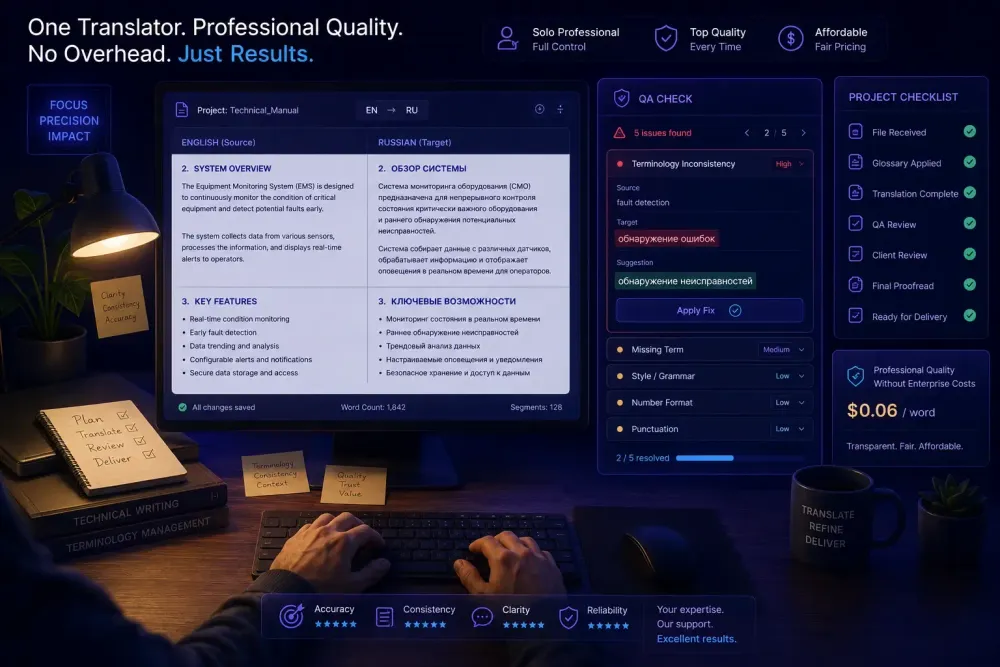
AI QA tools for freelance translators are usually framed as a luxury — something to think about once you're running a team, not when you're billing 2,000 words a day on your own. We see this framing cause two opposite problems: freelancers who do no systematic QA before delivery, and freelancers who've signed up for enterprise checking platforms that solve coordination problems they don't have. Both are avoidable once you understand what QA tools actually do, what's available without a subscription, and which checks genuinely apply to a solo workflow. This article focuses on the practical middle ground.
What QA tools actually do (and why the category is misunderstood)
The term "QA tool" gets used loosely enough that it means different things depending on the context. In an agency setting, it might refer to a standalone application like Xbench or Verifika, the built-in QA module inside a CAT tool, an MT quality estimation system, or a client-formatted review spreadsheet. Treating these as interchangeable leads freelancers to overpay or dismiss the category entirely.
What automated QA tools specifically do is check for error categories that are hard to catch manually at translation speed: number and date mismatches between source and target, untranslated segments, missing or doubled tags, inconsistencies in how the same source phrase was rendered across a long document, and terminology deviations from a glossary. These are mechanical checks, not evaluative ones. They don't tell you whether a translation is fluent, whether the tone is appropriate, or whether a technical phrase is used the way specialists in that field actually use it. That kind of judgment requires a human reader.
The implication for freelancers is that the value of a QA tool depends entirely on which error categories are relevant to your work. If you translate DOCX files directly without a CAT tool, tag-related checks are irrelevant to you. If you regularly do MTPE work — receiving AI-translated output and post-editing it before delivery — number and date errors become much more important, because MT systems produce them at a predictable and consistent rate. If you work on technical or legal projects with client-provided glossaries, consistency checking is the most useful feature you can run.
Understanding which checks matter for your specific workflow is the first decision, before you look at any particular tool or price point.
Free options that actually work for solo translators
Most industry coverage of QA tools is written from an agency angle, which means it leads with paid software. The free options get less attention, partly because they have fewer features and partly because they're not being marketed. That's worth correcting.
The Xbench free version is the most practical starting point. Xbench is available at no cost and supports bilingual files from most major CAT tools: SDLXLIFF from Trados Studio, XLIFF, TMX, memoQ MQXLZ, and several other formats. It checks for untranslated segments, inconsistencies, number mismatches, and forbidden terms. The free version has real limitations compared to Xbench Pro — the terminology checking is less sophisticated and some file format options are locked behind the paid tier — but for a solo translator working one project at a time, it covers the most common error categories without costing anything.
Setup takes about 20 minutes the first time through. You export your bilingual file from your CAT tool, load it in Xbench, configure the checks or accept the defaults, and run the QA pass before delivery. The output is a sorted list of flagged items by category, which you work through and resolve. Once you've done this twice, the whole process takes about 10 minutes for a typical 2,000-word document.
The built-in QA modules inside CAT tools are the other free option, and they're frequently overlooked. memoQ, Trados Studio, and Smartcat all include QA checks that run on demand before you export. If you already use one of these tools, the built-in module is the lowest-friction starting point. Its main limitation is that it typically only works with files created inside that specific tool — if an agency sends you a bilingual DOCX or a different CAT tool format, the built-in module may not apply.
This doesn't mean paying for a QA tool is never justified for freelancers. It means the free options cover enough ground that the upgrade decision should be based on a real gap, not on the assumption that professional QA requires a subscription.
How to use Xbench in a practical pre-delivery workflow
We've seen Xbench used effectively by freelancers working 1,500 to 4,000 words per day across technical, legal, and financial domains. The workflow that tends to hold up best is a two-step process: run the built-in QA check inside your CAT tool first to catch obvious issues, then export the bilingual file and run Xbench for a second pass focused on numbers, consistency, and untranslated content.
Where Xbench earns its place most clearly is on longer projects and on projects where a client glossary was involved. Consistency errors — translating the same source term two different ways across a 5,000-word document — are genuinely difficult to spot by rereading, especially after working on the text for several hours. Xbench surfaces them in seconds. If the project has no formal client glossary but you built your own terminology reference during translation, you can load it as a Xbench terminology list and check for deviations from your chosen translations across the whole document.
One constraint worth stating clearly: Xbench works best when your deliverable is in a supported bilingual format. If you're working directly in a DOCX without a CAT tool step, the bilingual export doesn't exist in the same form. In that situation, the manual checklist approach covered below is more applicable than trying to force a QA tool onto a workflow it wasn't designed for.
For MTPE work specifically, Xbench's number and date checks are worth running even if you skip the consistency check. MT systems reliably produce date format errors (switching between DD/MM/YYYY and MM/DD/YYYY), decimal separator mistakes, and number transpositions that read naturally in context but don't match the source. A 10-minute Xbench run before MTPE delivery catches most of these. If you want a full breakdown of QA tool options including paid alternatives, we've put together a detailed comparison at best translation QA tools in 2026: Xbench, Verifika, and the alternatives compared.
Building a pre-delivery checklist when you're not using a CAT tool
Not every freelancer runs projects through a CAT tool, and even those who do sometimes take on work where the file handling doesn't allow for a clean bilingual export. In those situations, a structured manual checklist replaces automated checking without sacrificing consistency.
The categories worth covering in a manual QA pass are numbers and dates, then terminology, then formatting. Numbers and dates are the highest-priority check because they're the most visible error category for clients. A transposed date in a contract or a wrong decimal in a financial document gets noticed immediately and creates a credibility problem out of proportion to the actual mistake. Going through every number and date in a 3,000-word document takes about 10 minutes but catches the category of error that generates the most post-delivery complaints.
Terminology checking manually means searching for the terms that appeared in a client glossary, or that you made a specific decision about during translation. On a legal document, you might search for "party," "agreement," and "indemnification" to confirm they appear consistently throughout. On a technical manual, you'd check the product-specific terms that appeared in the client reference sheet. This is slower than an automated check, but it works and it doesn't require any tools beyond your word processor's search function.
Formatting verification is the final step: confirm that heading levels match the source structure, that bold and italic markup is preserved, and that table and list structure is intact. On DOCX files especially, text expansion from translation can push formatting out of alignment in ways that are easy to miss when reading for content.
A checklist covering these three categories, saved as a text template you reuse per project, takes five minutes to create once and gives you a consistent pre-delivery process that you can point to if a client asks about your QA procedure.
Using AI as a checking layer without dedicated software
The most recent addition to the solo QA toolkit is using a large language model as a reviewing step — not for the mechanical checks that Xbench handles, but for fluency and accuracy spot-checking on content where tone matters.
The basic approach: after finishing a translation, take a representative sample from different sections of the document and prompt the LLM to compare source and target for meaning accuracy and naturalness in the target language. A direct prompt works: "Here is the source text in [language]. Here is the translation. Identify any segments where the meaning in the translation diverges from the source, or where the phrasing seems unnatural in [target language]." If you include the project glossary and any client style notes in the prompt context, the feedback becomes more specific and less generic.
This approach works best on content where register and tone matter: marketing copy, executive communications, HR documents. It's less reliable on highly specialized technical content where the LLM may not have enough domain context to evaluate specialized terminology accurately. And it doesn't replace number and date checks — language models are genuinely poor at systematic numerical error detection compared to a tool like Xbench.
One realistic limitation: LLM feedback on translations can be wrong with confidence. A model might flag an entirely correct translation as "unnatural" because it doesn't match the most common surface phrasing, or miss a genuine accuracy error because the text reads fluently. Treat LLM QA output as a starting point for verification, not a final review. That said, for a 20-minute pass on a 3,000-word document, even partial accuracy on fluency flagging is more than you'd catch by rereading your own work.
For a more detailed look at how AI output interacts with post-editing work, the article on how to post-edit AI translations efficiently covers the systematic side of reviewing AI-generated content.
When paying for a QA tool actually makes sense
Paid QA tools make sense for freelancers when the volume of work means the free options are leaving real gaps, or when the complexity of the content — terminology density, number of QA categories required, need for a formal QA report — exceeds what free tools handle.
Verifika is the paid option that comes up most often in conversations with experienced technical translators. It handles more bilingual file formats than Xbench, its terminology verification is more sophisticated, and it produces a QA report that some agencies and direct clients accept as documentation of a systematic review process. At roughly $10 per month for a personal license (check current pricing on the Verifika site — pricing changes), it's not a large expense for a full-time freelancer. Whether it solves a real problem for you depends on whether the free alternatives already cover your QA categories adequately.
Xbench Pro adds features worth considering if you use the free version regularly and want more control over terminology checking and report format.
What consistently doesn't make sense is spending on enterprise QA platforms designed for teams. Tools that price per seat per month, include workflow management for multiple linguists, and generate coordination dashboards were built to solve problems that grow linearly with team size. A solo translator doesn't have those problems, and buying the tool doesn't change that.
Your QA process, matched to your workflow type
The actionable takeaway is to build your QA process around your actual workflow rather than around what agencies do at scale.
If you use a CAT tool and have regular project volume, the combination of your tool's built-in QA module and Xbench free covers most mechanical errors at no cost and in about 15 minutes per project. Set up Xbench once, configure it for your most common file formats and error categories, and make it part of your delivery habit rather than an occasional extra step.
If you work directly in DOCX without a CAT tool, the manual checklist process is more applicable than trying to adapt automated tools to a workflow they weren't designed for. Numbers and dates, terminology, formatting — in that order, every time.
If you do MTPE work regularly, a focused Xbench run for number and date errors is the single highest-return QA step available to you. MT systems produce these errors systematically, clients notice them immediately, and catching them takes 10 minutes. Add an LLM spot-check for fluency on content where register matters.
The goal isn't to replicate a QA department. It's to have a consistent, repeatable process that catches the error categories most likely to surface in a client complaint. Once that process is in place and takes 15 minutes per project, it becomes the normal end of a project rather than an optional extra.