Best translation QA tools in 2026: Xbench, Verifika, and the alternatives compared
The best translation QA tools compared: Xbench, Verifika, QA Distiller, and built-in CAT checks. Find out which fits your workflow and error profile.
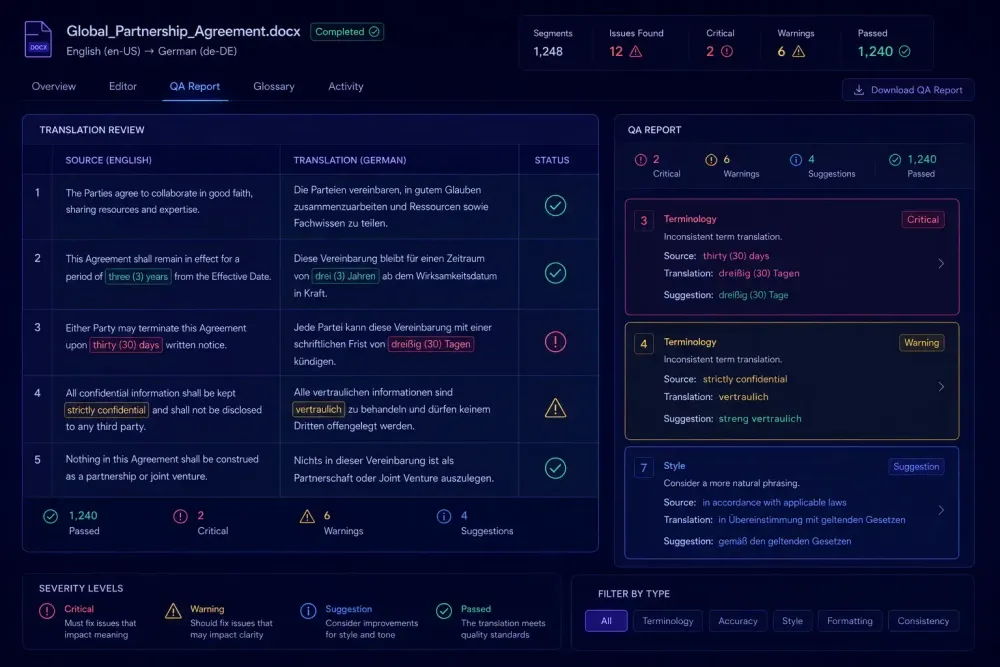
Most agencies have a QA step. Fewer have questioned whether the translation QA tools running that step are actually matched to how they work. Xbench gets installed once and rarely revisited. Verifika costs money so it must be worth it. Built-in CAT tool checks are "good enough" until a client sends corrections that a proper QA pass should have caught. This comparison is for teams who want to make that choice deliberately — what each tool actually checks, where it falls short, and how to match the tool to the project type rather than defaulting to whatever is already installed.
What automated QA tools actually check
Rule-based checks. That's the honest description of what every dedicated QA tool in this category does. They verify things that can be confirmed without reading for meaning: missing or malformed tags, number mismatches between source and target, untranslated segments, double spaces, punctuation irregularities, and terminology violations — cases where a listed source term appears in the segment but the expected target term wasn't used.
What they don't assess is meaning, accuracy, or register. A file can pass every automated check and still read poorly. That's not a flaw in the tooling; it's simply the scope of rule-based checking. The practical value is coverage and consistency: a QA tool applies the same set of checks to every segment in the project, which a human reviewer working against a deadline cannot reliably replicate.
The most meaningful differentiation between tools shows up in terminology handling. Some tools accept a termbase and flag every segment where a listed source term appears without the approved target. How granular that check gets — whether it handles inflected forms, context-dependent exceptions, or partial matches — varies significantly across tools.
Before going further: Trados Studio, memoQ, and Smartcat all include built-in QA checks. For many workflows, those checks cover the practical baseline. The question is whether your quality requirements, client expectations, or project complexity push past what a CAT tool's native checks handle. If the answer is yes, here's what the dedicated options actually give you.
Xbench: still the default for a reason
ApSIC Xbench has been part of professional translation workflows for well over a decade. The free version (2.9) is still widely installed across agencies and freelance setups. The paid 3.x upgrade adds features that matter at scale, and the pricing is reasonable enough that most teams running consistent volume make the switch at some point.
The core use case is project-level QA: load files from multiple CAT tools (SDLXLIFF from Trados, MQXLIFF from memoQ, XLIFF, TMX) and run checks across all of them in a single pass. For a team handling files from several clients on different CAT setups, that cross-format handling saves real time compared to running checks inside each tool separately.
Terminology checking is where Xbench earns consistent loyalty. Load a glossary, define which terms are critical versus advisory, run the check. Every segment where a listed source term appears but the approved target wasn't used gets flagged. For agencies managing multiple client glossaries, this is a practical enforcement mechanism: it catches terminology drift that individual translators will sometimes miss, especially on long or repetitive documents.
The honest limitation is reporting. Xbench's output is functional for internal review but not suited for external delivery. If a client expects a structured QA report as part of what you hand over, the output needs cleanup before it goes out. That's manageable, but it adds time.
Xbench works best for fast, reliable internal QA on standard file types. Its longevity in the industry reflects something real: the interface hasn't been modernized, but it's consistently reliable for what it does.
Verifika: when client-facing QA documentation is part of the deliverable
Verifika is the tool we reach for when a project requires formal QA documentation alongside translated files. The reporting structure is significantly more developed than Xbench — error categories, severity levels, and output formats clean enough to go to a client directly.
This matters most on regulated content. A pharmaceutical translation team preparing patient-facing materials needs to demonstrate, not just claim, that specific error categories were checked. A legal program with a 300-term client glossary needs to show which segments triggered terminology flags and why. Verifika's configurable profiles let you define this per client: what counts as a critical error for one project type won't be the same threshold for another.
Error classification goes deeper than most tools in this category. You can create custom profiles that distinguish between issues that block delivery and issues that should be reviewed but don't require correction before the file goes out. The tolerance for terminology warnings varies enormously between a marketing project and a regulatory submission. Verifika lets you model that difference in how the check is configured.
The format support covers SDLXLIFF, MQXLIFF, XLIFF, and others, and the interface is considerably more accessible than Xbench for project managers who run QA occasionally rather than daily.
One practical consideration: Verifika runs slower on large batches than Xbench. Single project files are no problem. For agencies processing 30-file batches under tight delivery timelines, the QA step needs to be scheduled with time to spare. The per-user subscription is manageable for small teams but becomes a real cost consideration when QA responsibilities are spread across several project managers.
Verifika's core strength is auditability. If you need to show what was checked, how errors were classified, and what was found, it's the strongest option in this category.
QA Distiller: for workflows where terminology errors are the primary risk
QA Distiller is less widely known than either Xbench or Verifika, but it has specific depth in terminology checking that matters for certain project types: complex glossary configurations with context rules, exceptions, and pattern matching beyond simple source-target pairs.
For agencies running long-term programs in regulated domains — pharmaceutical documentation for a large client, multi-year legal translation programs, financial disclosure materials for regulated markets — the setup investment pays off through fewer post-delivery corrections. Standard tools can hold a list of approved term pairs. QA Distiller can hold that list plus the logic around when variant terms are acceptable and when they aren't.
A concrete example: a team translating product documentation for a medical device manufacturer across three language pairs might work with 400 approved term pairs, several of which have acceptable variants depending on the document section. That conditional logic is difficult to model correctly in Xbench. In QA Distiller, you can define it and expect it to hold consistently across the project.
The tradeoff is setup time. The configuration investment is real, and it only pays off on workflows where the same glossary logic applies repeatedly — the same client, the same domain, projects running over months or years. For short-term or variable work, the overhead isn't justified.
QA Distiller handles standard CAT file formats. The reporting is adequate for internal use. For client-facing QA reports, Verifika remains the stronger option. Many agencies run both in the same workflow: QA Distiller for terminology depth, Verifika for the deliverable format.
How built-in CAT tool QA compares with dedicated options
Trados Studio, memoQ, and Smartcat all include QA checks as part of the standard workflow. For many teams, these built-in checks cover the practical baseline: missing tags, empty segments, number inconsistencies, and some level of terminology checking against the project glossary.
Smartcat's approach is specific enough to describe. As part of its AI translation pipeline, the platform runs automated checks that flag missing tags, number errors, and glossary violations. It also assigns a Translation Quality Score (TQS) at both the project and segment level, giving teams a visible quality reference during the workflow without an external tool step. For agencies already working primarily in Smartcat, this built-in layer handles a meaningful share of what a standalone tool would catch.
The gap between built-in and dedicated QA tends to show up in three places: aggregation across multiple files, configuration depth, and reporting format. Built-in checks typically work at the file level within the current CAT project. A standalone tool can pull results from 20 files across different tools, compare across language pairs, and produce output suited for delivery review. If QA documentation is a client deliverable, built-in checks usually don't meet that requirement.
For agencies working within one CAT tool on consistent project types, built-in QA is a sensible baseline. For teams handling variable file types, multiple CAT tools, or formal QA deliverables, a dedicated tool adds enough to justify the cost. Many professional teams run both: built-in checks during translation, a standalone tool for the formal pre-delivery pass.
What AI translation does to the error profile
Moving to AI-first translation workflows, where AI generates the first draft before human post-editing, changes the categories of errors that QA tools are asked to catch. Traditional MT errors were often random and localized: one word substituted, one phrase rendered awkwardly. AI-generated content tends toward different patterns.
Terminology hallucination shows up more often now. An AI model may translate a term correctly across most of a document and then substitute a semantically plausible alternative that doesn't match the approved glossary on a small number of segments. The sentence reads fluently, which is why human reviewers working at pace tend to miss it. A terminology check against a properly loaded glossary catches it.
Tag handling is another pattern. AI models sometimes reorder or omit inline tags in ways that break formatting downstream or, in software localization contexts, cause variable substitution errors. Standard tag validation catches this, but the rate of tag-related issues from AI-generated output tends to run higher than from experienced translators working directly in a CAT editor.
What this means in practice: the QA tool is only as useful as the preparation that preceded translation. An incomplete glossary means terminology violations pass undetected — not because the tool failed, but because it had nothing to check against. Teams moving to AI-assisted workflows find that the investment shifts earlier in the process, toward better glossary preparation before translation runs, rather than expecting QA to catch gaps afterward.
For more context on how this shift is playing out, see our overview of how AI translation tools are changing the way translators work in 2026.
If you're running AI translation on DOCX or XLSX documents and want QA built into the workflow rather than applied after the fact, SnapIntel gates translation start on glossary and prompt approval and returns a QA report alongside every completed job.
How to pick the right tool and get more from the QA step
The choice between Xbench, Verifika, and QA Distiller comes down to three practical questions: how often do you produce formal QA reports for clients, how complex are your terminology requirements, and how many people on your team use QA tools regularly?
For a team where QA is internal and the project setup is consistent, Xbench covers most practical needs. The free version is genuinely functional for freelancers and small agencies. The paid version earns its cost at higher volume.
If client-facing QA documentation is a regular deliverable, or if you're working on projects with formal quality requirements, Verifika's output quality justifies the subscription. The configurable profiles let you match the tool to specific client requirements rather than applying a single standard across different project types.
If you're running long-term programs in regulated domains and terminology compliance is the primary quality concern, QA Distiller's depth is worth the setup investment. That won't apply to most general-purpose workflows, and it's honest to say so.
Before switching tools, pull the correction requests from your last five delivered projects and categorize them: terminology errors, tag issues, formatting problems, untranslated segments? If terminology accounts for most of the corrections, weight your choice toward stronger terminology checking. If the majority involve formatting or tags, the built-in checks in your CAT tool or a fast Xbench pass likely cover what you actually need.
One change worth making regardless of tool: build or review the glossary before translation starts, not after the fact. A QA tool running against an empty termbase will pass terminology errors without flagging them. That's not something a better tool fixes — it's a sequencing problem in the workflow. Getting the terminology reference current before translation begins is the most reliable improvement you can make to what automated QA actually catches.