BYOK for AI translation: what it means to bring your own API key and why it matters
Learn what BYOK means in AI translation, how bringing your own OpenAI API key affects costs, data privacy, and which workflows actually benefit from it.
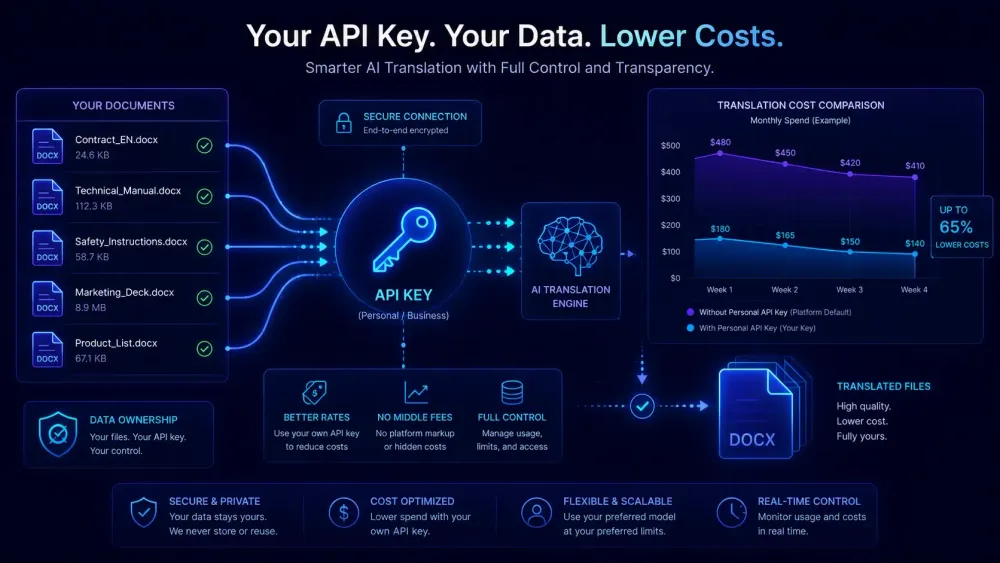
BYOK for AI translation started appearing in more translation tool marketing over the past year, and it almost never comes with a clear explanation of what actually changes when you enable it. Most teams don't seriously evaluate the feature until they've already hit a cost ceiling or a client starts asking hard questions about where their documents went. By then, switching is a hassle. Here's what BYOK really means in practice, what it changes (and doesn't), and how to figure out whether it belongs in your setup.
What BYOK actually means in AI translation
BYOK means you supply the translation tool with your own OpenAI API key instead of using the platform's built-in shared access. Every API call goes from the tool to OpenAI's servers using credentials tied to your account, not the platform's.
The way managed keys work: the tool provider buys API capacity at their own rates, marks it up into credits or per-word fees, and resells it to you. We've seen markups of two to four times the underlying OpenAI cost per token. When you bring your own key, that markup disappears. You pay OpenAI's published rates directly; the platform charges only for the software layer on top.
One thing that trips people up: OpenAI bills by tokens, not words. A word in English averages roughly 1.3 tokens. A glossary-injected prompt for a domain-heavy DOCX runs substantially more because the system prompt itself adds to the token count. That's different from how most translation platforms present costs — most quote per source word. When you move to BYOK, you're shifting from a predictable per-word rate to a variable token-based bill, which means your actual spend depends on prompt design, document complexity, and model selection, not just word count.
Not every tool supports BYOK, and among those that do, it's usually restricted to higher-tier plans. An OpenAI account with billing configured is also a prerequisite — not a big lift, but worth knowing upfront.
Why translation costs can spiral without BYOK
The economics of AI translation are easy to underestimate until you're running real volume. A 20-page technical DOCX typically runs 4,000 to 8,000 words. An agency handling a dozen such projects per month is pushing 50,000 to 100,000 words through AI.
At OpenAI's published rates for GPT-4 class models, 100,000 words costs roughly $3 to $10 in raw API spend, depending on the model and the input-to-output token ratio. A platform charging 1 cent per word for the same volume bills $1,000.
That gap compounds fast at scale, and it's why many agency-tier plans now list BYOK as a differentiator. Platforms selling to agencies know that teams doing this math will notice eventually.
The picture gets more complicated when you look at different model tiers. Newer, more efficient models from OpenAI cost significantly less than the GPT-4-equivalent models from a year ago, and for many language pairs the quality difference is smaller than the price difference. On a managed-key platform, you usually don't see which model is running underneath — you see per-word pricing, and that pricing doesn't change when OpenAI cuts API costs. With your own key, you control the model selection and you benefit directly when prices drop.
One thing to watch: "supports BYOK" on a pricing page doesn't always mean cost-neutral. Some platforms still charge per-document fees or monthly minimums on top of your API spend. Others restrict BYOK to certain file types or language pairs. Before signing up anywhere, ask specifically what you pay the platform and what goes directly to OpenAI at your actual monthly volume. The answers tend to be more complicated than the marketing language implies.
What happens to your data when you use a managed key
This is where BYOK stops being an internal accounting question and becomes something you may need to explain to clients.
When you use a platform's managed API key, your document content flows through OpenAI's API under the platform's account. The request is authenticated with the tool's credentials. OpenAI's data usage policies apply to whoever owns the account — which is the platform, not you.
That creates a gap in the data chain that matters when you're working with clients under NDAs, in regulated industries, or with documents subject to data residency requirements. Telling a client their content was "processed under your account" is hard to support if it actually went through a shared key belonging to a third-party platform.
With your own key, you are the account holder. Every request shows up in your OpenAI usage dashboard. You have an actual audit trail. OpenAI's current API terms don't use your content for model training by default — but verify this directly against the current policy, since these terms have changed before.
For agencies handling legal, pharmaceutical, or financial documents, data chain clarity is often the main reason to want BYOK, well ahead of any cost argument. If you're thinking carefully about how client data moves through your AI tools more broadly, our piece on data privacy in AI translation covers the wider picture.
Worth being clear about one limit: BYOK doesn't make your data processing fully isolated. The translation tool still handles your document on its own servers — it has to, in order to segment and prepare the file. Content passes through the platform regardless of which API key is in use. BYOK controls only what happens at the OpenAI API call layer. If full data isolation is a hard requirement, you also need to look at the tool's server-side retention and deletion policies, not just the key arrangement.
Who BYOK actually makes sense for
High-volume teams with a clear cost case — or agencies where client data contracts require a clean audit trail — are the clearest fits.
It's less compelling for freelancers translating one or two documents a week. Managing an API account, monitoring spend, and troubleshooting failed calls takes real overhead. At low volume, a platform's managed credit system is usually simpler and sometimes cheaper once you factor in minimum billing thresholds on the API side.
Teams with mixed technical levels need to account for the setup curve. Generating a key, configuring spend limits in OpenAI's dashboard, and debugging API errors is manageable if there's a technical lead overseeing it. It becomes friction when non-technical project managers are expected to handle it on their own.
There's also one case where the managed key is actively better: when the platform uses fine-tuned models or provider-specific configurations that aren't accessible via a personal OpenAI key. Some tools run on custom deployments or entirely different model providers. In those situations, bypassing the managed key means losing the capability that made the tool worth using. It's worth asking what model is actually running when you're on the managed key — not all platforms will tell you, which is itself informative.
This doesn't apply if your tool runs on standard OpenAI models that are equally accessible via any API key. But verifying that before you switch matters.
How to evaluate BYOK support before choosing a tool
When a tool claims BYOK support, four things are worth confirming before you commit.
What remains billable after you connect your own key? Platforms differ — some drop all per-word charges and keep only a monthly platform fee; others just discount the per-word rate rather than removing it. Get the specific numbers so you can calculate total cost per word at your actual volume.
Which models are accessible under BYOK? Most tools support standard OpenAI API models, but some lag on newer releases until they update their integration. If model version matters for output quality in your language pairs — it often does — confirm this before signing anything.
How does the tool handle API errors and rate limits? Under your own key, those are your problems to resolve. Check whether the tool surfaces clear error messages, retries on failure, or silently drops work. A batch job that fails quietly on 30% of files because of a rate limit is significantly worse than one that fails loudly.
Where is the key stored and how is it protected? An OpenAI key with billing attached is a meaningful credential. Look for at-rest encryption, masking after entry, and clear language around what happens in a security incident.
Some of this is in the platform's documentation. Some requires a direct conversation with support before you commit. If the team can't answer clearly, that's useful information on its own.
Getting the most out of your own API key
Connecting your own key is step one. Actually managing it well is where the ongoing savings come from.
Set hard spend limits in OpenAI's dashboard before your first job runs. A misconfigured batch process can send thousands of API calls before anyone notices. A monthly cap and a per-day soft limit that notifies before the hard limit kicks in are basic hygiene — worth setting up before the first unexpected bill arrives.
Think about which model you're actually running for each job type. GPT-4-level models produce better output on technical, legal, and domain-specific content, but they cost more per token. For high-volume work where post-editing is part of the workflow regardless, a cheaper model at roughly 80% of the quality for 20% of the API cost may be the right call. Not every translation tool exposes model selection to end users — confirm whether you can configure this before assuming you'll have the option.
Prompt design also affects your bill more than most teams realize. A glossary injected into every API call adds tokens to every request. If your tool passes a 2,000-word glossary as part of every segment-level call, that's a significant overhead multiplied across the document. Some tools batch segments efficiently; others call the API once per segment with the full context every time. The difference in API spend between those two approaches can be substantial at volume. Asking how the tool structures its API calls before you commit is worth doing.
Track cost per project, not just monthly totals. Long DOCX files with complex formatting produce larger prompts than plain text, and that difference shows up in your API bill in ways that flat managed per-word pricing hides entirely. A project-level cost view is what catches those outliers before they distort your budget.
One practical step before you switch
Calculate your current effective per-word cost before changing anything. Take last month's total platform bill, divide by total words processed, and write that number down. Then look up OpenAI's current published pricing for the model class your tool uses and run the same math at raw API rates.
The difference is how much of your current spend goes to the platform's margin rather than the actual AI compute. For teams at meaningful volume, that number tends to be surprising. For lower-volume users, it often confirms that the managed key is the better option — the overhead of running your own account at low volume isn't worth the savings.
If you want to see what a clean BYOK implementation looks like in practice, SnapIntel's Agency plan routes translation jobs through your own OpenAI API key. The platform charges for the workflow layer; the compute goes directly to your OpenAI account. Their BYOK setup guide explains exactly what remains platform-billed after you connect your key.
One practical note on timing: don't switch to BYOK mid-project. Set it up at the start of a new billing month or before onboarding a new client batch. That way your cost-per-word comparison is clean — you're not splitting the month between two billing models and trying to reconcile which charges came from which period. A clean before/after comparison is what tells you whether the switch was actually worth it.
Run your own numbers first. That calculation will tell you more than any feature comparison table.