What is document localization and how is it different from translation?
Document localization vs translation: understand what each covers, where translation ends, and how localization adds cultural and format adaptation.
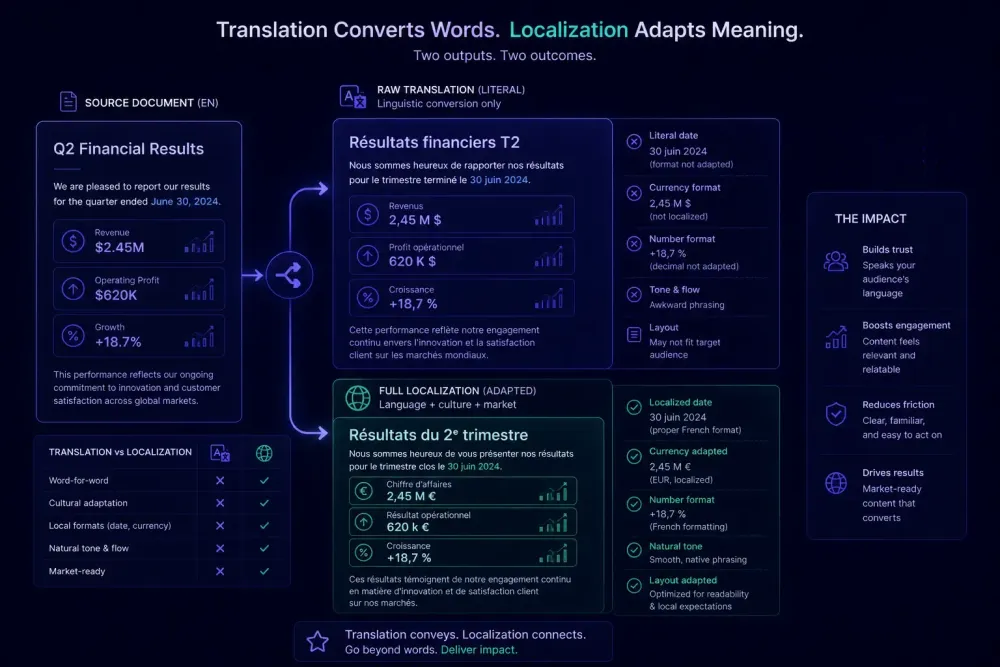
Most people treat "translation" and "localization" as synonyms. In client briefs, vendor conversations, and RFPs, the two words appear interchangeably, and rarely does anyone push back. The confusion is understandable — both convert content from one language into another. But document localization vs translation is a real distinction, and treating them as the same thing produces predictable problems: missing context, broken layouts, and deliverables that technically say the right words but feel wrong to the target reader.
We've seen this repeatedly across agency and corporate projects. A client asks for "translation" of a financial report. The translator delivers linguistically accurate text. The client comes back with revisions — not about language, but about date formats, currency placement, table alignment, and a disclaimer that doesn't apply in the target market. Those revisions are not translation failures. They're localization gaps that weren't scoped in the first place.
Understanding the difference matters before the project starts, not after delivery.
What translation covers, and where it ends
Translation is the conversion of written content from a source language to a target language. A skilled translator reads the source text, understands its meaning and register, and produces equivalent content in the target. That's the full scope.
Translation is a linguistic task. It handles words, sentences, and paragraphs. When done well, it preserves meaning, maintains tone, and handles technical terminology with precision. What it does not do, by definition, is adapt content to the target locale's formatting conventions, cultural expectations, or legal context.
Consider translating a product manual from English to German. A translator who does their job correctly will produce accurate German text. But if the source uses US-style decimal separators (1,500.50) rather than the German convention (1.500,50), those symbols won't flip automatically. If the manual references a warranty process specific to the US market, the translator isn't expected to flag it as inapplicable in Germany. And if the document uses tightly formatted columns that break visually when German words run 20–30% longer than their English equivalents, that's a layout problem, not a translation problem.
Most translators and agencies understand this boundary intuitively. The problem is that it's rarely written into project scopes. The default assumption on both sides is that translation is the deliverable. Localization either happens automatically, gets treated as someone else's problem, or shows up as an unbudgeted revision round.
One practical example: a law firm translating client-facing materials from English to Spanish for a Latin American market. The text can be linguistically accurate and still include US-specific legal references, dates in MM/DD/YYYY format, and imperial measurements — all of which feel foreign to the target reader even though every sentence is correct in Spanish. That's not a translation failure. It's the absence of localization.
Document localization vs translation: what the localization layer adds
Localization picks up where translation stops. While translation converts language, localization adapts content for a specific target market — accounting for cultural context, formatting conventions, visual presentation, and, where applicable, regulatory requirements.
For documents, localization involves several distinct layers that translation doesn't address.
Formatting and typographic conventions are the most immediate. Date formats differ by market: 05/03/2026 means May 3 in the US and March 5 in most of Europe. Time formats (12-hour vs. 24-hour), number separators (comma vs. period vs. space), currency symbols and their position in a number, and address formats all follow locale-specific rules that translation won't correct. A translated document that still uses the source locale's formatting conventions creates friction for the reader even when the language is perfectly accurate.
Text expansion is another practical consideration. German typically runs 20–35% longer than English. Finnish and Dutch can expand further. Chinese and Japanese often contract. When a document has tightly formatted tables, fixed-width columns, or page-constrained layouts, translated text that doesn't fit simply breaks the visual structure. Localization accounts for this through adjusted layout, controlled abbreviation where acceptable, or reformatted elements.
Cultural adaptation sits at a different layer. Examples, imagery, and references that register naturally in one culture can read as confusing or tone-deaf in another. A marketing document built around baseball metaphors works in North America and needs adaptation for markets where the sport is unfamiliar. This extends to color symbolism, idioms, and the formality register expected in business writing for specific audiences.
Legal and regulatory content adds another dimension. Documents containing disclaimers, terms of service, or compliance-specific language often require market-specific versions rather than translated ones. A privacy notice drafted under GDPR may need substantial changes for a different regulatory framework — that's localization work, not translation work.
Not every project requires all of these layers. An internal memo translated for internal use probably needs linguistic accuracy and a corrected date format, nothing more. The question is whether the required layers are defined before work starts, rather than discovered when a client returns the file with comments.
When the distinction changes the outcome in practice
The practical gap between translation and localization isn't equally relevant for every project type. Some documents need only linguistic accuracy. Others need thorough adaptation. Knowing which category a project falls into before scoping sets expectations on both sides.
Documents where translation is typically sufficient: internal communications, working drafts, and technical reference documentation aimed at professionals who routinely work in English regardless of their native language. These audiences need accuracy, not a locally native feel.
Documents where localization is required: client-facing materials including proposals, contracts, and marketing collateral; financial reports with market-specific data presentation standards; legal and compliance documents where regulatory context varies by jurisdiction; and product documentation for consumer goods sold in specific regional markets.
Documents where the scope blurs: HR materials, technical manuals for regulated industries, and B2B sales materials targeting specific regions. These often need translation plus selective localization — accurate language and correct locale conventions, without the full cultural adaptation layer required for consumer-facing content.
The practical test we use: does the target reader need to make any mental adjustment to read this document naturally? If they'd notice the date format, find the layout cramped due to expanded text, or encounter a reference that doesn't apply to their market — localization belongs in the scope.
The error we see most often isn't agencies intentionally skipping localization. It's agencies quoting translation when the client actually needed localization, then absorbing revision rounds that weren't in the budget. Getting the scope right in the first conversation is easier than renegotiating it at delivery.
The formats that make localization harder
The format a document lives in has a direct effect on how complex localization becomes.
DOCX is the most common format in professional translation and localization work. It's structured in a way that most CAT tools handle well — text is accessible in segments, formatting is generally preserved, and translation memories can be applied efficiently. DOCX localization still requires attention to tables, headers and footers, embedded images containing text, and numbering systems, but the overall process is manageable without specialized desktop publishing tools.
PDF is a different story. PDFs don't expose editable text the way DOCX files do. Localizing a PDF typically means working from the source file that generated it — an InDesign layout, a Word document — or going through OCR to extract text, translating, and then rebuilding the layout. A document that takes two hours to translate from a DOCX can take six hours from a PDF when the source file isn't available, because rebuilding the layout is a separate skilled task.
PowerPoint files introduce slide design constraints. Text boxes have fixed dimensions. Fonts must be available on both source and target systems. When text expands significantly in translation, layouts may require font size reductions, reflowed text, or split slides — tasks that belong to a designer or DTP specialist, not a translator.
Excel files carry their own requirements: number format locales, formula syntax differences (some functions use commas vs. semicolons depending on system locale), and cell width constraints. HTML and web-based document formats add character encoding and directionality concerns for right-to-left scripts.
The format question matters at scoping. When a client sends a PDF and expects a fully localized DOCX on delivery, they've made an implicit assumption about the workflow that significantly affects time, cost, and required skills. Surfacing that assumption early — before work starts — prevents surprises when the invoice arrives.
How a professional localization workflow runs
A document localization workflow looks different from a standard translation job. The steps typically sequence as follows.
Document analysis comes first. Before translation starts, someone on the team assesses the document for format complexity, text expansion risk, cultural flags, and locale-specific elements needing adaptation. This is where scope gets defined accurately, not estimated loosely.
Translation preparation follows. Glossaries are built or updated, translation memories are loaded, and locale-specific style guides are briefed to the translator. More preparation at this stage means fewer revision rounds later.
The translation step itself — ideally run in a CAT tool that preserves document structure and enables TM and glossary suggestions — is where the bulk of the linguistic work happens. For a deeper look at how this step fits into broader localization programs, our complete guide to document localization covers the full picture.
Post-editing and adaptation follows translation. A reviewer — a native speaker of the target language with familiarity with the target market — checks for cultural appropriateness, register, and localized content that the translator flagged but couldn't resolve unilaterally.
Layout review (DTP) comes next for format-intensive documents: PDFs, InDesign files, complex PowerPoints. A specialist checks that the translated text fits the layout and that formatting conventions — number formats, dates, currency symbols — have been applied correctly.
A QA check closes the workflow before delivery: a structured pass for consistency, terminology accuracy, formatting errors, and completeness. Having a formal QA report here — rather than an informal read-through — makes it easier to document what was verified, what required a judgment call, and what was handed off to the client with a note.
If your documents are DOCX and you need AI to handle the translation step with structured output — translated DOCX, a spreadsheet export for TM import, and a QA report — SnapIntel covers that layer within this kind of workflow. It handles translation execution and initial QA, not the full localization stack, which is exactly the right fit for the translation step in a process like this one.
Scoping mistakes that create localization debt
Most localization problems don't start at delivery. They start at scoping.
The most common mistake: treating localization as an optional premium rather than the default scope for client-facing documents. When a project is scoped as "translation," the translator limits their work to linguistic conversion — correctly. When the client expected localization, the gap appears as revision requests that weren't accounted for in the budget.
A second common problem: using translation tools for localization jobs without the surrounding process. A CAT tool handles linguistic conversion well. It doesn't correct date formats, adjust for text expansion in tables, or flag cultural references needing adaptation. Those steps require deliberate workflow design, not just better software.
Third: not accounting for format complexity in estimates. A 10,000-word DOCX and a 10,000-word PDF are not the same project if the PDF requires layout reconstruction. Per-word pricing that treats them identically produces estimates that don't reflect actual work.
A pattern we've seen across agencies: separating translation and localization between different vendors with no handoff documentation. The translator delivers accurate text; the DTP team receives the file with no brief on what adaptation decisions were made. The DTP team then makes format changes that inadvertently affect meaning, or misses locale-specific formatting requirements the translator had flagged and never communicated downstream.
The fix is direct: scope localization explicitly. Decide which layers apply to the specific project — linguistic conversion, formatting conventions, cultural adaptation, regulatory content — and agree on them before work begins. That conversation takes fifteen minutes and prevents revision rounds that eat margin without adding value.
Where to start
For any document project going to a market-native audience, start with the localization question rather than the translation question. Define which layers apply, settle the format question early, and brief your team before the work starts.
The revision cycles that eat agency margin are almost always the ones that skipped this step. Not because the translation was wrong — but because the scope was incomplete before the first file was opened.