Document localization: the complete guide for agencies and corporate teams
A practical document localization guide for agencies and corporate teams — process, file formats, TM, glossary, and QA from intake to delivery.
Document localization is one of those disciplines that looks straightforward until you're deep in a project and the client's PDF won't open correctly in any translation tool, or the translated DOCX has broken tables on every third page. We've seen that scenario more times than we'd like, which is why a practical, no-nonsense guide on this topic is long overdue.
The phrase "document localization guide" gets searched a lot, but most results either stop at the definition or assume you already have a mature workflow. This is for teams that need to build one — or want to pressure-test the one they have.
What document localization actually means
Translation and localization are not the same thing, even though people use the terms interchangeably. Translation is converting text from one language to another. Localization is what happens when you also adapt everything else — date formats, currencies, measurement units, tone, culturally specific references — so the document reads as if it was written in the target language from the start.
For a technical manual, localization might mean swapping imperial measurements for metric and changing register from informal to formal. For a marketing brochure aimed at a German audience, it means restructuring sentences (German grammar tends toward longer constructions) and dropping idioms that don't travel.
In practice, the gap between translation and localization shows up most clearly in documents with complex formatting. A DOCX contract might translate cleanly because it's mostly plain text. A PDF brochure with wrapped text, embedded tables, and gradient backgrounds is a different problem — formatting breaks, text expands, and suddenly the design team is doing two hours of desktop publishing work per page.
This distinction matters because it shapes how you scope and price a project. If a client sends you a 40-page financial report and asks for "translation," you need to clarify whether they expect the output to look identical to the source. If they do, that's localization — and the effort involved is very different.
File formats and what they actually mean for your workflow
Not all document formats are equal from a localization perspective.
DOCX is the easiest to work with. Most CAT tools extract text from DOCX files cleanly, preserve formatting tags, and produce a translated DOCX that looks close to the original. The main issues arise with complex elements — text boxes, embedded charts, WordArt — that CAT tools handle inconsistently.
PDF is one of the most common formats clients hand over, and also one of the most frustrating. Text-based PDFs can be processed reasonably well; scanned PDFs require OCR and then manual cleanup. In either case, you lose the source file and have to reconstruct formatting from scratch in a DTP application. This is expensive and slow.
PPTX is manageable in most CAT tools, but slide layouts can shift significantly when text expands in translation. Languages like German, Finnish, or Russian tend to produce longer words than English, so text overflow is a real problem that needs to be caught in QA.
XLSX is often simpler than expected. Cells translate one at a time, and most CAT tools handle it well. Watch for formulas that reference localized function names — in some Excel versions, function names change per locale.
The honest advice: before accepting a project, open every file in the tool you plan to use and see what happens. Don't assume a clean import.
Building a document localization process
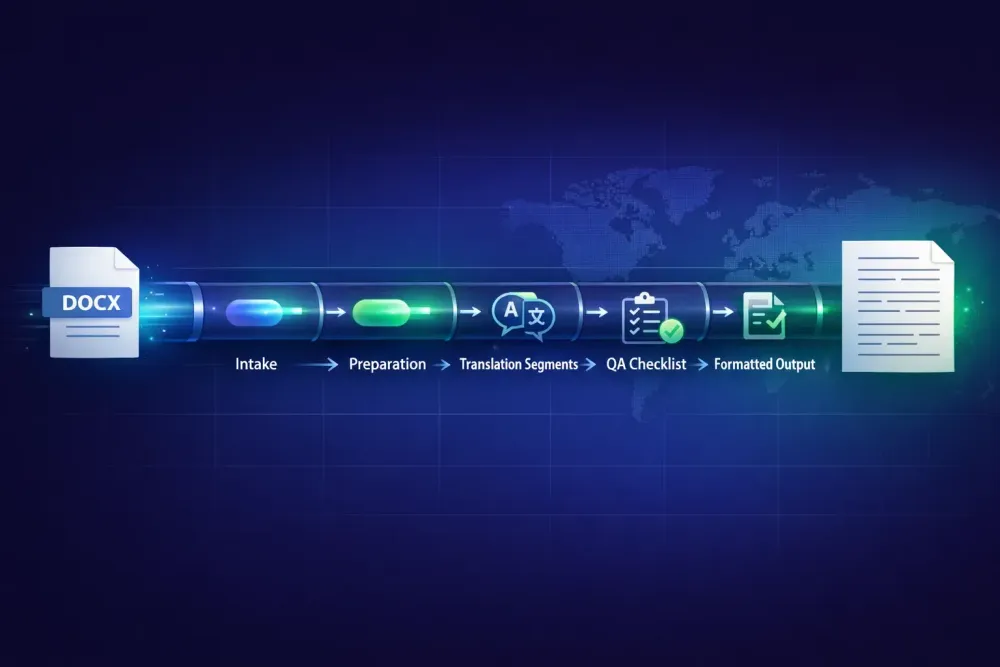
A repeatable process is what separates teams that can scale from those that rebuild every project from scratch. The stages we've found most reliable:
Intake and assessment. Before anything else, review the source files. Check format, identify problematic elements (text in images, embedded fonts, complex layouts), and estimate the DTP effort required. This is also when you confirm the scope — translation only, or full localization including formatting restoration.
Preparation. Export the text to a CAT-friendly format if possible. Set up translation memory and glossary resources. If the client has existing approved translations, load them as reference. This step reduces per-word cost on repetitions and keeps terminology consistent.
Translation. In a CAT tool, the translator works on segments side by side with the source. TM matches surface automatically, glossary terms are flagged, and QA checks run in the background. For MTPE workflows, a pre-translated file is loaded and the translator reviews rather than translates from scratch.
QA. A proper QA pass checks for missing translations, terminology consistency, number formatting, punctuation errors, and tag integrity. Automated QA flags obvious issues; human QA catches the rest — particularly style, tone, and register problems that automation misses.
DTP and formatting. For complex formats like PDF, this is where the most time goes. The translator's output is re-flowed into the original layout, text boxes are adjusted, and the document is checked against the source page by page.
Delivery and client review. Send the file, collect feedback, track revision rounds. The number of revision rounds should be agreed upfront — "unlimited revisions" is not a scope.
Setting up translation memory for document localization projects
Translation memory is one of the most concrete ways to reduce costs and improve consistency across a document localization project, and it's underused by teams that haven't set it up properly.
The mechanics are simple: every confirmed translation gets saved to the TM database. When a similar segment appears in a future project, the tool surfaces the previous translation. Exact matches (100%) are applied automatically. Fuzzy matches (75–99% similarity) are suggested and reviewed by the translator.
Where we see TM misused: teams maintain one giant TM for all clients and all domains. A pharmaceutical company's approved terminology leaks into a legal contract translation, or vice versa. A better approach is per-client TMs, optionally with a shared TM for generic content like boilerplate legal disclaimers.
For document localization specifically, TM pays off most on projects with structural repetition — regulatory documents, standard contracts, technical documentation with modular sections. A typical legal contract might have 30–40% TM leverage on the second version, which translates directly into lower cost and faster turnaround.
One thing to keep in mind: TM doesn't improve if it's never corrected. If a translator makes an error that gets confirmed, that error propagates through every future project that hits the same segment. Regular TM audits — quarterly spot checks, at minimum — catch problems before they compound.
Glossary management in document localization
Alongside TM, a well-maintained glossary is the other structural pillar of consistent localization. A glossary is a controlled list of approved term translations for a specific client or domain — not a general dictionary, but a client-specific reference.
In our experience, glossaries tend to be underbuilt early in a client relationship and desperately needed by the time the fifth project arrives. Building one from the start is worth the upfront investment.
For document localization, glossaries matter most in technical, legal, and medical content where terminology must be exact. A medical device manual where the same component gets called three different things across sections isn't just stylistically inconsistent — it can be a compliance problem.
A practical approach: extract a candidate glossary from the first project by identifying domain-specific nouns and verbs in the source document, propose target-language equivalents, and get the client to approve or correct them before translation starts. This conversation also surfaces client preferences that wouldn't otherwise be explicit — whether they prefer formal or informal register, whether certain brand terms should stay in English, whether they have style guide requirements.
After the first project, maintain the glossary by adding new terms as they appear and flagging contradictions. Most CAT tools store glossaries in TBX format, which can be exported and shared across tools.
QA for document localization: what to actually check
QA in document localization is not one thing. There are at least three distinct types of checking, and conflating them leads to gaps.
Linguistic QA covers accuracy (does the translation convey the source meaning?), fluency (does it read naturally in the target language?), and style (does it match the client's tone?). This requires a human reviewer who's fluent in the target language and understands the domain.
Automated QA covers the things tools can check programmatically: missing translations, number and date format mismatches, glossary violations, missing or corrupted formatting tags, and punctuation inconsistencies. It's not a substitute for linguistic review, but it's a cheap way to catch a class of errors before they reach the client.
Formatting QA is specific to complex documents. After the translated file is reassembled — especially for PDF and PPTX projects — someone needs to check the document visually against the source. Text overflow, missing text boxes, broken table borders, shifted images: these don't show up in the CAT tool because they're not translation errors.
The order matters: run automated QA first to fix mechanical errors, then do linguistic review, then formatting QA at the end. Doing it in the wrong order means reviewers fix formatting problems, only to break them again in subsequent editing rounds.
Getting document localization right: what actually helps
A few things that come from watching a lot of projects go sideways:
Get source files before quoting. A client who says "it's just a 5,000-word PDF" may not realize the PDF is scanned, in an unusual font, or full of text embedded in images. Seeing the file changes the estimate.
Don't skip the glossary conversation on a first project with a new client. Even a short call to confirm three or four domain-specific terms will save revision rounds later.
Build DTP time into every PDF project budget. It's almost never zero.
Version-control your TM. If a client changes their mind on a term after 20 projects, you need to be able to update past entries without rebuilding the TM from scratch.
When working with MTPE workflows, make sure the post-editor understands they're editing, not translating. The mindset is different. Editing a machine's work requires checking every segment — not just polishing the ones that look obviously wrong.
The difference between a document localization project that runs cleanly and one that generates four rounds of client corrections usually isn't the translation quality. It's the process before and after: how well the source was analyzed, how clear the glossary was, how thorough the QA.