Translation workflow automation: which repetitive tasks are worth automating first
A practical guide to translation workflow automation tasks: which steps to automate first, what actually saves time, and what to watch out for.
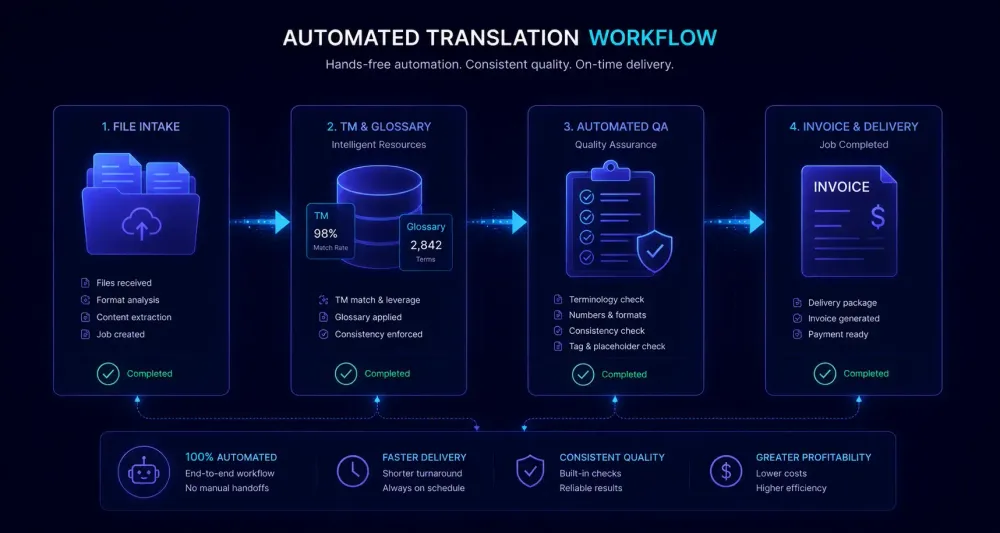
There's a specific kind of fatigue that builds in translation agencies and freelance operations over time. Not from translating, but from everything around it: the file renaming, the assignment emails, the status pings, the invoices with near-identical line items that still need manual entry, the glossary PDF sent to yet another new freelancer. Translation workflow automation tasks are where most small and mid-sized operations quietly lose their biggest efficiency gains. Knowing which ones to automate first is what separates teams that get real time back from those that spend weeks configuring something that runs twice a month.
We've watched a lot of translation teams go through this — agencies with large freelancer rosters, two-person shops managing a client list, and everything in between. Some build genuinely useful systems. Others invest real effort automating things that happened three times last year. Here's what we've actually seen work.
Why not every translation workflow automation task is worth the same effort
Most automation conversations start from tools, not problems. Someone reads that their TMS has a Zapier integration and the first question becomes "what can I hook up?" instead of "what's actually costing me time every week?"
A more useful frame: frequency multiplied by error rate. Tasks worth automating happen on every project — ideally every file — and produce errors when done by hand. A task that occurs once a week and is almost always correct isn't a good first target, even if it's tedious. A task that happens twenty times a day and regularly leaves someone working from the wrong file version is.
Partial automation also tends to work better than trying to build a full end-to-end pipeline, at least at the start. Teams that automate too much at once build brittle systems. The client who sends a ZIP instead of a DOCX. The freelancer who replies to a notification with a question the system can't route. The file whose name doesn't match the expected pattern. When those edge cases hit, someone has to debug the system right when a deadline is approaching.
Start narrow. Prove one step runs reliably for a few weeks. Extend from there. Full end-to-end automation is achievable, but the path there is almost always iterative.
File intake and preparation
If you run more than a handful of projects each week, file intake is almost certainly the first thing worth automating. It happens on every project, involves the same steps each time, and fails in entirely predictable ways.
The standard manual process: client sends files by email or shared folder, a PM downloads them, renames them to match your convention, organizes them into a project folder, and hands them off. Every step has a failure mode. Files land in the wrong place. Two versions exist simultaneously and a translator opens the older one. A PM spends Monday morning renaming thirty files.
The entry point for intake automation is usually a controlled drop point — a dedicated shared folder, a client portal, or an email alias routed to a monitored inbox. From there, even basic folder-watching tools can move files into project subfolders automatically when they arrive. More complete setups use webhook triggers that create the project structure as soon as a qualifying file is detected.
The payoff is cumulative. Saving five minutes of intake handling per project, across 150 projects a month, returns over twelve hours to your PM team. The error rate reduction matters as much as the time: file handling errors compound through the rest of the workflow, and catching them late costs considerably more than preventing them at intake.
This works best when clients are consistent in how they deliver files. If your clients' methods vary a lot, establishing upstream consistency first will make the automation considerably more stable.
Pre-translation steps: TM application and glossary loading
Many translation teams already have the infrastructure for this and aren't fully using it. Running a TM lookup before anyone touches a file — human translator or AI — is a low-setup step that should happen automatically on every project.
Exact TM matches go in without review. Fuzzy matches get flagged. A segment translated for the same client eight months ago doesn't need to be redone from scratch. If you're running AI translation on top, pre-applied TM matches mean the AI handles genuinely new content rather than regenerating confirmed segments.
Glossary loading fits in the same step: confirming the project's glossary is available before translation begins, so translators have the right terminology from segment one. Discovering a term conflict three-quarters of the way through a file is fixable — it's just considerably more annoying than not having it happen.
In CAT platforms that support automation rules — memoQ's automation server, Phrase's workflow engine, Smartcat's rule system — you can go further: triggering pre-translation automatically when a project is created, routing the output to a reviewer queue, and notifying the PM only when the file is actually ready for human input. Each of those steps, done manually, requires someone to remember the right order every single time.
If you're evaluating how AI translation tools fit into an existing CAT workflow, getting pre-translation setup right is one of the first things to sort before adding AI to the mix.
One caveat worth stating directly: pre-translation automation is only as good as your TM. An inconsistently maintained TM with outdated segments will spread those problems faster through automated application than a careful reviewer would. If TM quality is uncertain, clean it first.
Project notifications and assignment routing
This category gets underestimated because each individual task feels small. Sending a "file ready for review" email, telling a PM a batch is done, reminding a freelancer their deadline is tomorrow — none of it seems significant in isolation. In an active project environment, it stacks up continuously. And it's the category most likely to fall through the cracks: a PM gets pulled into a call, forgets to send the assignment email, and a translator waits half a day.
Assignment routing is worth automating if you have a pool of freelancers with documented language pair and domain specializations. The logic is repeatable: incoming project, match on language pair, narrow by domain, check availability, trigger notification. A well-maintained spreadsheet of your translator roster combined with an email template that auto-populates from a project record gets you most of what a full TMS integration gets you.
Deadline reminders can run through calendar automation or simple email sequencing tied to project records. The point isn't which tool — it's that the reminder fires without a PM having to remember.
One failure mode to build against: automated notification systems don't adapt when project details change. If a deadline shifts after a reminder sequence starts, the reminders fire for the original date. Any notification automation needs a manual override path.
QA automation: which checks should never be manual
Translation QA has layers, and not all of them require human judgment. The binary, rule-based checks — did every source tag carry through to the target? Are any numbers missing or wrong in the target? Is a required glossary term absent or swapped for a non-approved variant? — should run automatically.
Running these checks before a reviewer opens the file changes what the review actually involves. Instead of hunting for missing tags and counting numbers, the reviewer focuses on fluency, register, and meaning. The automated layer handles mechanical errors so the human review covers ground where human judgment actually matters.
Most CAT tools include built-in QA rule sets. Dedicated tools like Xbench add more coverage and run in batch mode across multiple files. Some AI translation tools include quality ratings or structured QA reports as part of their output.
If you translate DOCX or XLSX files with AI and want QA visibility built into the workflow, SnapIntel includes a quality rating and a QA report alongside every completed translation job — so whoever opens the translated file first already has a signal about where to look.
To be clear: automating QA doesn't replace human review. It makes human review faster and more focused.
Delivery admin and billing
These are the tail end of any translation workflow, and they're reliable time sinks. Project delivered, invoice generated, invoice sent, payment tracked. Same fields, same calculations, same email for the hundredth time.
Billing automation ranges from basic — invoice templates with client and project data pre-populated from a project record — to integrated, where your TMS pulls metadata directly into your billing tool. For most operations under fifteen people, the template approach handles most of it. What makes it work is connecting the project record (word count, rate, language pair) to the invoice template so the math runs automatically.
Delivery checklists can become a short form that fires a confirmation email once all items are checked off. No more ambiguity about whether delivery actually happened.
How to sequence translation workflow automation tasks practically
Here's what tends to work in practice:
File intake first. Return is immediate, failure modes are predictable, and you don't need CAT tool integration to start. A controlled drop point and a consistent naming convention are enough.
Pre-translation and TM application second. Configure automation rules for your most common project types. If you're using AI translation, confirm TM pre-population runs before translation starts.
QA automation third. Turn on the rule-based checks your existing tools already support. Figure out which error types show up most in manual review and see whether any can be caught automatically.
Notifications and assignments once you have stable project templates. Start with deadline reminders and delivery confirmations. Don't build anything complex until the basics run reliably.
Billing last. Automating it before the upstream steps are clean means pulling inconsistent data into your invoices. Fix that first.
The one rule that applies everywhere: don't automate a broken process. If file intake is chaotic because clients deliver files however they want and nobody has set expectations, automating that intake locks in the chaos. Get the process working by hand first, then enforce it with automation.
Translation workflow automation tasks worth doing share one characteristic: they're rule-based, frequent, and currently dependent on a person remembering to do them the same way every time. That's where automation earns its keep — and where manual execution consistently breaks down.