Translation Memory Maintenance: How to Audit, Clean, and Protect Your TM
A practical guide to translation memory maintenance: audit your TM, fix conflicting entries, and protect leverage with a manageable routine.
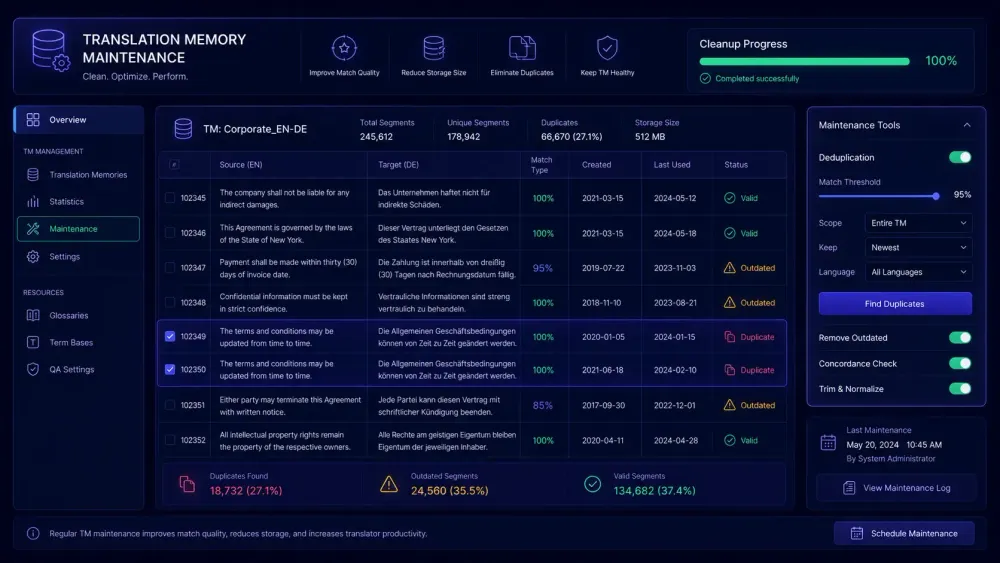
Translation memory maintenance is one of those tasks that every translation team knows matters and almost nobody schedules time for. You set up a TM when you start working with a new client or launch a new project, load it with approved translations, and let it grow. For a while, it works exactly as intended. Then, a year or two into real-world use, leverage numbers start sliding. Terminology inconsistencies show up in delivered files. Translators quietly stop trusting the suggestions.
We've watched this happen at agencies of all sizes. A TM that worked well at launch becomes a source of reviewer friction because no one built a maintenance routine into the workflow. The fix is less dramatic than starting over: even a minimal schedule, applied consistently, keeps most TMs usable without a rebuild.
What translation memory maintenance actually involves
Translation memory maintenance means periodically reviewing what's stored in your TM, removing or correcting entries that are wrong, outdated, or duplicate, and confirming that what remains still reflects your current standards.
In practice, it splits into a few distinct activities.
Structural cleanup covers duplicates, blank entries, and segments where source and target text are identical — which almost always indicates an import error. Most CAT tools have a filter for this, and running it quarterly takes under an hour for a TM of ten thousand segments.
Terminology alignment means checking whether TM entries still match your current glossary. If a client updated a product name six months ago, your TM might still suggest the old version, pulling inconsistencies into every project that touches it.
Age-based review means flagging segments confirmed before a major terminology update that haven't been revisited since. They're not automatically wrong, but they're unverified under the current standard. Most CAT tools let you filter by confirmation date; others require an export to a spreadsheet.
Domain separation matters when a single TM serves multiple clients or subject areas. A segment accurate in pharmaceutical instructions might be wrong in a consumer brochure. Tagging segments by client or domain reduces cross-contamination across accounts.
None of it is rewarding work in the short term. The cost of skipping it shows up in QA metrics and translator throughput over time, and by then fixing it takes significantly longer than if you'd caught it early.
Signs that something is wrong with your TM
You don't always need to run a formal audit to notice the problem. A few patterns in day-to-day project work make it apparent before you've looked at any data.
Translators dismiss TM suggestions without reviewing them. When a team has learned through experience that suggestions are more likely to introduce problems than save time, they stop engaging with them. That's a rational response to low-quality data, not a training gap. If you're in a project review and translators are explaining why they ignored a 95% match, the match is the issue.
The same QA comment keeps appearing across projects. If reviewers flag the same terminology error repeatedly and the translator can point to a TM match that introduced it, the match is the problem. A QA report showing the same error pattern three projects in a row is pointing at the TM, not the translator.
High leverage, flat productivity. If your reported match rate looks solid but translators aren't producing more output per hour than on low-TM projects, the matches are requiring substantial editing before they're usable. This is one of the cleaner signals that TM quality has drifted. You're counting savings that aren't actually happening.
Clients notice consistency problems. A client who spots the same phrase translated three different ways across a document set has a legitimate complaint. A TM is supposed to prevent exactly that. When it doesn't, the argument for maintaining one at all starts to weaken.
How to run a practical TM audit
You don't need to start at segment one and work through every entry. Starting with the segments causing the most reviewer friction gets most of the value in a fraction of the time.
Start with flagged segments from recent QA
Export three months of QA reports from Xbench, Verifika, or your CAT platform's built-in checker, and filter for terminology and consistency flags. For each flagged segment, check whether a TM match was applied. If so, that match is a candidate for correction or deletion.
This approach targets what's actually hurting you right now rather than auditing everything at equal weight. In our experience, 20% of TM entries account for 80% of reviewer friction — and they're usually not hard to find once you're looking at QA output systematically.
Run deduplication on a TMX export
Export your TM as a TMX file and run deduplication. In Excel, filter by source segment, sort alphabetically, and identify cases where the same source text maps to multiple conflicting target translations. Pick the approved version, remove the rest, and reimport.
The step is tedious, but it often has the highest immediate impact. One high-frequency source segment with two contradictory translations can propagate inconsistency through hundreds of downstream matches before anyone catches it. On a TM that's been built from multiple project sources over several years, deduplication alone can remove fifteen to twenty percent of total entries.
Flag entries that predate your last style update
Search your TM for segments confirmed before your last major glossary or style change. Don't delete them outright — move them to a lower-priority TM or mark them for reviewer attention. This creates a buffer: translators still see the older matches, but at a reduced match percentage that signals "check before accepting."
The goal isn't to erase institutional knowledge. It's to ensure older, unverified segments get human review before they're applied automatically.
Managing duplicate and conflicting entries
Duplicates accumulate quickly in active TMs, especially when the TM has been built from multiple sources: projects handled by different project managers, client-provided TMX imports, and segments auto-confirmed during pre-translation runs. A TM that started clean two years ago can easily have a fifteen percent duplication rate by now if imports haven't been audited.
The clean standard is one approved target translation per source segment per language pair. Legitimate exceptions exist — regional variants (en-US vs. en-GB), formal and informal registers where a language requires them, domain-specific versions of a term — but each exception should be differentiated by metadata (client name, domain tag, date range) rather than appearing as two identical-looking entries that differ only in the target.
What causes real problems is the opposite: multiple target versions of the same source with no metadata separating them. That's not optionality — it's ambiguity. Translators encountering that segment have to make a judgment call that should have been resolved during maintenance. Over the course of a 5,000-word document, that kind of ambiguity adds up to significant reviewer time.
Most CAT tools handle this through TM priority ordering or penalty weighting: matches from a lower-priority TM appear at a reduced match percentage, signaling to the translator that they warrant closer review. If your setup doesn't support priority weighting, the practical fix is to maintain one clean working TM and move unverified or older segments to a separate archive file, consulted only when the primary TM has no match.
One pattern worth watching specifically: when you import client-provided TMs. These often contain entries built under different standards, different terminology conventions, or different style guides. Importing them directly into your working TM without review is a fast way to contaminate a clean TM with inconsistencies you didn't introduce and can't easily trace back.
Building a TM maintenance schedule
The most common reason TM maintenance doesn't happen is the absence of a fixed schedule. It ends up on someone's backlog, deprioritized every time a project deadline comes up, and by the time it becomes urgent the cleanup takes far longer than it would have with quarterly attention.
A schedule that works for most agencies without requiring dedicated QA staff:
Quarterly: Run deduplication, remove blank and source=target entries, check for terminology mismatches against your current glossary, and flag segments that predate major style updates. For a TM under 50,000 segments, this takes two to four hours. For a larger TM, split the work by client or language pair across two sessions.
After every large project: Review the segments translators corrected or rejected during the project. If a TM match was corrected the same way five or more times, remove the original entry and replace it with the corrected version. This is the fastest path from post-editing effort to improved future matches — you're converting reviewer work directly into TM improvement rather than letting it disappear into a closed project.
After any glossary update: The moment a client changes a term or an internal standard is revised, search your TM for segments containing the old term and update or remove them. This is the most time-sensitive step in the whole maintenance schedule. Outdated terminology from a TM spreads through new projects before anyone flags it, because translators apply the match automatically without recognizing that the underlying term has changed.
A project manager can handle this rotation. No specialized tool or dedicated QA resource required — just a fixed calendar slot and a clear owner.
How TM quality affects leverage numbers
Translation memory leverage — the percentage of words in an incoming project that match existing TM segments — is one of the most commonly cited indicators of workflow efficiency. It's also one of the most misleading when TM quality is poor.
If a translator applies a 95% match and spends four minutes correcting it because the terminology is outdated, that segment still registers as a TM hit in the leverage report. The real cost of that project was higher than translating from scratch. Any margin calculation built on the leverage figure was wrong, and the error accumulates invisibly across every project.
Agencies that maintain their TMs carefully tend to see measurable differences on TM-heavy projects: translators accept suggestions at a higher rate, post-editing time per word drops, and reviewers leave fewer corrections per delivered file. These effects compound. A TM built with discipline and maintained on schedule delivers the leverage rate being reported. One that hasn't been maintained delivers a reported rate that doesn't correspond to actual time or cost savings.
One test worth running: compare your reported TM leverage against translator output per hour on TM-heavy projects over the last two or three months. If high leverage isn't producing proportionally faster delivery, TM quality is worth examining before you look for other causes. We've seen agencies with a 40% reported leverage rate that were effectively getting 15% in real productivity terms because so many of the matches required full re-translation.
This doesn't require a QA audit to investigate. A quick conversation with your translators about which matches they actually use versus which ones they discard is often enough to confirm where the problem is.
Tools and workflows that support TM management
Most CAT platforms include TM management features, though their depth varies considerably.
Smartcat's Translation Memory supports multiple TMs per workspace, priority ordering, and fuzzy match thresholds. Associating separate TMs per client keeps segments organized by account and reduces cross-contamination. For cleanup, the standard workflow is to export as TMX, process externally, and reimport — the complete Smartcat guide covers TM setup and configuration in detail if you're working within that platform. Xbench remains widely used for cross-referencing TM exports against a glossary and running systematic terminology checks across large segment sets without having to open the CAT tool.
For agencies that run an AI pre-translation step before sending files into a CAT tool, the format of the exported bilingual content matters for clean TM import. When the AI step produces a properly structured source/target spreadsheet, importing it into your CAT tool's TM is straightforward. When it doesn't — mismatched columns, merged cells, encoding issues — you end up with the kind of partial or duplicate entries that require manual cleanup. SnapIntel exports a neutral XLSX alongside the translated DOCX, with standard source and target columns, specifically to make this step cleaner for teams that want to update their TM after an AI translation run.
Whether you're working in Smartcat, memoQ, Trados, or any other platform, the underlying maintenance principles are the same. The TM format (TMX for most exchanges) is standardized, which means cleanup work done in one tool or in a spreadsheet applies equally to any platform you import into.
Practical takeaway
Translation memory maintenance doesn't require specialized software or a dedicated QA role. It requires a schedule and someone willing to own it.
Start with the highest-friction areas: run deduplication on your TM export, pull QA reports from the last quarter and identify which errors trace back to TM matches, and flag segments confirmed before your last major terminology update. That work alone, done twice a year, keeps most TMs reliable without a rebuild.
This works best when it's treated as a recurring project task rather than a response to complaints. By the time translators are loudly frustrated with TM quality, you're already dealing with months of propagated inconsistencies across delivered files. Catching it early — when the first QA pattern starts repeating — keeps the cleanup to a manageable scope.
The longer TM maintenance is deferred, the more effort recovery takes. A TM that's been audited consistently over three years is faster, more accurate, and easier to update than one rebuilt from scratch every time the accumulated errors become unmanageable.