Termbase vs. glossary: what's the difference and when to use each
Termbase vs glossary: not the same thing. We break down the structural difference, when each format makes sense, and where TBX fits in real workflows
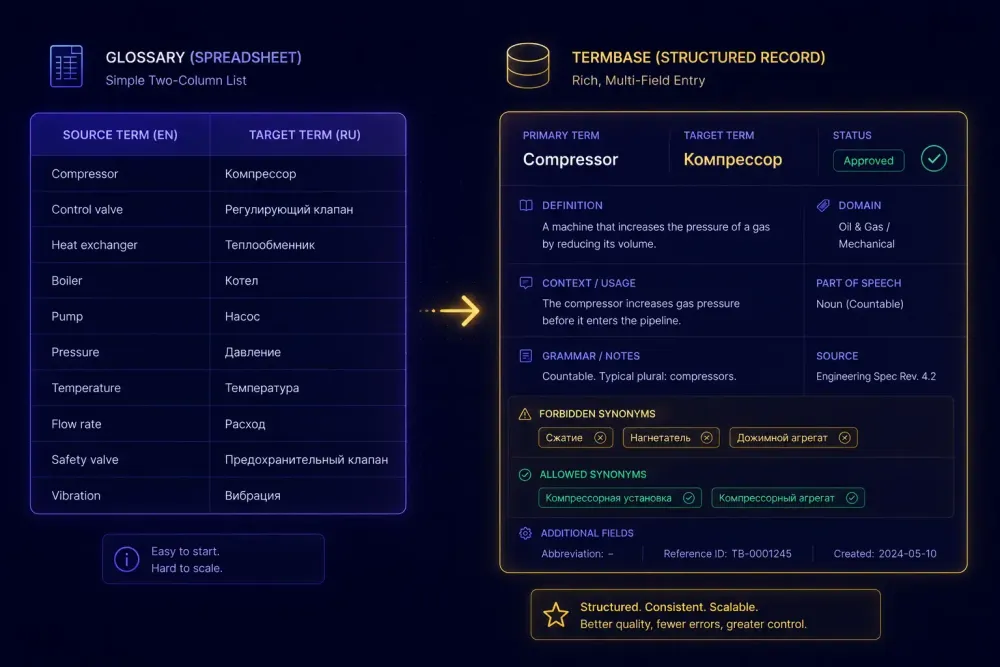
If you've worked in translation for more than a few months, you've probably used both terms without much ceremony. "Glossary" tends to mean whatever terminology list the client sent over. "Termbase" sounds more official — something the CAT tool vendor mentions in the onboarding docs. In our experience working with agencies and freelancers, the two get treated as synonyms far more often than they should, and that creates subtle problems down the line.
The termbase vs. glossary question isn't academic. It has real consequences for how well your terminology holds up across a project, how you share approved terms with a team of ten translators working simultaneously, and whether your output meets a client's requirement for structured TBX delivery. Getting clear on the difference lets you make a deliberate choice instead of defaulting to whichever format you happened to open first.
What a glossary does in translation
A glossary, in translation practice, is a paired list of approved terms. Source term on one side, target term on the other. Sometimes a brief note column. That's the full structure.
This simplicity is a feature. Building a glossary takes almost no setup: a spreadsheet, a shared document, or the terminology import field in your CAT tool. You can go from a client-provided reference to a working glossary in under an hour. For most short-to-medium projects, that speed matters more than structural depth.
Consider a practical scenario. A software company sends you their product manual for EN→ES translation and attaches a 70-term glossary with columns for English, Spanish, and context notes — a few entries say things like "keep technical, do not localize" or "always capitalize this term." You load it into your CAT tool, and matching source terms trigger glossary hits in the editor panel. Consistency improves immediately without any additional process.
Glossaries also transfer easily between people and tools. A CSV file works across Trados, memoQ, Phrase, and most other CAT tools. You can email it, upload it to a project management platform, or paste it into a shared folder. Version control is manual, but manageable when the team is small and the project is short.
Where glossaries fall short is at scale. If you're managing recurring work for the same client across three years and twelve language pairs, a glossary spreadsheet accumulates revision problems. When term 34 gets updated in March and three translators are working off cached copies, you find the inconsistency in a client QA review rather than before delivery. There's also no good place in a glossary to record why a term was approved, what domain it belongs to, or whether one of three candidate translations is "approved" while the others are "acceptable but not preferred."
A well-maintained glossary outperforms a neglected termbase every time. We've seen agencies running full MultiTerm setups that haven't updated their terminology since 2022, while a competitor running Google Sheets glossaries produces cleaner, more consistent output because someone actually owns the maintenance.
What a termbase is — and why the structure is different
A termbase is a structured database of terminology entries. Where a glossary stores term pairs, a termbase stores records.
Each record in a termbase can hold considerably more information: the source term, one or more target equivalents, a definition, usage context, subject domain, grammatical form, notes about forbidden synonyms, entry status (approved, deprecated, under review), and provenance data like who approved the entry and when. The depth varies depending on the project and client requirements, but the infrastructure for storing all of it exists.
The standard file format for termbases is TBX — TermBase eXchange, governed by ISO 30042. It's an XML-based format that most major CAT tools support for both import and export. When an enterprise client specifies "deliver terminology in TBX for import into our MultiTerm database," they mean a termbase, not a spreadsheet.
Here's a concrete case. A legal translation team at a mid-size agency was managing EN/DE/FR terminology for a major client in EU regulatory translation. Initially they ran shared Excel glossaries across the three language pairs. After a QA incident where the German and French translators had each independently approved different terms for the same regulatory concept — based on different versions of the client's reference documents — the team migrated to SDL MultiTerm. The change that mattered wasn't the tool itself. It was that a termbase let them mark one form as the official approved term and the other as "do not use," metadata that every translator saw when that term appeared in a segment. A glossary has no structural way to enforce that distinction.
CAT tool support for termbases is built in at the application level. Trados uses SDL MultiTerm as a companion application with dedicated features for building and querying term records. memoQ has its own built-in term base module. Phrase TMS includes a terminology management component. All three accept TBX import and export. The glossary import path in these tools, by contrast, typically supports CSV or Excel — simpler to use, less metadata to carry.
Termbase vs. glossary: where the distinction shows up in daily work
Both types of terminology data show up as suggestions in the CAT editor. From the translator's seat, the difference can seem invisible: a source term gets flagged, and a target suggestion appears in the side panel. But what surrounds that suggestion differs significantly depending on what's behind it.
With a glossary, you get the approved target term and maybe a note. With a termbase entry, you can surface the definition, domain, grammatical form, usage context, entry status, and whether the term has forbidden alternatives. For a translator working on technical documentation — medical device manuals, patent filings, financial regulatory reports — that surrounding context reduces guesswork and catches errors that a simple term match would miss entirely.
The metadata in a termbase also makes terminology governance tractable. Project managers can query which entries are currently under review, report to clients on the size and coverage of the term inventory, and flag entries that need updating after a client feedback round. None of this visibility exists in a spreadsheet glossary.
One practical middle ground that many agencies land on: storing glossary-level data in the termbase format. You use the CAT tool's term base module, but you only populate the term and target fields, ignoring definition, domain, and status for now. This gives you the CAT tool integration and TBX export capability without the full maintenance overhead. It's not a textbook termbase, but it's a reasonable way to grow into the format without overhauling your entire workflow at once.
This approach works best when you have a stable client relationship and you're building toward a proper termbase over time. It doesn't apply to one-off projects where the glossary will be discarded after delivery.
TBX format: what you actually need to know
TBX is worth understanding even if you don't work with it every day. There are two main variants in active use.
TBX-Default is the full ISO 30042 format. It supports all defined field types, complex multilingual structures, and fine-grained metadata. This is the format expected by enterprise clients and large TMS platforms. If an organization is running SDL Trados GroupShare or a major localization management platform, they'll often need TBX-Default with specific field mappings that match their internal setup.
TBX-Basic is a simplified subset. It covers the fields most agencies actually use: term, definition, domain, context, and status. It's easier to create and validate, and for most cross-tool interoperability needs, it's sufficient. If a client asks for TBX delivery and doesn't specify a variant, TBX-Basic is usually the right default.
In practice, you generate TBX by exporting from your CAT tool's termbase module. MultiTerm, memoQ, and Phrase all have TBX export options. If you're building a termbase from client materials — previous translation memories, style guides, reference documents — the process typically involves a terminology extraction step (either manual or semi-automated), review rounds to confirm which candidate terms to include, and then populating the termbase with approved entries.
One operational detail to watch: TBX files exported from one tool and imported into another sometimes have field mapping problems. Core fields — term, definition, language code — usually transfer cleanly. Custom fields and metadata beyond the standard set may not map correctly across tool boundaries. If cross-tool interoperability is a hard requirement for a project, test the full export-import cycle before committing to a workflow. We've seen agencies lose custom metadata silently on import without realizing it until a client asked for a term audit.
Two additional format notes worth keeping in mind. First, TBX is XML, so it can be created or transformed programmatically if needed — useful when you're migrating an existing glossary into a termbase structure. Second, some CAT tools use proprietary termbase formats internally (MultiTerm's .sdltm / .sdltb, memoQ's .mtb) and only convert to TBX on export. If a client needs to import your termbase into a different tool, always export to TBX rather than sending the native format.
When a glossary is the right choice — and when it isn't
We see both over-investment and under-investment in terminology management. Neither produces good outcomes.
A glossary handles the job well when:
- The project is short-term or genuinely one-off
- The terminology set is small — under 200 terms, typically
- You're working with one or two translators who can coordinate directly
- The client hasn't specified a delivery format for terminology artifacts
- The glossary won't carry forward to future work with this client
A termbase is worth the overhead when:
- You're managing recurring work for the same client over multiple years and project types
- The term inventory is large, domain-specific, and changes regularly (medical, legal, financial, technical)
- Multiple translators work simultaneously and need context beyond the approved form itself
- The client requires TBX delivery for import into their own TMS or localization platform
- You need documented approval history for quality or compliance purposes
The most common practical error is building termbase infrastructure too early. An agency handling eight to ten projects a month with four stable translators often invests significant time in MultiTerm setup that doesn't measurably improve output — their glossary was already doing the job. The termbase investment starts paying off when team size, project volume, or client requirements create problems that a glossary genuinely can't solve.
The second most common error is staying with glossaries too long. An agency that has grown to 20 translators across 10 language pairs, with dozens of recurring clients, will hit a point where glossary version control falls apart and terminology consistency becomes an ongoing quality problem. At that scale, the efficiency gains from proper termbase management are real, and the switch pays for itself quickly in reduced revision rounds and fewer client escalations.
This doesn't mean there's a hard threshold where one tool stops working and the other takes over. Most translation agencies sit somewhere in the middle for years, running structured glossaries for some clients and basic termbase setups for others. That's fine. The goal is deliberate choice, not uniform adoption.
How AI translation changes the terminology equation
AI-assisted translation adds a layer to this question that's worth addressing directly.
When you're running AI translation — whether through pre-translation in a CAT tool or a standalone AI translation workflow — the format of your terminology input affects the output differently than it does in human translation. A human translator consulting a glossary makes a judgment call on each term hit. An AI model processes your terminology as context, and how that context is structured affects whether it actually follows the approved terms consistently.
Most AI translation tools accept flat glossary input: a list of source–target term pairs injected into the prompt or translation context. This is closer to a glossary format than a termbase format, and for most AI workflows it's sufficient. The richer metadata in a termbase — definitions, domain markers, forbidden synonyms — can in principle improve AI translation quality if the model is given that information, but few tools use it structurally today. The practical floor is: does your terminology actually make it into the model's instruction context, or is it stored in a reference file the AI never reads?
This matters more than the glossary vs. termbase distinction for most teams working with AI translation right now. A flat glossary that gets injected into the translation context before each segment produces better term consistency than a well-structured termbase that sits in a file the tool ignores.
If you're working with AI translation and want your approved terms to actually influence the output, tools like SnapIntel build glossary review and approval into the project workflow before translation starts. The glossary you prepare becomes part of the instruction set the model receives, not a document stored separately.
If you're starting from scratch and need a working glossary for a new client or project domain, the free Glossary Generator at snapintel.io lets you upload a source document, extract candidate term pairs automatically, and review the suggested translations before exporting. It won't replace a mature termbase for long-running client work, but it removes the blank-page problem at the start of a new project considerably faster than building from scratch.
The actionable takeaway
The choice between a termbase and a glossary isn't about which approach is more professional. It's about matching the tool's overhead to your workflow's actual requirements.
Start with a glossary. Maintain it properly: one canonical version, distributed actively to your team, updated when terms change, with someone owning the process. If that system holds up as your volume grows, there's no reason to replace it.
When glossary limitations start causing real problems — inconsistency creeping into deliverables because translators are working from different versions, clients requesting TBX delivery for import into their systems, terminology sets growing beyond what a spreadsheet can manage cleanly — those are the right signals to invest in a termbase.
Most agencies hit this point somewhere between 15 and 25 active translators and recurring multi-year clients. Below that threshold, a disciplined glossary process often handles the workload without the additional overhead. Above it, the time saved on revision rounds and QA escalations more than offsets the cost of setting up and maintaining proper termbase infrastructure.
Pick the format that matches your current reality, maintain it well, and revisit the decision when it starts failing rather than preemptively.