Internationalization vs localization vs translation: i18n, l10n, and t9n explained
Understand the real difference between internationalization, localization, and translation — and why confusing them creates expensive project problems.
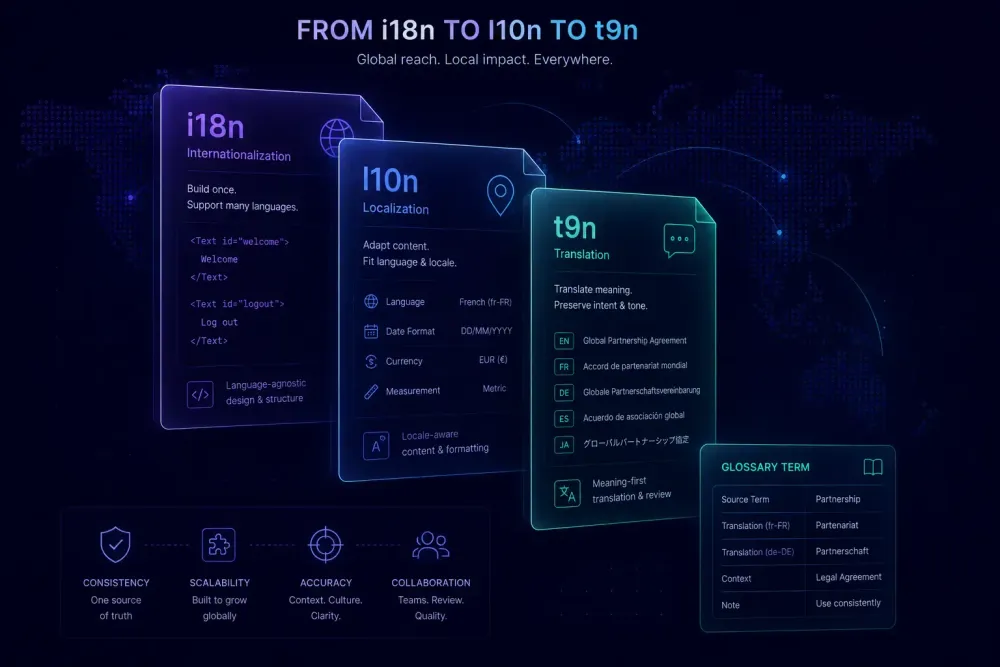
People use "translation," "localization," and "internationalization" as if they're different words for the same thing. They aren't — and the confusion costs real money. We've watched agencies spend weeks on translation projects that had to be partially redone because the source documents were never prepared for localization. We've seen software teams pay for translations they couldn't ship because their codebase didn't support the target language's character set. The distinction between internationalization (i18n), localization (l10n), and translation (t9n) isn't semantic trivia. It determines how you scope a project, how you price it, and whether the end user can actually use what you deliver.
What internationalization actually means
Internationalization is the process of preparing a product — software, a document template, a content system — so that localization can happen later without structural reconstruction. The abbreviation i18n counts the 18 letters between "i" and "n" in "internationalization." Same logic produces l10n and t9n.
For software, i18n means separating UI text from code (externalizing strings into resource files), supporting Unicode character rendering, handling date and number formatting by locale, and building layouts flexible enough for varying text lengths. A button labeled "Submit" in English becomes "Einreichen" in German — 9 characters vs 6, different width, same meaning. A layout built to fit 6 characters will overflow. For right-to-left languages, the problem goes deeper: the entire page layout direction needs to change, which is a structural problem that no amount of translation work can fix.
For documents, i18n is structural too. A DOCX template built on consistent paragraph styles rather than manual formatting is easier to localize than one where every heading was styled by hand. A slide deck with percentage-based text containers handles content expansion better than one with fixed pixel widths. PDFs with text baked into design elements can't really be localized at all — they require full recreation.
The practical test: if you had to produce this content in 20 languages, would the existing structure survive that, or would you be rebuilding halfway through? Whatever stands between "yes" and "no" is your i18n gap.
One clarification worth stating plainly: i18n produces zero translated content. A perfectly internationalized product can still be entirely in English. What it has done is remove the structural barriers so that localization doesn't become an emergency mid-project.
Localization is bigger than language
Localization is the process of adapting content for a specific locale — not just a language, but a region and cultural context. Translation is one part of that. Conflating the two creates scope problems at nearly every stage.
The clearest demonstration: localizing from en-US to en-GB requires no translation. You're working in one language throughout. But you still need to handle "colour" vs "color," "postcode" vs "zip code," "flat" vs "apartment," and date formats where 04/05/2026 means April 5 in the US and May 4 in the UK. Legal text differs by jurisdiction too — a terms of service written for US law needs adaptation for UK requirements. That's localization without any translation.
Now consider a legal contract moving from English to German. Translation is required, but so is: decimal and thousands separators (1.234,56 rather than 1,234.56), German date conventions, compliance with German disclosure requirements, and legal terminology that doesn't map cleanly onto common law equivalents. German legal text is typically 30-35% longer than English, so a layout pass is usually unavoidable. If you scope this as "translation only" and the client expects a fully adapted deliverable, that conversation gets uncomfortable.
Beyond language, localization covers: number, date, currency, and measurement formats; legal and regulatory text by jurisdiction; cultural references and imagery choices; address format and payment method conventions; right-to-left layout support for Arabic, Hebrew, Farsi, and Urdu. The Globalization and Localization Association (GALA) uses localization to describe the full locale-adaptation process, explicitly distinguishing it from translation as one component within that process.
For agencies, the practical implication is scope clarity. When a client asks you to "translate" a product brochure, they may expect local-market-appropriate adaptation that isn't covered by the word "translate." Getting this explicit at the brief stage — what is the expected delivery: linguistic conversion or full locale adaptation? — saves revision cycles that nobody budgets for.
Where translation sits
Translation is the linguistic transfer of meaning from source language into target language. It's the work happening inside a CAT tool, the activity translation memory systems are built to support, the professional skill translators develop over careers. And it's one layer of localization, not the whole thing.
This doesn't diminish translation. The t9n layer is where linguistic quality is determined. Poor translation produces a poor localized product regardless of how well the surrounding preparation was done. But technically accurate translation alone doesn't guarantee something that works for its target audience.
The failure mode we see most often at the translation layer: correct at the segment level, tonally wrong for the market. German has formal and informal registers — Sie vs du — that need to be established upfront and maintained consistently throughout a document. A technical manual that switches registers halfway through because two translators worked from different instructions will read as unprofessional to native speakers even if every term is accurate. Brazilian Portuguese and European Portuguese are mutually intelligible but noticeably different in vocabulary, tone, and spelling conventions. A translation that ignores those differences produces something that native readers will find slightly off, even if they can't immediately articulate why.
For document translation specifically: the CAT tool manages the t9n layer — segment by segment, with translation memory matches and glossary enforcement. The localization layer is everything around that: source document preparation, review for regional appropriateness, post-translation formatting work. Agencies that treat translation as the whole job tend to underscope and then overrun budgets fixing the gaps.
MTPE (machine translation post-editing) fits here too. Post-editing operates at the translation layer — the linguistic transfer has already happened, and the post-editor brings the output to delivery quality. MTPE doesn't fix i18n gaps in source documents, and it doesn't add cultural adaptation that wasn't scoped into the project. The efficiency gains are real and often significant, but they're confined to the translation layer.
How the three layers connect
i18n comes first. l10n comes second. t9n happens within l10n. The order isn't convention — each layer depends on the one before it.
When i18n is skipped, localization becomes retrofitting. For software, that means touching the codebase for every language instead of updating a resource file — multiplying bug risk and creating structural inconsistencies. For documents, it means reformatting by hand rather than relying on cascading styles. Retrofitting i18n costs more than building it in up front, and the resulting files tend to be messier in ways that compound across projects.
For software projects, the sequence is: engineering builds the product with i18n in place (strings externalized, locale-aware formatting, UI flexible enough for text expansion); localization planning determines which locales to support and what changes per locale; translators handle the linguistic work for each locale within the agreed workflow; engineers integrate translated strings and test for layout, rendering, and encoding issues.
For document workflows, these stages compress but still exist. The mistake we see most often is treating step three as the entire job — delivering a translated DOCX without checking whether dates, numbers, and measurements were adapted to target locale conventions, or whether the layout survived content expansion. It's technically a translation. It's not a complete localization.
Agencies that add regional and structural QA to their post-translation review — alongside standard linguistic QA — consistently deliver better work. This is an extension of an existing checklist, not a separate process to design from scratch.
The real cost of unresolved i18n gaps
Skipping i18n in software has well-documented consequences. Companies have rebuilt entire UI systems after discovering that fixed-width containers couldn't handle anything beyond short English strings. Right-to-left support added late requires restructuring page layouts — not just flipping text direction — because RTL affects component placement, punctuation handling, and reading flow in ways a translator can't fix at the segment level.
For documents, the failure mode is quieter but shows up in rework time. German and Finnish text routinely run 25-40% longer than English equivalents. A slide deck designed with tight text containers and 20-point font in English becomes a layout problem in German when text wraps unexpectedly. The translator did their job correctly. The template wasn't prepared for what they were asked to do.
These are the structural problems we see most often in documents that weren't set up for localization:
Manual formatting instead of paragraph styles. When heading styles aren't applied consistently — when bold was used instead of Heading 2, or font sizes were set manually rather than through a named style — text expansion after translation requires a full manual reformatting pass. On a 50-page document, this adds hours and introduces inconsistencies the client will notice.
Fixed-width text containers. Tables with exact column widths, text boxes with pixel dimensions — these assume English text length and fail when content expands. Percentage-based or auto-fit layouts handle expansion without anyone having to manually adjust elements after delivery.
Locale-specific formats in the source. Dates written as "April 5, 2026," numbers formatted as "$1,234.56," measurements in imperial units — these require translators to identify and adapt every instance individually, with no automation support. Source documents with ISO-format dates (2026-05-26) and neutral number formats are reliably faster to localize and produce fewer adaptation errors.
Fonts that don't cover the target script. A document designed in a Latin-script typeface may not render Cyrillic or CJK characters correctly, and this problem typically shows up after translation is delivered, not before. Font selection is part of the i18n work.
What document teams can actually control
Here's the practical reality for agencies: source files arrive as-is from clients. You rarely get to design them, and you can't retroactively rebuild a poorly structured DOCX. But you can run a pre-translation check before the job goes to translators.
Ask three questions before translation starts: Does the layout have room for content expansion — particularly for languages like German, Greek, or Finnish that typically run longer than English? Are there locale-specific dates, numbers, or measurements in the source that translators will need to adapt, and have they been flagged in the brief? Are paragraph styles applied consistently, or will text expansion force a manual reformatting pass?
These checks take less time than the rework they prevent. A 30-minute template audit before translation starts is faster than a 4-hour DTP pass after delivery. A note in the brief about target locale date conventions is faster than a second review cycle to fix every date that came through in the wrong format.
For teams running AI-assisted document translation, preparation matters even more. Inconsistent heading structure, mixed formatting, and locale-specific content in the source all affect translation output quality — whether the work is done by a human or an AI model. Structured preparation before translation starts is the document-level equivalent of i18n.
SnapIntel is built for this kind of structured DOCX and XLSX translation workflow: it includes a glossary and prompt preparation step before AI translation runs, creating an explicit gate that prevents teams from jumping straight to output without preparation. For teams that need to extract candidate terminology from a source document before translation starts, the free Glossary Generator pulls a term list from a DOCX automatically — useful when a client hasn't supplied a glossary and you need to build one quickly.
This doesn't apply to every project. Short, well-structured documents in familiar language pairs don't need a full pre-translation audit. But for complex documents, new language pairs, or sources with known structural inconsistencies, ten minutes of preparation before translation starts saves hours after delivery.
Before the next job lands
Before a localization project goes to translators, spend ten minutes checking three things about the source files: are styles applied consistently, or will text expansion force manual reformatting? Are there dates, numbers, or measurements in locale-specific formats that need a note in the brief? Does the layout have room to grow when content expands? A short localization brief — target date format, decimal separator, currency symbol, formality register — gives translators what they need before they start and cuts revision cycles at the end. That investment pays back faster than any QA pass run after delivery.