How to share a translation glossary with freelancers without losing consistency
How to share a translation glossary with freelancers without losing consistency: the right format, timing, version control, and QA in one workflow.
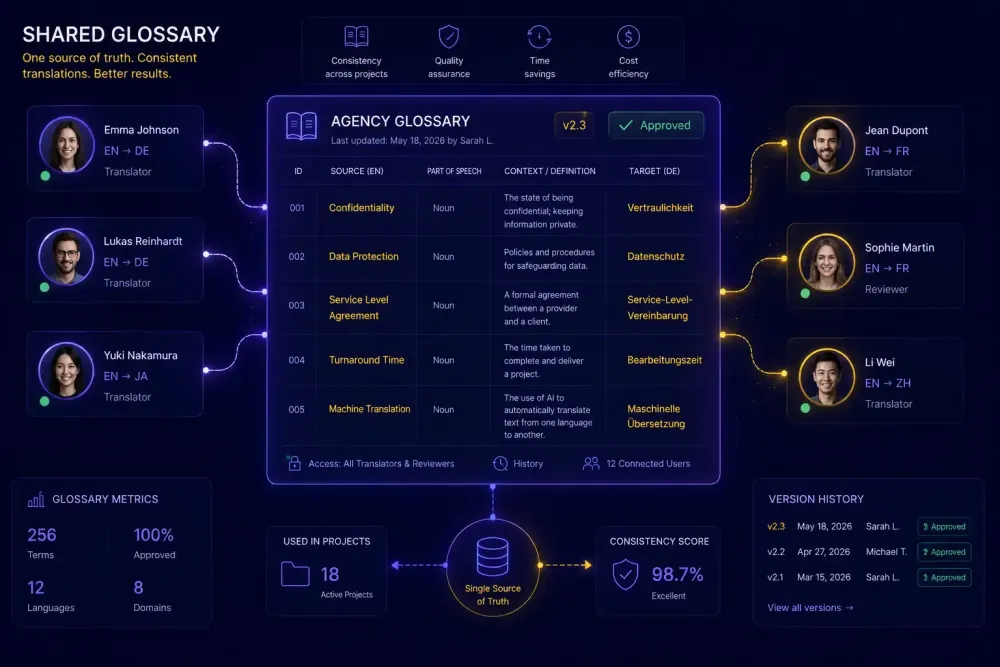
Send a glossary to a team of freelancers, and there's a reasonable chance that by the end of the project, the same source term gets translated three different ways. The translators may have been perfectly competent. The glossary may have been well-constructed. The problem usually lives in the chain between "glossary exists" and "glossary applied," and that chain has two or three weak links that nobody addressed before the project started. We've spent a lot of time looking at where that chain breaks, and the answer is almost never the content of the glossary itself. It's format, timing, and follow-up. This article covers all three.
Why sending a glossary file isn't enough
The phrase "we shared the glossary" usually means "we sent a file." That's necessary, but it resolves only the first link in the chain: access. What it doesn't resolve is whether the file is in a format the translator can load into their CAT tool, whether they know which terms are mandatory versus preferred, and what they're supposed to do when a source term doesn't appear in the glossary at all.
These gaps open up differently depending on the translator's setup. A freelancer working in Trados or memoQ has the technical ability to import a TBX termbase and get automatic term suggestions in the editor as they work. If you sent a PDF or a Word document instead, that option is gone. The translator has to keep the glossary open in a second window and manually cross-reference it — which happens less consistently than project managers expect.
Timing introduces a separate problem. When the glossary arrives a day or two after the source files, the translator has already started making terminology decisions. Those early calls tend to be sticky. A translator who has confirmed 30 segments won't go back and revise them based on a glossary that arrived late — at least not without an explicit request, which adds time and friction neither side wants.
The third gap is accountability. Without a QA step that specifically checks for glossary compliance, there's no feedback signal. A translator who has never received feedback on a terminology miss has no particular reason to treat the glossary as a hard constraint rather than a reference document they can interpret freely.
None of these gaps require sophisticated tooling to close. They require a more deliberate distribution process — one that starts before the project files even go out.
What format your glossary needs to be in
Before thinking about how to distribute a glossary, get the format right. The correct format depends on what tools your freelancers are using.
For translators working in Trados, memoQ, or Phrase, TBX (TermBase eXchange) is the standard. It's an ISO format that these CAT tools import natively. Once loaded, the tool surfaces term suggestions directly in the editor whenever the source term is detected — the translator sees the approved translation inline while working. No manual lookup, no second window. That inline visibility is how you actually get consistent output, rather than hoping the translator remembered to open the reference file.
For mixed teams where translators use different CAT tools, a bilingual Excel or CSV is more practical. A three-column format — source term, target term, usage notes — works with almost every tool and can be read directly by reviewers or clients who aren't using a CAT tool at all. It's also considerably easier to update than a TBX when terms change during the project. When working with Excel, be precise about column headers: source-language label in the source language, target label in the target language, and a clear "Notes" or "Context" header for the third column. A translator importing the file for the first time shouldn't need to guess which column is which.
The approach that works for most agencies: maintain the master glossary in Excel or Google Sheets — easy to edit, automatic version history — and convert to TBX when distributing to translators who use compatible tools. Xbench and several free online converters handle TBX export reliably.
Something worth adding before the file goes out: a column for usage context or domain notes. "Use 'vendor' not 'supplier' in formal B2B contexts" is more useful to a translator than just the term pair alone. It reduces guesswork and cuts down on mid-project queries that end up in your inbox.
If your team works within a shared platform like Smartcat, glossaries can be associated directly with a project workspace and surfaced in the editor automatically when the source term is detected. That's a clean solution for teams operating within a single environment. For agencies whose freelancers use individual CAT tool installations — which covers most freelancer workflows — format and delivery remain the project manager's responsibility.
When to send the glossary and what to include with it
The simplest change a project manager can make to improve glossary compliance is timing. The glossary should go out with the project files — same message, same moment, with the same weight as the source documents and the deadline. When it arrives separately, even just a day later, translators tend to treat it as a supplement rather than a requirement.
The distribution package should include three elements alongside the glossary file.
First, a note distinguishing mandatory terms from preferred ones. Mandatory means the translator must use the approved translation exactly, without substitution. Preferred means the approved translation is the default, but there may be legitimate cases for a slight variation. Many translators assume all glossary terms are preferred unless told otherwise. Spelling out the distinction costs nothing and matters for output consistency.
Second, an instruction for what to do when a source term doesn't appear in the glossary. Without this, translators either make silent judgment calls or interrupt the project manager with queries. A single instruction — "if you encounter a term not covered here, use your best judgment and flag it in the comments file for post-project review" — resolves most of that ambiguity before it becomes a bottleneck.
Third, mention whether terminology compliance will be checked before delivery. Translators who know a QA step is coming treat the glossary differently than those who assume it won't be reviewed. That single piece of information shifts behavior without any additional enforcement.
For context: a software localization agency we work with reduced their post-delivery terminology revision requests noticeably by adding two sentences to their standard project briefing — one clarifying which terms were mandatory, one mentioning that a terminology check would run before delivery. Same translators, more consistent output.
How to verify that the glossary was actually applied
Sending the glossary resolves access. A verification step resolves application.
The simplest approach needs no specialized software. Most CAT tools can export a bilingual view of the translated segments — a spreadsheet with source and target text side by side. Open that alongside the glossary, search for each mandatory source term in the source column, and verify the target column contains the approved translation. For a standard-sized document, a focused spot check on high-priority terms takes 15 to 20 minutes. It won't catch every miss, but it catches most meaningful ones.
The most common misses are synonyms — the translator chose a close equivalent rather than the exact approved term — and legacy terms, where an older translation from a previous project is still the one that comes to mind first. Both show up clearly in a side-by-side bilingual export, which is part of why the export-and-scan approach works even without dedicated QA tooling.
For broader coverage, QA tools like Xbench and Verifika both include glossary check functions. They flag every segment where a known source term appears but the approved translation is absent — including cases where the translator used a synonym or an older version of the term. These tools process a document in seconds and surface the majority of terminology errors faster than any manual scan.
A consistent pattern from agencies that run even a lightweight terminology check before delivery: far fewer client revision requests on terminology. The check costs 15 to 20 minutes of a reviewer's time. A round of client revisions on delivered files typically costs considerably more.
If you work with a recurring pool of freelancers, the QA output becomes a useful feedback mechanism. Logging which translators consistently misapply which terms lets you send targeted, specific notes rather than generic reminders. A translator who receives a precise explanation of why a term should be rendered a certain way builds that habit across future projects. Generic style guide reminders rarely produce the same result.
Managing glossary changes during a live project
Glossaries change mid-project. A client revises preferred terminology after reviewing early segments. A legal review introduces a new constraint. Someone catches an error in the original glossary three days in. How you communicate those changes determines whether they actually reach the translators.
The worst approach is to update the file and resend it without flagging what changed. Most translators won't compare versions, and those who notice the file is newer won't know what was modified.
A versioned glossary with a changelog is a reliable fix. Add a "version history" tab to the master Excel file. When a term changes, log the date, the old term, the new term, and a brief reason. When you resend, reference the changelog in your message: "Version 2.1 — see changelog tab. Mandatory term updated in row 7." That takes about a minute to write and prevents a significant amount of downstream confusion.
When an update arrives while translation is actively underway, specify the scope explicitly. "This applies to unconfirmed segments — if you've already confirmed a segment containing this term, you don't need to revise it unless you're currently in that section." Without that clarification, some translators re-review everything; others assume the update doesn't apply to them at all.
The secondary benefit of a versioned glossary is institutional memory. When the same client returns for a new project, you have a full record of every terminology decision and the reasoning behind it. In legal or technical domains, that history matters — terminology decisions in those fields are often contested, and documented reasoning means you don't reconstruct the rationale from scratch each time.
What to do when there's no glossary to start with
Some of the friction around sharing a glossary comes from a step before distribution: building one in the first place. Clients frequently don't have a proper termbase, or they have something partial — a list of product names, a few preferred abbreviations — that doesn't function as a real working glossary.
Building one from scratch before project start is time-consuming, but there are ways to reduce that time. The most productive starting point is the client's existing materials: previous translations, technical documentation, marketing assets, or any content that has already been localized. Consistent terminology surfaces across those documents, and pulling it out systematically is much faster than writing terms by reading source text alone. Even a small set of reference documents — two or three previously localized pages from the client's website, a past translated report — is usually enough to extract the most important domain-specific terms.
For projects where you need a working bilingual glossary quickly and don't have time to build one manually, our free Glossary Generator handles the extraction step. Upload a DOCX or reference document, and it returns a structured bilingual glossary you can edit and distribute. It's designed for the situation where a project needs to start without a client-provided termbase.
Once the glossary exists — however it was built — the distribution workflow described above applies the same way. The origin of the glossary doesn't change how it should be sent, formatted, or verified.
One honest limit worth noting: automatic extraction works well when the client has existing localized material with consistent terminology in it. If the project is a first-ever translation with no reference material at all, you'll need to build the glossary from domain knowledge and terminology resources rather than extraction. Extraction needs something to extract from.
The change that makes the biggest difference
If there's one step worth fixing before anything else, it's timing. The glossary should go out with the source files — same message, same moment — not as a follow-up a day later. That shift alone changes how translators perceive terminology requirements before they've made any decisions.
Everything else builds from there: the right file format for the translator's tool, a clear distinction between mandatory and preferred terms, a versioned changelog for mid-project updates, and a terminology spot check before delivery. None of these steps are particularly complex individually. Together, they close most of the gap between "the glossary was sent" and "the glossary was actually applied."
For teams that need to generate a starting glossary before any of this can happen, the free Glossary Generator at SnapIntel is a practical starting point — particularly when a project needs to begin without a client-provided termbase. The distribution workflow itself, though, is what determines whether that glossary gets used.