How to catch terminology errors in AI-translated documents before delivery
How to catch terminology errors in AI translation before delivery: a practical checklist for agencies and freelancers using QA tools and glossary checks.
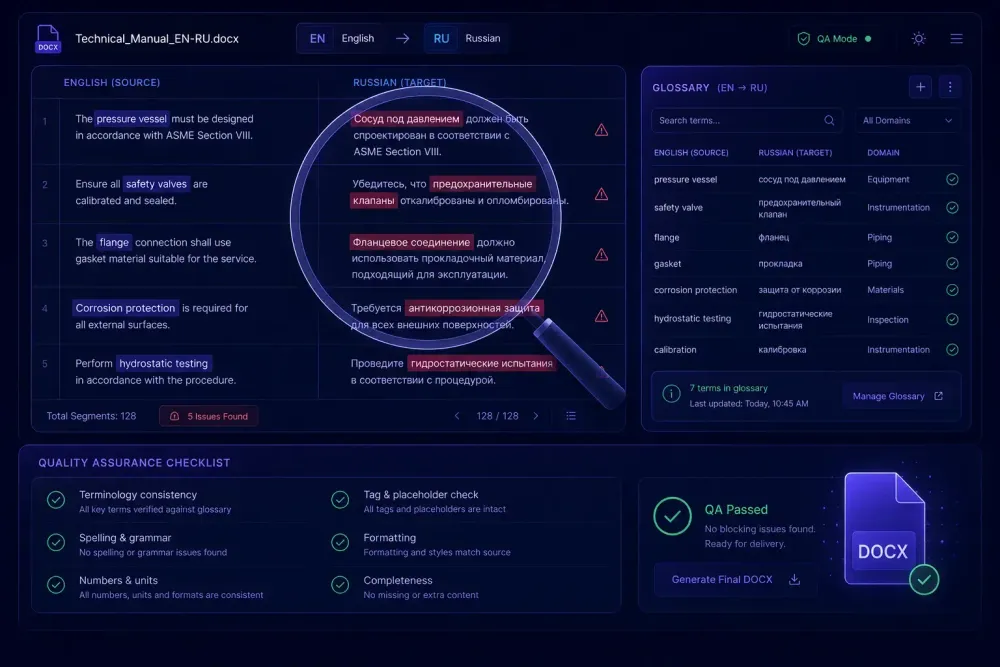
Terminology errors are the failure mode reviewers catch most consistently — and that automated QA tools miss most often. A segment can be grammatically clean, well-structured, and even stylistically polished, yet carry the wrong term: "agreement" where the client specifies "contract," "cardiovascular" where the protocol says "cardiac," "installation" where the glossary requires "deployment." AI translation engines produce this error category at a higher base rate than human translators, not because the overall output is poor, but because language models are optimized for fluency and coherence rather than adherence to a controlled vocabulary. Before you send a translated file to a client, a structured terminology check is the most efficient way to surface the errors most likely to come back.
Why terminology errors in AI translation output are hard to catch
When an AI model translates a document, it generates output token by token, weighted toward the statistically most plausible continuation given the source text and the target language. That produces fluent text in most cases. What it doesn't do is compare each output segment against a controlled vocabulary list and reject synonyms that aren't on it.
The result is predictable. AI translation of a legal document about "force majeure" will handle the term correctly in most instances, but may produce "act of God," "superior force," or the raw Latin form across different segments of the same file — unless the model has been explicitly instructed to use a specific form. In our experience reviewing AI output from multiple engines, terminology drift across long documents is close to universal. A 10,000-word technical manual might have "module" in segments 1 through 40 and "component" from segment 41 onward, simply because both words are contextually valid and the model made different selections at different points.
Client-specific terminology is harder still. A pharmaceutical client that requires "investigational medicinal product" throughout a regulatory submission will find an AI translator alternating between "IMP," "study drug," "trial medication," and the full phrase at unpredictable intervals. None of those substitutions are technically wrong in a general sense. All of them would fail a glossary audit.
This doesn't mean AI translation doesn't belong in professional workflows. It means the terminology check that used to be a formality has become a required step.
The four categories of terminology errors that show up in AI output
In the files we've reviewed, terminology errors in AI-translated documents break into four categories. Each one calls for a different detection approach.
Synonym substitution is the most common. The AI picks a contextually valid synonym instead of the client's required term: "buyer" for "purchaser," "vendor" for "supplier," "component" for "part." These look correct on a read-through. They only surface when you compare the output against the project glossary systematically.
Inconsistency across segments appears when the same source term translates differently at different points in the document. A reviewer checking individual sentences won't catch it. A search across the full file will. We've seen a 50-page operations manual where "maintenance window" appeared as "maintenance period" in three separate sections — invisible to a reader, obvious to a QA search.
Domain drift happens when the model defaults to the wider domain's standard vocabulary instead of the client's specific version. Medical translation is the clearest example: the general clinical term might be "adverse event," but a client's regulatory protocol may specify "adverse drug reaction" for a compliance reason. The AI produces whichever term appeared most often in training data for that context, not necessarily the one the client specified.
Cross-lingual near-synonyms appear most often in closely related language pairs — Spanish into Portuguese, Dutch into German. The model occasionally carries a source-language term into the output because it resembles a target-language word but carries a different meaning. These are infrequent but expensive to miss in legal and technical content.
Knowing which category a problem belongs to determines how you catch it. Synonym substitution and inconsistency respond to string search. Domain drift needs a reviewer with genuine domain knowledge. Cross-lingual errors need someone who reads both languages natively.
Building a glossary-driven check into your delivery process
The most reliable approach for catching terminology errors before delivery is a systematic comparison of the translated output against the project glossary. That sounds obvious. How teams actually implement it determines how many errors get found.
The approach that consistently underperforms: asking a reviewer to "read through and flag terminology issues." Reviewers are good at errors that disrupt fluency. Synonym substitution doesn't disrupt fluency — that's the problem. The brain reads "supplier" where the document requires "vendor" and registers no issue, because both words make sense in context.
The approach that works: extract the target-language terms from your glossary, run a search through the translated document for each term and its non-approved synonyms, and flag every instance where the wrong form appears. For a DOCX file, your word processor's Find function handles this quickly. For an XLSX workbook, a search across translated cells covers the entire file at once.
For this to work, the glossary needs to exist before translation starts — not during post-editing. A glossary built after the fact to capture terms you already noticed were wrong misses the point of the check. The glossary is the specification; the check compares output to it.
This works best when the glossary is comprehensive enough to cover the domain. A 30-term glossary on a 60-page technical manual leaves a lot of unchecked ground. Time spent building a fuller glossary before translation runs is cheaper than discovering terminology gaps during delivery review.
What automated QA tools actually catch
Several QA tools include terminology checking as a core feature. Xbench and Verifika are the most widely used in professional agency workflows. Both accept a reference glossary — TBX or tab-delimited format — and flag segments where a source term appears but its approved translation doesn't.
These tools handle synonym substitution and inconsistency well. They're fast, consistent across large files, and don't develop fatigue. Where they fall short: domain drift requires semantic understanding rather than string matching, so automated tools won't catch it. Cross-lingual near-synonyms need human bilingual judgment.
One limitation worth naming clearly: automated terminology checkers are only as good as the glossary you supply. If your glossary covers 50 terms and the client's domain has 200 specialized terms, a clean QA report tells you those 50 terms checked out — it doesn't tell you anything about the other 150. That's the nature of reference-driven checking, not a flaw in the tools.
For agencies running AI pre-translation at volume, the most effective setup combines automated terminology checking for coverage on defined terms, followed by targeted manual review of high-risk segments. Neither step replaces the other.
Using translation memory as a consistency cross-reference
Translation memory serves a different function than a glossary, but it's also a useful reference during terminology review. If your TM includes previously approved translations for the same client or document type, a concordance search — pulling up a source term and reviewing how it translated across all TM entries — shows quickly whether the current AI output matches the established pattern. Segments where it doesn't go on the review list.
This only helps when you have an existing TM for the client. For first-time projects in a new domain, the current run is the baseline. Being explicit with the client about that is worth doing: the first AI-translated project establishes the terminology reference, and follow-on projects benefit from the glossary and TM that come out of it.
If you work with a neutral XLSX export from your translation tool — a side-by-side view of source and target text — a bilingual terminology review is often faster than reviewing the formatted DOCX directly. You can compare terms across the full file without the document layout getting in the way.
A pre-delivery terminology check, step by step
The check below covers the main error categories and adds roughly 20 to 30 minutes per 5,000 words of target text. For contracts, medical documents, and technical specifications, that time is non-negotiable.
Start by checking glossary coverage. Open the project glossary and confirm it represents the domain's critical terms. If a term appears frequently in the source file but isn't in the glossary, add it before the check begins. A glossary that doesn't reflect the actual document won't surface the errors that matter.
Then confirm source-term presence. For each glossary term, check that its source-language form actually appears in the file. AI translation only handles what's in the source. A source term that was truncated or dropped can't produce a wrong target term, but it may produce a content gap that needs separate attention.
Run the target-term sweep. Search the translated file for the required target-language form of each critical glossary term. Confirm it appears where expected. Then search for known synonyms and flag any instance where a non-approved variant appears in place of the required form.
Check consistency on repeated terms. Pick the five to seven most frequently repeated content terms and run a concordance search to confirm they translate identically throughout. On a short document, a careful read catches this. On a 40-page report, you need the search.
Finally, review high-risk segments manually. Domain-specific definitions, section headings, numbered specifications, and segments flagged by your QA tool belong in a targeted human review before the file goes out. These are where domain drift and cross-lingual errors tend to appear, and automated tools won't flag them.
If you use SnapIntel for AI document translation, the QA report generated alongside each translation run surfaces potential segment-level issues and gives you a starting point for the high-risk manual review — rather than reading through the entire file from the beginning. The glossary you add to the project before translation also works against synonym substitution during the translation step, which reduces what you need to catch afterward. That said, a post-translation terminology check is still worth running on any content where getting a term wrong has real consequences. For more on how AI translation tools fit a professional workflow, our earlier post on how AI translation tools are changing the way translators work in 2026 covers the broader picture.
When the client sends the file back with terminology comments
Even with a solid pre-delivery check, terminology rejections happen. When a client returns a file with a comment about a specific term, don't correct just the flagged instance. Run the full check for that term category across the entire document.
If the client flags "vendor" where they require "supplier," correct every instance in the file — not just the marked one. Then check the same category for related terms: other party roles, contractual labels, product names. If one term from a category slipped through, others in the same category may have too.
Use the rejection to update the glossary. A missed term is direct information about what the client's reference should contain. The agencies we've worked with that build term additions into their rejection response process end up with tighter references and fewer rejections on follow-on work. The first project in a new domain is rarely the cleanest. The second one, built on a better glossary, usually is.