Free translation glossary generator: how to build a bilingual glossary in minutes
Build bilingual glossaries faster with a free translation glossary generator — from terminology extraction to CAT tool export and workflow integration.
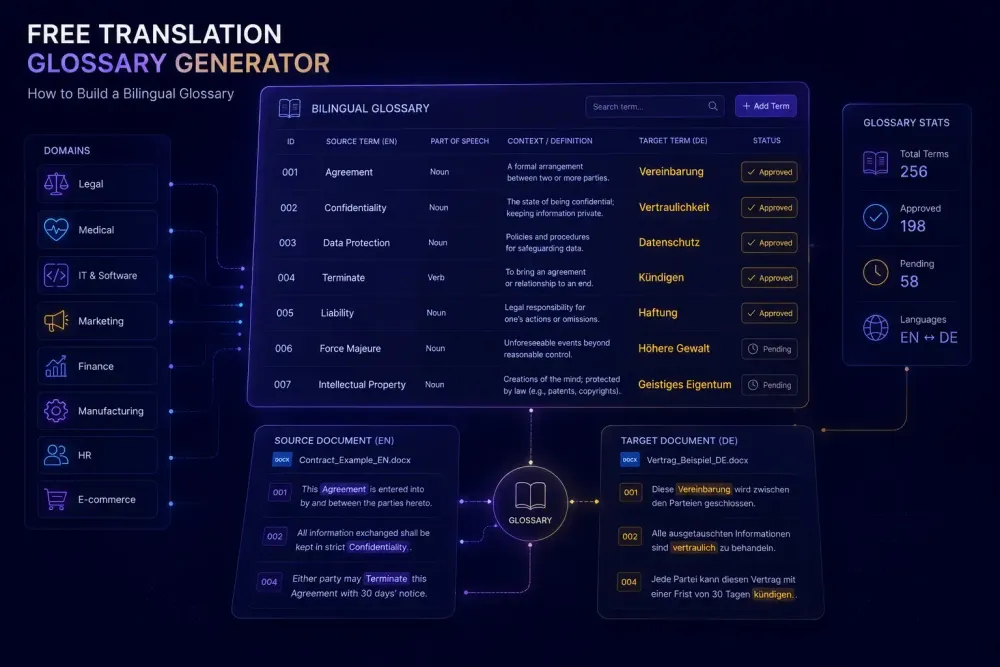
Most translation projects don't fail because of bad translators. They fail because two competent people made independent decisions about the same ambiguous term, and nobody noticed until the client did. A free translation glossary generator can close that gap — not because it makes terminology decisions for you, but because it forces the conversation to happen before translation starts rather than during QA.
We've worked with enough translation teams to know that glossary creation gets postponed more than any other preparation step. It's not laziness. It's time pressure, combined with the belief that a glossary can always be built retroactively if needed. It usually can't — at least not without rework that eats into the project margin and strains the client relationship.
Why terminology inconsistency is so hard to catch
Take a typical parallel translation setup: two freelancers working on different halves of a 40-page technical agreement. No glossary, no shared reference, just the source document and their own experience. Each makes defensible choices. The first translator uses "liquidated damages" throughout; the second prefers "penalty clause." Both are acceptable renderings of the source term. Neither is technically wrong. But the client uses "liquidated damages" across all their contracts and notices the inconsistency immediately.
The problem is that standard QA tools won't flag this. They check for missing segments, formatting inconsistencies, number errors, and glossary violations — but there's no glossary to violate. The inconsistency passes review and lands in the client's inbox.
The effect compounds for agencies with ongoing client relationships. Without a maintained glossary, each new project restarts the terminology conversation from scratch. A term gets translated one way in January and another in May. By December, the client has three or four renderings of the same concept scattered through their localized materials, and no one can tell you which was intended. According to CSA Research, terminology inconsistency ranks among the top quality complaints from enterprise translation buyers — not because translators lack skill, but because the process infrastructure to support consistency isn't there.
A free glossary generator doesn't solve all of this. It solves the most addressable part: getting an agreed term list into translators' hands before any segments are touched. That's where most of the damage gets prevented.
What actually belongs in a bilingual glossary
The worst glossaries aren't the empty ones. They're the overloaded ones. A term list with 800 entries covering every common noun in the source document defeats its own purpose: translators stop consulting it because the signal-to-noise ratio is too low.
A functional bilingual glossary has three entry types: domain-specific terms that carry genuine translation risk, company- or client-specific vocabulary where an approved target rendering exists, and source-language words where multiple acceptable renderings differ meaningfully in the target language. Everything else adds noise.
In practice, this means 50 to 200 terms for most projects. A 20,000-word medical device manual might contain 600 technical terms, but fewer than 120 are genuinely ambiguous or specialized enough to warrant a controlled translation. The rest are standard medical vocabulary any competent translator handles consistently without guidance.
Each entry needs a source term, a target term, and a brief usage note explaining context. Without the note, "account" can mean a financial account, a billing account, or a user account — three different renderings in Russian, German, or Chinese — and translators have no way to resolve the ambiguity without reading surrounding context every time. The note takes ten seconds to write and saves real time during translation.
Status markers matter too: approved, provisional, under client review. This tells translators which terms are fixed decisions and which are still open. When clients ask why a particular rendering was used, you have a documented answer.
How a free translation glossary generator works
Automatic terminology extraction combines frequency analysis with linguistic annotation. The tool scans your source document, identifies noun phrases and specialized compound terms, ranks candidates by frequency and domain specificity, and presents a filtered list for human review.
Domain classification is what separates useful extractors from noisy ones. In a legal document, "agreement" and "party" appear constantly but don't need glossary entries — any legal translator knows these. "Indemnification threshold" or "novation clause" are different: they appear less often but carry higher translation risk. A generator that weights domain specificity surfaces the second category more reliably than a pure frequency sort would.
A well-tuned extractor produces roughly 70% useful results and 30% noise. A 30,000-word technical manual might surface 400 candidates; 120 to 150 will be worth keeping. That's still a meaningful review effort, but it's faster and more systematic than building the list by hand — and it catches the two-occurrence terms that manual extraction tends to miss entirely, the ones that appear rarely but matter a great deal if mistranslated.
One thing worth being direct about: a generator finds candidates; it doesn't translate them. You still need a human to add the target-language equivalent, approve the entry, and write any necessary context note. The time savings come from eliminating the extraction phase, not the review phase. If you're expecting to upload a document and download a finished bilingual termbase in one step, the reality requires more from you than that.
Output formats to look for: CSV, TBX, and Excel. CSV works well in AI translation workflows where you paste glossary content into a prompt or context document. TBX is the termbase standard supported by Trados, memoQ, Phrase, and Smartcat — if you're importing into a CAT tool, TBX is the cleaner path. Excel works for client review and internal sign-off before any import happens.
Most free tools cap document size at 20 to 30 pages per run, which covers most standalone projects. For longer documents, you'll need to run extraction in segments or accept that the output samples the content rather than covering it fully.
Building a bilingual glossary from source documents
Glossary creation works best as a staged process rather than a single extraction step. Here's how we approach it on real projects.
Start by gathering all available materials. The source document is the minimum, but more context improves coverage and domain classification. Previous translations, client brand guidelines, product specifications, even a few pages from the client's website add useful signal. The extractor doesn't need pristine text — rough reference materials still help calibrate its domain model.
Run the extraction. Upload your documents, select the source language, let the tool run. For a 25-page document, most free tools complete this in under a minute.
Review the candidate list carefully. Sort by frequency and work through the top 200 candidates. For each: domain-specific vocabulary worth including, generic word to discard, or something requiring research before you decide. Flag uncertain candidates rather than skipping them — return after the initial pass when you have more context from the rest of the list. Rushing this step is the most common way glossaries go wrong.
When you have no previous translations to reference — a new client, a new domain — slow down even more during this review. You're making term decisions blind, without the benefit of a reviewer who knows the client's preferences. In these cases, we mark more entries as provisional and build in a light post-project review to check whether any terms drifted from what the glossary specified.
Add target-language equivalents. Where the client has a preferred translation, use it. For new terms, use your best judgment and mark the entry as provisional. If you're working with a team, circulate the candidate list for a quick pass by a domain specialist before finalizing. A ten-minute review by someone with real subject-matter experience often catches several plausible-but-wrong candidates that would otherwise sail through.
Export and distribute. For a CAT tool workflow, export as TBX and import into the project termbase. For AI translation, a CSV or clean plain-text export works well in prompt context. For client-facing review, Excel is usually the most readable format.
After delivery, spend five minutes reviewing whether any new client-specific terms appeared during the project. Maintained incrementally, a glossary strengthens with every engagement. Left to stale, it becomes a file nobody trusts.
Termbase or simple glossary — which format do you actually need
A TBX termbase supports metadata that a flat file can't hold: domain tags, usage notes, client IDs, language variants, approval status across multiple language pairs. For agencies handling an ongoing client account across more than two target languages, a maintained TBX termbase pays off quickly. Entries are added once and available across all language pairs with consistent metadata.
For a freelancer working a single project in one language pair, that overhead usually isn't justified. A two-column Excel file — source term, target term — is faster to create, easier to edit mid-project, and does the job completely. If the engagement is under 15,000 words and isn't part of an ongoing relationship, don't build a termbase. Build a glossary.
The point where most agencies shift to a proper termbase is around the third project with the same client. At that point, structured terminology management starts saving more time than it costs, because you stop rebuilding the term list from scratch on each engagement.
One practical note: free glossary generators typically output CSV or Excel by default. Producing a TBX file requires either a paid tool or a separate conversion step — TBX conversion utilities exist online, but they add friction. If your CAT tool accepts Excel imports, that's often the faster path for smaller teams.
This changes if a client supplies their own TBX termbase and expects you to work from it. Import it into the project and treat it as authoritative for the duration.
Connecting your glossary to an AI translation workflow
Building a glossary is one problem. Getting an AI model to actually follow it is a different one, and it catches a lot of teams off guard.
A flat list of 300 terms pasted into a system prompt is difficult for a language model to parse consistently, especially when relevant terms appear deep in a long document or context window. LLMs tend to drift from earlier instructions as context grows. What works better is keeping the glossary lean — 80 to 100 terms per job — and structuring each entry clearly: source term, target term, one-line usage note. Put your highest-priority terms first, the ones where a wrong rendering will generate a client complaint.
If you're running AI translation on DOCX or XLSX files, SnapIntel's free Glossary Generator lets you extract bilingual term candidates directly from your source documents and feed them into a structured translation workflow. The platform requires glossary and prompt approval before translation can start, so the AI runs against a term list you've actually validated rather than one that slipped through unreviewed.
That gate exists because we've seen what happens without it. Auto-extracted candidates are often plausible but wrong. A term incorrectly entered in the glossary will produce the wrong rendering consistently across every segment where it appears, because the model follows instructions. That's not random inconsistency — it's systematic error that requires post-editing effort proportional to how often the term appears. Catching it before translation starts is the only cost-effective fix.
This matters most in legal, pharmaceutical, and technical domains, where single-term precision directly affects the usability of the delivered document. For general business content, the stakes are lower — but the logic holds either way: a reviewed glossary produces better AI output than an unreviewed one, and the review takes less time than fixing the results afterward.
The one habit that sticks
The glossary process that actually runs on every project is the minimal one: five minutes of extraction, twenty minutes of review, before any translator touches a segment. Not a comprehensive termbase with client sign-off and domain metadata. Just a reviewed list of the 50 most important terms for this document, this language pair, this client.
Done consistently, this builds something more durable than any single glossary file: a process that catches terminology decisions at the start of a project rather than at the end. The list gets stronger with each project for the same client. The review gets faster as you learn their vocabulary. After six months, the glossary habit runs on its own momentum and the terminology problem largely disappears.
One last thing: the first glossary is always the hardest. There's no previous project to pull from, no existing term list to extend. Every term decision feels like a guess. That's normal. Build the list anyway, mark everything provisional, and refine it after delivery. By the second project with the same client, 60% of the review is already done. By the third, you're mostly just adding new terms and confirming what you already know.
The extraction takes about as long as it takes to brew a cup of coffee. Start today, with the document you're working on right now.