CAT tool vs translation management system: what's the difference and which do you need?
Confused between a CAT tool and a TMS? We break down how each works, where they overlap, and how to pick the right one for your workflow.
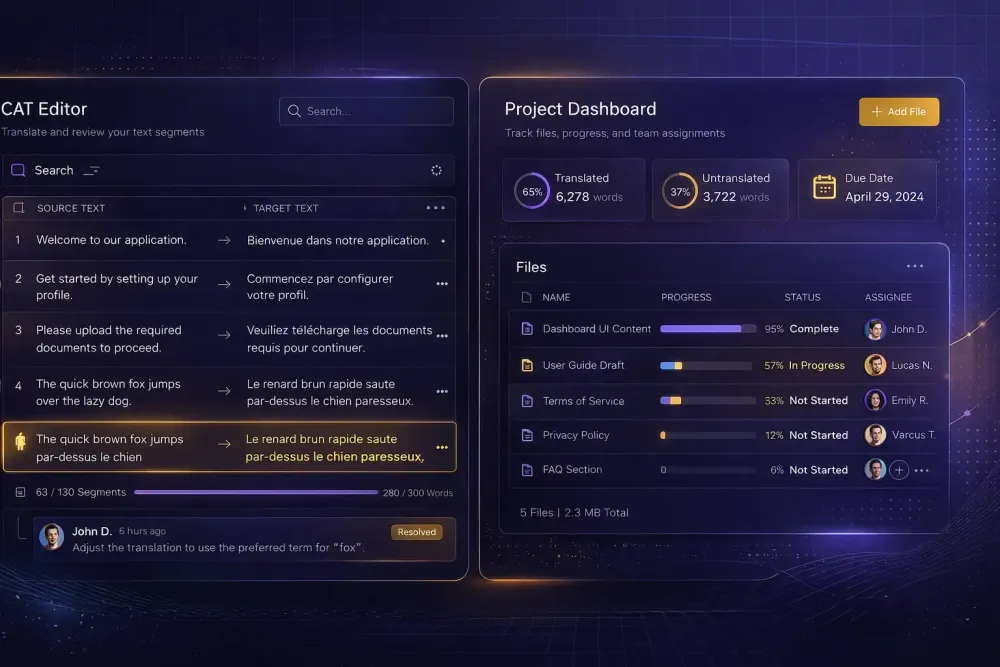
If you've spent any time looking at translation software, you've run into both terms: CAT tool and TMS. Vendors use them interchangeably. Blog posts conflate them. And the products themselves have been borrowing each other's features for years, which makes a clean comparison harder than it should be. We talk to a lot of agencies and freelancers who are genuinely unsure what they're buying — and that confusion leads to paying for capabilities they don't need, or missing the ones they do. Here's how we actually think about the cat tool vs translation management system question.
What a CAT tool actually does
A CAT tool — short for Computer-Assisted Translation tool — is built for the translator sitting at a desk doing the work. Its job is to show source and target text side by side, segment by segment, and give you access to translation memory suggestions, glossary matches, and sometimes automated quality checks while you type.
Classic workflow: you open a file in the editor, work through each segment, confirm translations, export a finished file. The CAT tool handles the micro-level work. It tracks which segments are confirmed, which are fuzzy matches from TM, and which still need attention. Smartcat's browser-based CAT editor, for instance, surfaces TM suggestions, AI output, and glossary matches in a sidebar panel as you work through the document, all without leaving the browser.
What CAT tools aren't particularly good at: coordinating across a team, handling the logistics of a multi-file project, or managing client communication. A single translator on a single document? A CAT tool is usually all you need. A team of five working on a 40,000-word project with two reviewers and a deadline? That's where you start needing something more.
One thing worth clarifying: translation memory and glossary databases often live inside a CAT tool, but they don't belong to it. When you move to a TMS or switch CAT tools, your TM typically travels with you in TMX format. Your work isn't locked in.
What a translation management system does
A TMS sits above the CAT tool in the workflow stack. Its job is coordination: creating projects, assigning files to people, tracking progress, managing deadlines, handling client intake, and often automating parts of the handoff between stages. Some TMS products include their own built-in CAT editor; others are designed to work alongside external editors.
If the CAT tool is where translation happens, the TMS is where translation projects are managed. A project manager at an agency might spend their entire day in the TMS — creating projects, uploading source files, assigning translators, checking completion percentages — without ever touching a segment.
A typical TMS adds things like automated file routing between translation and review stages, client portal access, invoicing, vendor management, and reporting. In larger agencies, a TMS is what makes it possible to run 50 concurrent projects without tracking every file in a spreadsheet.
It's worth noting that the line between these two categories has blurred significantly. Smartcat is genuinely both: it has a full CAT editor and a project management layer with assignment workflows, deadline tracking, and a marketplace for finding and paying freelancers. Whether you think of it as a CAT tool or a TMS depends entirely on which features you use most.
Where the confusion comes from
The overlap is real, not just a marketing problem. Most modern platforms have expanded to cover both ends of the workflow. memoQ started as a desktop CAT application and added project management features over time. Phrase (formerly Memsource) positions itself as a TMS but includes a fully functional CAT editor. Smartcat has the entire stack in one product.
What this means practically: you can't always tell from the product name or category label what you're actually getting. You need to look at specific features and decide whether they match your role.
Freelancers almost never need a TMS. The project management layer is overkill when you're the only person working on your files. A solid CAT tool with TM and glossary support is the right call.
Agencies with three or more concurrent projects, multiple translators, or review stages start feeling the pain of coordinating manually. That's usually the point where the TMS investment starts paying for itself — not because the CAT features are better, but because the logistics layer saves real time.
The feature overlap that trips people up
Both CAT tools and TMS platforms typically include translation memory, glossary management, QA checks, and file export in multiple formats. These are table-stakes features now, not differentiators.
Where they diverge meaningfully:
CAT tools are stronger on: segment-level editing experience, keyboard shortcuts, real-time TM and glossary lookup, and micro-level quality feedback. If translation speed and accuracy at the segment level matters most to you, the CAT editor quality is what you're optimizing for.
TMS platforms are stronger on: project lifecycle management, multi-user workflows, automated stage routing, vendor management, client-facing portals, and reporting. If you're managing other people's work rather than doing translation yourself, these are the features that actually affect your day.
A few things that genuinely only exist in proper TMS platforms: bulk project creation from client intake, automated assignment rules based on language pair and domain, and consolidated invoicing across multiple vendors. These sound abstract until you're managing 30 projects a month and doing it manually — then they get very concrete very fast.
How to decide which one you actually need
The honest answer is that it depends on your scale and your role in the workflow.
If you're a freelance translator or a small team of two or three, a CAT tool is almost certainly enough. Focus on TM quality, glossary features, and format support. You don't need a project management layer you'll never use.
If you run an agency with dedicated PM roles, a TMS starts making sense once you're past roughly five to ten concurrent projects. The coordination overhead compounds — each project needs file tracking, deadline management, and handoffs between stages. A TMS automates most of that.
There's also a middle ground: single-stack platforms like Smartcat where the CAT editor and project management live together. This works well for agencies that want everything in one place without integrating separate tools. The tradeoff is that you're betting on one vendor for both functions.
One thing we'd flag: don't upgrade to a TMS just because it sounds more professional. We've seen agencies buy expensive TMS licenses and use maybe half the features. Start with what you actually need, track where your coordination pain is coming from, and expand from there.
What about TM and glossary — do they live in the CAT tool or the TMS?
This is one of the most common practical questions we get, and the answer is: it depends on the platform, but your data is usually portable.
In most modern platforms, TM and glossary databases are associated with the workspace or project, not the editor itself. In Smartcat, they're workspace-level resources — you attach a TM or glossary to a project, and any translator working in that project's CAT editor can access it. When you move a TM between tools, you export it as TMX and import it on the other side.
The implication: choosing between a CAT tool and a TMS shouldn't feel like a data lock-in decision. Your translation memory follows you. What you're deciding is which workflow layer you need, not which data silo you're committing to.
Some agencies maintain their TM inside their TMS and export segments to translators who work in separate desktop CAT tools. Others keep everything in one platform. Both are valid. The question is whether your translators and PMs need to be in the same system at the same time — if yes, a unified platform makes coordination much simpler.
Making the call
The cat tool vs translation management system question resolves pretty quickly once you know your workflow. One translator, occasional projects, standard file formats: a good CAT tool is what you need. Growing agency, multiple translators, regular client intake, review stages: a TMS pays for itself.
Before buying anything, map your actual workflow on paper. Who creates projects? Who assigns translators? Who does QA? Who handles delivery? If the answer to all of those is "me, the same person," you probably don't need a TMS yet. If the answer involves three different people and a shared spreadsheet, you do.
The good news is that the market has moved toward unified platforms that handle both reasonably well, so you don't always have to choose. For teams already working in Smartcat, the project management layer is already there — it's worth taking a close look at the features you might not be using before deciding you need a separate tool.
You can read more about how AI translation tools fit into CAT workflows and explore the SnapIntel docs if you're looking at how structured AI workflows sit on top of Smartcat bilingual exports specifically.