Best free document translators in 2026 and the hidden tradeoffs of each
Not all free document translation tools are equal. We break down the best free document translator options in 2026 and what each one actually costs you.
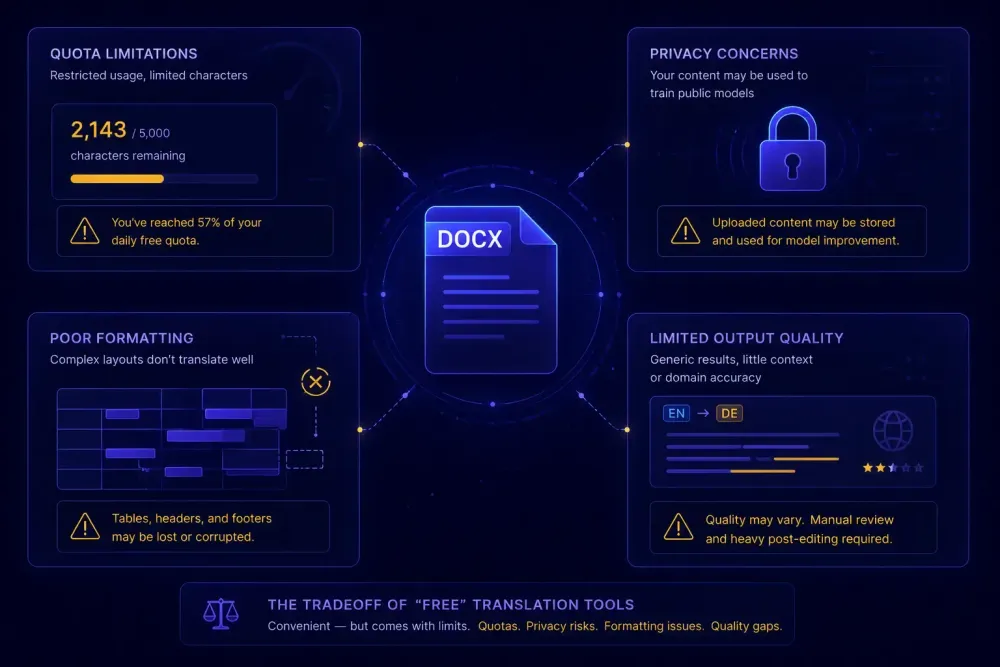
Free document translation has never been more accessible, and choosing the best free document translator for your needs is increasingly non-trivial. Google Translate's document upload, DeepL's free tier, DocTranslator, ChatGPT with file upload — all of them accept a DOCX or PDF and return something usable at zero cost. If you're trying to understand a supplier quote in German, get the gist of a legal notice in French, or read a technical spec from a Korean partner, these tools can save you real time.
That said, "free" comes with tradeoffs that aren't always visible until you need something the tool doesn't do. We've watched translators and project managers reach for free tools in a pinch, get a result that looks fine on screen, and only find the problem later: a DOCX with broken tables, a term translated three different ways across one document, or a client's confidential content that quietly went through a server with no clear data policy. This article breaks down each major free document translator, what it does well, and where the real costs show up.
What the best free document translators actually offer in 2026
The category has expanded. Five years ago, free document translation meant copying and pasting text segments into a browser tab. Now most major translation providers include document upload in their free tiers, and the underlying MT quality has improved considerably across the board.
The tools in widest use right now: Google Translate's document feature, DeepL Free, DocTranslator and similar web services, and ChatGPT's file upload (available with a paid ChatGPT subscription — worth noting because many people treat this as "free" when it isn't quite). Microsoft Translator has document translation capabilities too, but it requires API setup that most individual users won't navigate without developer support.
These tools differ across three dimensions that actually matter for document work. First, file format coverage: Google Translate handles DOCX, PDF, PPTX, and TXT; DeepL Free handles DOCX, PPTX, and PDF; DocTranslator adds XLSX and a broader list. Second, how much formatting survives: a simple two-column DOCX usually comes back usable, but a document with nested tables, text boxes, and tracked changes is another story entirely. Third, what you get beyond the translated file: with every free tool, the answer is essentially nothing — no QA report, no glossary enforcement, no consistency check, no indication of where translation quality dropped.
Understanding where each tool fits makes it much easier to pick the right one before you've already uploaded the file.
Google Translate document upload: what works and what breaks
Google Translate's document feature is almost certainly the most used free translation option in the world. Network effect is part of that — everyone has a Google account — and so is the fact that output quality has improved substantially on many language pairs since 2022.
For straightforward DOCX files with running paragraphs, basic headers, and simple tables, it does a reasonable job. Formatting usually holds. PDF translation works on text-layer documents and produces readable output, though the layout shifts around unpredictably.
Where it starts to fall apart is document complexity. A 30-page technical manual with nested tables, footnotes, form fields, or multi-column layouts typically comes back damaged in some way. Text boxes get dropped or misplaced. Tables collapse or lose their structure. If the original document has tracked changes, the output can mix source and revised text without clearly indicating which is which. Running that kind of document through Google Translate and delivering it to a client would require significant cleanup before it was usable.
There's also no glossary support anywhere in the free tier. If a term needs to appear consistently across a document — a product name the client wants translated a specific way — Google Translate will translate it however the model decides, and that decision can vary within the same file. For internal reference purposes, this rarely matters. For client-ready delivery, it often does.
File size is a practical ceiling too. Documents above a few megabytes tend to fail silently or return partial output with no clear error message about what was dropped.
In our experience, Google Translate's document feature works best when you need to understand content quickly and delivery accuracy isn't the requirement. It's a reading-comprehension tool more than a production translation tool.
DeepL's free tier: strong output, hard ceilings
DeepL's output quality on European language pairs has earned it a real reputation, and the free tier extends some of that to document translation.
The limits are specific: three document translations per month and a 5 MB file size cap. For a freelancer testing the platform or someone translating occasional personal correspondence, that might cover the need. For any professional volume — a few files per week — it's not a workable limit.
Within those limits, formatting preservation is better on average than what Google Translate produces for straightforward documents. Paragraphs, headers, and lists usually survive. The output text quality on English-German, English-French, English-Spanish, and similar pairings is noticeably more natural than most alternatives at the free tier.
The same gaps appear as everywhere else in this space: no glossary enforcement, no QA output, no cross-document consistency. If the same term appeared in 15 places and got translated 4 different ways, there's no report flagging that. You'd need to catch it in review.
For lower-resource language pairs or content outside European languages — English to Thai, English to Indonesian, or CJK pairs — DeepL's quality advantage narrows considerably. The three-document limit applies regardless of language pair or document type, so the ceiling is the same whether you're getting strong output or mediocre output.
DeepL's paid tier (Pro) is a meaningfully different product. It removes document limits, adds glossary uploads, and explicitly commits to not using submitted content for model training. The free tier is better treated as an evaluation option than a production workflow.
DocTranslator and similar web services: convenience with a catch
A set of web services — DocTranslator, OnlineDocTranslator, and several competitors — occupy a specific niche. They're wrappers: they accept your file, run it through a translation API (typically Google Translate or Microsoft Translator), apply a formatting preservation layer, and return the result.
The case for them is that the formatting layer sometimes handles complex document structure better than the raw API would on its own. A DOCX with multi-column layouts or a PDF with layered formatting occasionally comes back in better shape than it would through Google Translate's native document feature. The format support tends to be broader too: XLSX, TXT, ODT, and others appear across these services.
The issue most users don't think through carefully: when you upload a document to any of these services, it goes to a third-party server. The data handling policies vary significantly. Some services are clear about retention; many are not. For translating a general-interest article or a marketing brochure, this is probably fine. For anything covered by an NDA, a client confidentiality clause, or data protection requirements, uploading to an unvetted third-party service is an exposure worth thinking about before you click upload.
Translation quality is also determined by the underlying engine, not by the wrapper. If DocTranslator routes through Google Translate, you're getting Google Translate quality with better formatting handling — not higher translation accuracy. Most of these services don't advertise which engine powers them, so understanding the routing helps calibrate expectations realistically.
ChatGPT for document translation: controllable but not a workflow
ChatGPT with file upload has become a legitimate option for single-document translation work. With a paid subscription, you can upload a DOCX, specify target language, register, tone, and terminology constraints in detail, and receive output that often follows those instructions well. Telling it "translate this formal legal agreement and maintain the formal Sie form throughout in German" produces usable results. A standard MT engine can't process that instruction at all.
The quality on supported language pairs is competitive with specialized engines, and the controllability is genuinely useful for content where register or domain-specific phrasing matters.
What it isn't is a translation workflow. The output format depends on your prompting, and DOCX formatting rarely survives intact in any complex document. You're working in a chat interface, not a structured environment with project context, translation memory, batch handling, or QA output. If you close the session, the context from previous decisions is gone. There's no mechanism for enforcing consistency across a multi-file project.
For a freelancer handling a single document with specific style requirements — a press release, a short legal summary — ChatGPT can produce good results quickly. For anything involving multiple files, ongoing client glossaries, or deliverables that will be reviewed for consistency, the limitations become apparent fast.
One caveat on the "free" claim: ChatGPT Plus costs $20 per month. It's inexpensive compared to most professional translation tools, but treating it as a free translator isn't accurate.
For more context on how AI translation tools have developed in 2026, this overview covers the broader shift.
The data privacy question most users skip
Every free document translation service has this in common: uploading a document sends it to someone else's server. What happens to it there is governed by that service's data handling practices, which most users don't read before uploading.
Google's terms for Google Translate state that submitted content may be used to improve their services. That's been Google's position for years. DeepL's free tier does not commit to the same data protection that DeepL Pro does — the paid tier explicitly prohibits using submitted content for model training via a contractual commitment; the free tier does not. Smaller web services have even more variation, and some are quite opaque about what they retain and for how long.
For professional translation work, this is a concrete issue. Translation agencies typically operate under NDAs with their clients. A client's confidential product specification, internal financial document, or legal contract was almost certainly not disclosed to any free translation service in that NDA. If an agency uploads that document to a free tool and the tool uses it in some capacity, that's an exposure the client never consented to.
We've seen this come up specifically in enterprise procurement conversations. Procurement teams at larger organizations now regularly ask translation vendors how submitted content is handled — and the expectation is a clear contractual answer, not a pointer to a terms-of-service page. Most free tools can't provide that answer clearly, because the answer for many free tiers is "we may use it to improve our services."
If your work involves anything covered by client NDAs, GDPR data subject requirements, healthcare privacy regulations, or corporate confidentiality policies, the data handling policy of your translation tool is as important as the output quality. The question isn't just "does it translate well?" but "where does my client's document actually go?"
When free tools work and when they don't
Free document translators solve real problems. If you need to understand the content of a foreign-language document before a meeting — a regulatory notice, a supplier proposal, a research paper — a free tool delivers that understanding in seconds. For personal correspondence, casual reference material, or content where errors don't carry meaningful consequences, free tools are often exactly the right choice.
The gap opens when output needs to be production-ready. That means terminology consistency across a document and across projects, formatting that holds up in the client's environment, some form of quality output, and a data handling arrangement compatible with client confidentiality requirements. Free tools don't address any of those requirements systematically.
For agencies and freelancers working at real volume, the cost of free tools typically shows up in the review cycle rather than at upload time: hours spent catching terminology inconsistencies, correcting formatting that broke in the client's version of Word, or managing client revision requests because a table came back wrong or a glossary term was translated inconsistently throughout.
If you work with DOCX or XLSX files and want to run a structured AI translation workflow — with a glossary review step, a prompt confirmation gate before translation starts, and a QA report in the output — SnapIntel has a free plan covering 2,000 words per month. It's not a production-volume free tier. It's designed so you can run an actual structured job on a real document and see what the output and QA artifacts look like before deciding whether the workflow fits your process.
Before committing to any free tool for professional use, three checks are worth running. First, test on a representative file, not a clean paragraph — the formatting tradeoffs show up on documents with tables, footnotes, or multi-column layouts, not on simple text. Second, read the data handling terms for the specific tier you're using, not just the paid tier page, since free tier policies frequently differ. Third, know what you'll get beyond the translated file: if you need a QA output, a neutral XLSX export, or a term consistency report, free tools don't produce those.
Free tools are a starting point. Knowing exactly where each one ends makes it easier to decide when that starting point is sufficient.