AI Translation Tools for Small Translation Agencies: What Works and What Doesn't
AI translation tools for small agencies: what actually works in production, where tools fail, and how to run an honest evaluation before you commit.
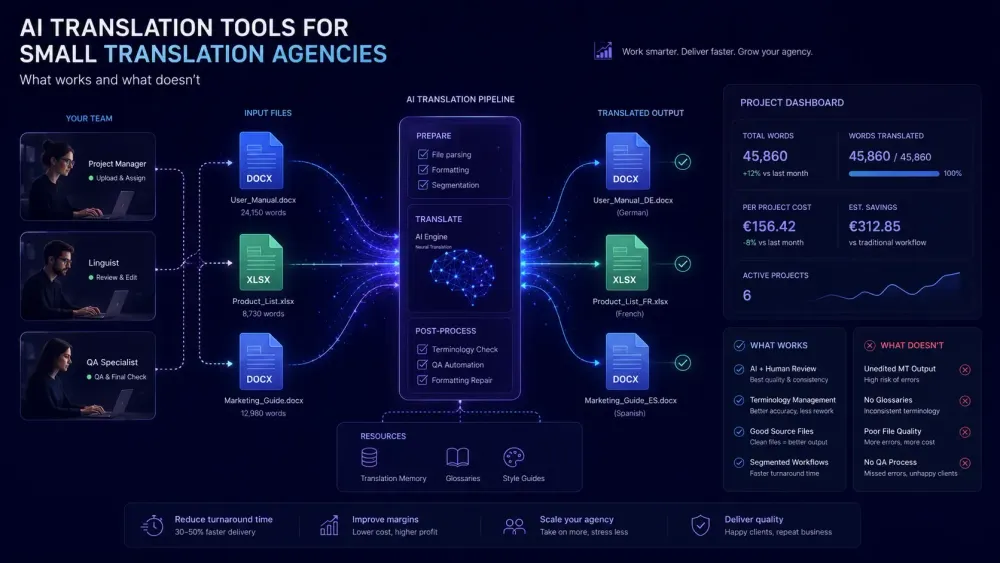
Running a small translation agency means making every tool decision count. There's no IT department to absorb a bad choice, no budget for a six-month transition to a platform that turned out wrong for your file types. When it comes to AI translation tools for small agencies, the question we hear most often is: "which one actually works?" — and the honest answer depends heavily on what your clients send you, how your team is structured, and what you mean by "works." This article covers what we've seen from agencies using AI translation tools in real workflows: where they genuinely help, where they fall short, and what an honest evaluation looks like before you commit.
What small agencies actually need from AI translation tools
Large LSPs can absorb a tool with a six-week implementation curve. A team of five cannot. The features that matter at a small agency differ from what matters at enterprise scale, and being precise about this before evaluating anything saves real time.
Setup time is the first filter. A tool that requires administrator-level configuration before the first translator can do anything useful was built for a different kind of organization. For small agencies, onboarding has to happen across an existing workload, not as a dedicated implementation project. This isn't about simplicity as a preference — it's about whether the tool is usable without dedicated IT support behind it.
Format fidelity on your actual file types comes next. Most small agencies work primarily with DOCX and XLSX files, and the tool's behavior on those specific formats is what matters. General-purpose quality benchmarks don't tell you what happens to a DOCX with merged table cells and dynamic headers, or an XLSX with protected sheets and formula-linked visible text. Your most complex recent client file will.
Consistent glossary enforcement matters differently depending on your domain. Legal and technical agencies work with terminology that's contractually specified. If the AI tool uses glossary terms as context during translation but doesn't verify the output against them systematically, you'll find out during client review — which is not when you want to find out.
Predictable pricing rounds out the list. Subscription quota models, per-word pricing, and BYOK (Bring Your Own Key) options all have different risk profiles. Matching the pricing model to your actual workload pattern makes a real difference over a quarter.
The agencies that evaluate tools well tend to do one thing: they test on a real client file in the first session, not a clean sample provided by the vendor.
Understanding the pricing models
There are three main pricing structures for AI translation tools, and each makes different assumptions about your workload.
Subscription quota models charge a flat monthly fee for a word allowance. Smartcat's Smartwords system is a typical example: 1 Smartword equals translating one word, unused credits expire at the end of the subscription term, and overages bill separately. This model works well if your volume is consistent month over month. For agencies with project-based patterns — quiet stretches followed by rush periods — it creates friction that compounds over time. You overpay in slow months or scramble to use credits before they expire, often by running low-priority content through the tool just to avoid leaving Smartwords on the table.
Per-word and pay-as-you-go models price each project individually. Cost certainty at the project level makes client pricing easier to calculate. The trade-off is that quarterly forecasting gets harder, and some vendors charge different rates for different language pairs or document types — meaning your cost estimate for a project can vary based on which combination you're working with.
BYOK models let you connect your own OpenAI API key and pay OpenAI rates directly, cutting out the vendor markup. For agencies translating high volumes of text-heavy DOCX and XLSX files, the cost difference between vendor-managed pricing and direct API pricing can be substantial — particularly at volumes above 80,000–100,000 words per month. Below that threshold, the simpler administration of a subscription often outweighs the savings.
BYOK doesn't help with PDF processing that involves complex layouts, image text extraction, or formats that require vendor-side preprocessing. Those steps use infrastructure beyond what an API key covers. But for DOCX and XLSX workflows where the main cost driver is the language model itself, BYOK can change the unit economics meaningfully.
Where AI translation actually saves time
The real time savings from AI translation in small agencies are more specific than the marketing suggests.
The biggest is draft-to-review speed. A 12,000-word legal contract that would take a translator four days to draft arrives in a reviewable state in a few hours. The meaningful metric is not how fast the AI produces output — it's how quickly a post-editor can get the file to delivery standard. Tools that generate cleaner first drafts reduce post-editing hours, which is where actual labor cost lives.
Terminology consistency across long documents is the second real gain. Translators drift. On a 20,000-word technical manual, a term used consistently through the first ten pages may start varying by page fifteen — not from carelessness, but because tracking terminology mentally across a long document is genuinely hard. AI translation with enforced glossary terms maintains consistency mechanically throughout the file. This matters more for technical and legal content than for marketing material, where some variation is acceptable.
Where AI translation doesn't save time: documents with poor source quality, content that requires cultural judgment, and short high-context segments. If the source document is ambiguous, AI produces fluent ambiguity. Pre-editing a badly written source before running it through the tool often leads to better final output than trying to fix a translation of unclear content. That extra step sounds counterintuitive but we've seen it cut total project time more than once.
This doesn't apply if you regularly receive well-structured source documents. It applies if you sometimes get messy drafts from clients — which most agencies do.
Format fidelity: what actually breaks
Every AI translation tool claims to preserve document formatting. What that means in practice depends on the document type and its internal complexity.
For DOCX files, the common failure modes are tables with merged cells, headers and footers containing dynamic fields, numbered lists that reset after complex nesting, and captions on embedded images. These are not rare edge cases — they're the standard content of legal, financial, and technical documents. An agency translating annual reports will encounter merged table cells on almost every project. An agency handling engineering documentation will find that numbered sections with cross-references need manual attention after translation.
For XLSX workbooks, the issues run differently. Most tools translate visible cell text and leave formulas intact, which is the correct behavior. But workbooks with conditional formatting, sheet protection, or visible text strings that reference cell addresses can behave unexpectedly after translation. A workbook that looks correct on screen but breaks the client's downstream formulas is worse than a visible translation error — it takes longer to diagnose, and it surfaces at the client's end rather than during internal QA.
We've seen agencies spend more time on format cleanup than on post-editing translation errors, for specific document types. That's the situation the initial trial should surface, not the third client project.
The test that works: take the most complex file from a recent client project and run it through the trial. Not a vendor sample — your actual file, with the structural complexity your clients typically send. Download the output and compare it side by side with the original. Format problems invisible in simple paragraph documents will show up here.
Tools that maintain an explicit mapping between source content positions and output positions tend to produce more reliable results on complex files. This structural tracking — knowing exactly which translated segment came from which position in the original document — is what allows proper reconstruction of tables, lists, and formatted sections. Tools that extract text, translate it, and re-inject it without that mapping tend to produce good output on simple files and problematic output on complex ones.
Terminology enforcement: the gap most tools don't close
There's a meaningful difference between a glossary field and glossary enforcement. Many small agencies learn this distinction during client review.
Entry-level AI translation tools typically include a glossary input but treat it as soft context during translation rather than a hard requirement. The model may apply the glossary term correctly in one paragraph and ignore it three pages later. For branded product names, legally defined terms, and domain-specific vocabulary agreed with a client, inconsistent enforcement is a quality problem — not an edge case.
Tools with dedicated post-translation verification run a separate pass after the initial translation, checking output against glossary requirements and flagging segments where terms weren't applied correctly. Smartcat's AI pipeline includes a glossary-term fix step using OpenAI-based correction on flagged segments — a meaningful structural difference from tools that accept glossary input but don't verify the output against it.
For small agencies, the practical question is whether the tool surfaces terminology errors before the file leaves the building. A QA report that flags glossary violations as part of the post-editing workflow changes the review process substantially — and reduces the chance of a client finding terminology errors the agency missed.
Building a glossary for a new client doesn't have to start from a blank field. Tools like SnapIntel's free glossary generator can extract candidate terms from a source document, giving you a set to review and refine rather than constructing from nothing. That's a meaningful time saving at the start of a new client relationship.
The other thing worth acknowledging: even well-enforced glossaries have limits. If the source document uses inconsistent terminology — a common problem in client-drafted content — the AI tool will faithfully translate inconsistency rather than standardize it. That's a source quality issue, not a tool issue, but it shows up in QA reports and revision requests if nobody catches it first.
Post-editing as the real cost variable
Post-editing time is the variable that AI translation evaluations most consistently undercount. It's also the one vendors are least likely to help you calculate accurately.
MTPE (machine translation post-editing) splits into two levels. Light post-editing targets fluency and obvious errors in output that's essentially correct — the translator treats the AI draft as mostly usable and focuses on making it read naturally. Full post-editing treats the AI output as a starting point and works through every segment. Which is appropriate depends on content type, language pair, and the specific tool's output quality for that combination.
The calculation that matters: average post-editing hours per 1,000 words, multiplied by your post-editor's rate, plus the AI tool's per-word cost. Compare that total against full human translation rates for the same content type. The math is sometimes compelling. Sometimes it isn't. Language pair and content complexity are the main variables.
Language pair is where the biggest surprises tend to appear. AI translation quality between English and German is substantially better than between English and Arabic, English and Vietnamese, or English and Japanese. The post-editing workload reflects this gap, and an agency where most volume is in European language pairs will see very different economics from one focused on Asian languages. Both are real situations — they just produce different conclusions about which tools are worth using and at what price point.
Run the evaluation against your actual language pairs and content types, not whatever the vendor shows in their product demo. The demo language pair is almost never the hardest one in your workload.
How to evaluate a tool before you commit
The evaluation process that works for small agencies is simpler than most vendor recommendations suggest, and it focuses on the variables that determine whether a tool is actually profitable to use on real projects.
Test your most common file type first, and use a real client file — not a sample document. A file from last month's workload, with the structural complexity your clients actually send. Look at what comes out of the tool and estimate honestly how much work it needs before delivery.
Test your most demanding language pair, not your easiest one. The quality gap between easy and difficult pairs is large enough to change the entire economics of using the tool.
Test glossary enforcement with actual client terminology. Enter five to ten terms from a recent project and check whether the output applied them and whether the tool flagged where it didn't.
Run the full cost calculation for one representative project: AI tool cost plus realistic post-editing time at your actual rates. Compare that to what the same project costs through your current process.
For agencies primarily working with DOCX and XLSX files and wanting a structured translation workflow with preparation controls and QA output built in, SnapIntel is worth including in that comparison. It supports BYOK for agencies managing API costs directly and includes domain analysis, glossary controls, and a QA report as standard parts of the workflow — not add-ons.
The tools that look best in a product demo are not always the ones that deliver the most value when a client deadline is running. Structure your evaluation around real files, real language pairs, and real deadline conditions. That's the only test that produces a reliable answer.