AI translation for Trados users: how to speed up your workflow without switching tools
AI translation for Trados users: how to integrate AI pre-translation into your workflow without switching tools or breaking your TM setup.
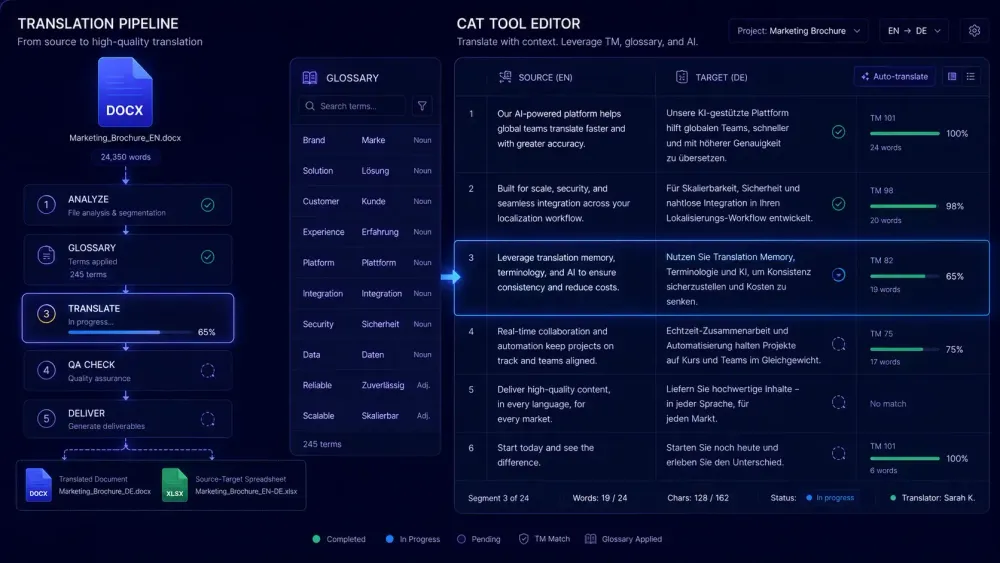
For most Trados users, AI translation isn't a question of whether to add it, but how to do it without dismantling what already works. Your TM took years to build. Your term bases define what a specific client expects to see in every document. Your workflow configurations handle file types that don't always play nice. Switching platforms means walking away from all of that. The good news is that ai translation for Trados users doesn't require a platform switch. What it requires is a decision about where in the Trados workflow the AI step fits, and enough structure in that step to make the output worth editing. This article covers the practical options.
Why ai translation for Trados users looks different from standard MT
Most Trados users who've tried MT pre-translation have tried it through DeepL or one of the built-in connectors. The results are... fine. The output is workable. You're editing rather than translating from scratch. But the error pattern is predictable: inconsistent terminology, structural decisions that vary across the document, segments where the MT made a plausible guess at something domain-specific that turned out to be wrong.
The difference between that experience and what document-aware AI translation produces is what the practical experiments are showing. When an AI translation step has your glossary as a hard input and a brief description of the content domain before it starts, the output it generates is calibrated differently. Terminology matches your approved terms because you gave them. Register holds across the document because the AI saw the whole thing before it started.
We work with agencies on this kind of workflow, and the difference shows up in measurable ways. A 5,000-word industrial equipment manual translated with proper domain context gave post-editors roughly 30 percent fewer structural edits than the same content through generic MT, because the AI was working with the client-approved terminology from the start. The corrections that remained were in register and a few ambiguous source passages where more context would have helped. That's not a marginal improvement in effort; it changes what the project costs.
The AI step isn't replacing the post-editor or the TM. It's improving what goes into Trados before anyone opens the SDLXLIFF file.
What Trados already offers for AI pre-translation
Trados has supported MT connectors for years. In Project Settings, under Language Pairs, you can configure pre-translation using DeepL, Microsoft Translator, Google Translate, or RWS's Language Cloud engine. Once connected, Trados fills all untranslated segments before the translator opens the file.
For content with significant TM leverage, this is often enough. If a high proportion of your segments get 100% or strong fuzzy matches from your existing TM, the MT connector handles the remainder and the post-editor cleans it up. That's a workable setup for the right kind of project.
The limitation is architectural. MT connectors in Trados work segment by segment. The engine gets one source sentence, returns one translated sentence, and moves on. There's no document context. It doesn't know what it translated three pages earlier, and there's no reliable way to pass your term base as a hard constraint rather than a suggestion.
For longer projects where terminology must be consistent across the whole document, this creates a predictable problem. The same source term appears in two rendered forms. Register drifts between sections. The post-editor catches it on review, but by then the corrections are scattered across the file instead of being prevented at the source.
Trados's built-in MT is the right choice for shorter content, high-repetition material, or projects where turnaround time matters more than output calibration. For terminology-heavy documents where clients track consistency closely, it's worth considering a different approach.
The DOCX-first approach: translating before your Trados project starts
The alternative is to run AI translation on the source DOCX before you create your Trados project. The source file goes through an external AI translation tool that accepts a glossary and domain context. The translated output comes back. Then you decide how to bring it into Trados.
The workflow looks like this. You receive the source DOCX. Before opening Trados, you upload it to your AI translation tool, select the language pair, paste in your glossary terms, and write a few sentences about the domain so the AI isn't guessing. The tool translates the full document in one pass, with access to everything in the document at once. You download the translated output.
From there, two practical options in Trados.
The first: use the translated DOCX as a reference document. Create your Trados project from the source file normally and open the AI-translated DOCX alongside for reference. The translator works in the SDLXLIFF file as usual; the translated DOCX is context, not the working file. TM suggestions still come from your existing TM.
The second: use the neutral source/target spreadsheet that some AI translation tools export. This is an XLSX with source text in one column and AI-translated text in another. Import it into a temporary Trados TM, run pre-translation against it in your new project, then review and confirm the segments. Approved segments merge into your main TM and work exactly like any other TM entry going forward.
The first option takes minutes to set up. The second fits more cleanly into a Trados-native workflow once you've done it once, and keeps your TM current without any separate export step at the end.
Keeping your translation memory in sync with AI output
The question agencies ask most often: if AI handles the bulk of the translation, does the TM lose value?
It doesn't, as long as you're confirming segments in Trados. The TM doesn't know or care where the pre-translated content came from. When you post-edit and confirm a segment, that confirmed version goes into the TM exactly as if you'd translated it yourself. The AI-assisted origin is irrelevant.
After the project, your TM contains approved, human-reviewed output. On the next project for the same client, Trados applies those TM matches normally. If the post-editing was done well, TM leverage on subsequent projects improves because you've built an actual history of how that client's content should read.
You're not bypassing the TM. You're building it faster.
One thing to watch: if you import a neutral XLSX into a temporary TM and pre-translate from it, those raw AI segments show up in your project but aren't in your main TM yet. Confirming and merging needs to be part of how you close out the project, not something you do later when you remember to.
What post-editing AI output actually looks like in Trados
Post-editing AI output in Trados is different from post-editing generic MT. The difference is apparent within the first few segments.
Terminology is the clearest change. When the AI was given a glossary, the terms in your segments already match your Trados term base. You're confirming rather than correcting. For technical content, where a mishandled client term leads to a revision request, this changes the review session noticeably.
Consistency across long documents improves too. Generic MT making independent segment-by-segment decisions sometimes renders the same source construction differently across a 40-page document. Document-aware AI sees the full text before it starts and makes more stable choices. In practice, this means less time hunting through a long file to find where the inconsistency crept in.
What stays the same: AI makes mistakes. Ambiguous source segments are a reliable source of errors, especially when the ambiguity depends on context outside the document. Idiomatic expressions sometimes come back literal. Some language pairs produce weaker output regardless of how much context you provide.
Post-editing is still post-editing. The difference is that the effort is directed at actual problems rather than at terminology corrections that proper glossary input could have prevented in the first place.
This works best for structured documents: technical manuals, legal forms, financial reports, standardized materials. For creative or marketing content that needs significant adaptation, or language pairs where AI output quality is lower, the calibration benefit is smaller. Worth knowing before you decide which project types to test this on.
How agencies are building this into their Trados setup
One pattern we see in agencies running Trados across multiple project managers is a two-stage setup that kicks in when a new client relationship starts.
The project manager takes any reference materials the client provides, extracts the key terminology, and builds an initial glossary. That glossary goes into both the Trados term base and the AI translation tool. First document for the client: the AI uses those terms from the start.
After the first project, the approved post-edited segments get merged back into the client's TM in Trados. The glossary gets updated with terms the translators refined during post-editing. By the third or fourth project, a meaningful portion of segments are 100% TM matches, and the AI pre-translation step focuses on genuinely new content only.
This isn't a radically different workflow. It's the same TM growth loop agencies have always run, with a better-calibrated starting point in the AI step. Setup effort concentrates in the first project for each client and then largely disappears.
The real question for agencies isn't "should we use AI translation" but "how do we structure it so our TM stays clean and clients see consistent quality from document one." The DOCX-first approach with TM import is one answer that fits inside a Trados-native workflow without requiring anyone to change how they work day to day.
Getting started: the practical next step
The lowest-friction test is to take a source DOCX from a project you know well, run it through an AI translation tool with the glossary you'd normally use in Trados, and compare what comes back to what Trados's built-in MT would produce for the same content. That comparison, on real content, tells you whether the quality difference justifies the extra step for your specific work.
If you want more context on how AI tools are reshaping translation workflows more broadly, this overview covers how AI translation tools are changing the way translators work.
For a tool that handles DOCX translation with an explicit glossary input, a translation prompt you control before the job starts, and a neutral source/target XLSX export that works with any CAT tool's TM import workflow, SnapIntel is worth running that test on. The free plan covers 2,000 words per month, which is enough for a genuine comparison on a real project. The neutral XLSX export imports directly into Trados TM without any custom configuration needed.
A few decisions before you start: which content type to test first (stable, terminology-heavy documents show the clearest difference), whether to use the AI output as a reference document or via TM import, and how you'll measure edit effort per segment so you know whether the approach actually saves time. Run the same content type twice: once with Trados's standard MT pre-translation, once with the DOCX-first approach. A direct comparison on real content tells you more than any general claim about AI productivity.
A note on MTPE pricing when you use this approach
One practical question for freelancers and agencies: how do you price a project when AI has done substantial pre-translation work? Machine translation post-editing (MTPE) rates are typically lower than full translation rates, on the assumption that you're editing rather than generating. When AI output quality is high, the MTPE work is lighter, and light MTPE is priced differently from full MTPE.
The industry hasn't standardized rates for AI-assisted MTPE with proper glossary coverage. What we see in practice is that well-calibrated AI output can shift a project from full MTPE toward light MTPE pricing, depending on actual error density. Tracking edit effort per segment on a few test projects is the most reliable way to set rates that reflect what the work actually involves, rather than relying on default MTPE discount tables that assume average MT quality.