Translation quality assurance: the complete guide for agencies and freelancers
A practical guide to building a real translation QA process — pre-translation controls, in-process checks, revision, and QA reporting that agencies actually follow.
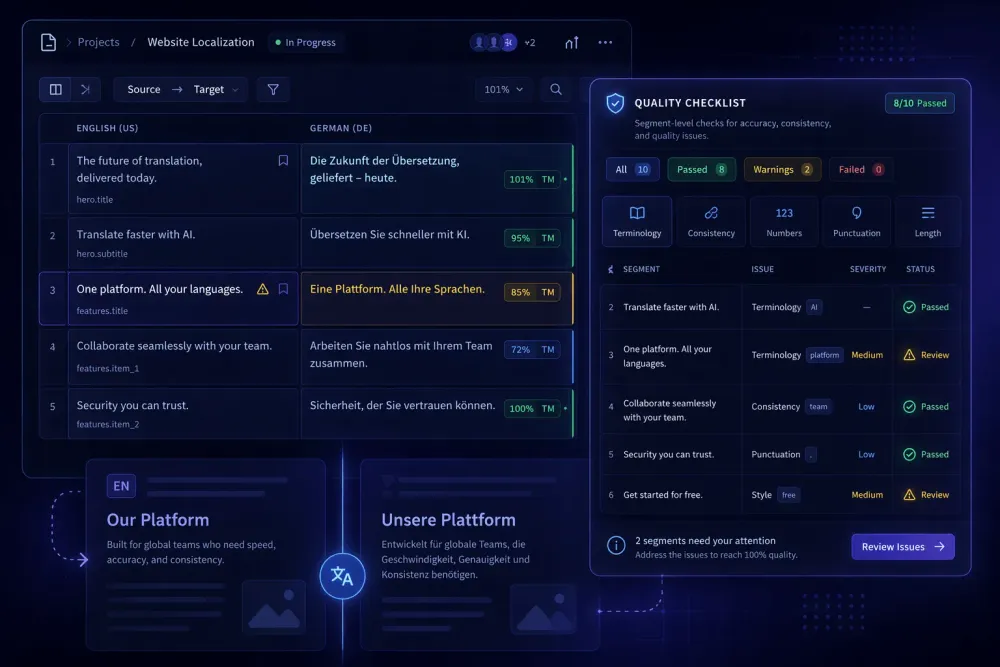
Translation quality assurance is one of those things agencies talk about constantly and implement inconsistently. Every team has some version of a QA process — a checklist here, a review round there — but very few have a system that holds up under pressure: tight deadlines, new translators, unfamiliar subject matter. This guide covers what a real translation QA process looks like, why the common shortcuts fail, and what you can put in place today.
What translation quality assurance actually means
QA in translation gets conflated with revision, proofreading, and final review — and they are related, but not the same. Quality assurance refers to the systematic processes that prevent errors from reaching the client. Revision and proofreading are reactive. QA is structural.
A useful working definition: translation QA is the combination of process controls, automated checks, and human review steps that catch errors at the right stage, before they compound. That means QA starts before translation, not after. It starts when you define the scope, agree on terminology, and establish what "acceptable quality" looks like for this project.
In practice, most agencies treat QA as a post-translation step. A second translator reads the target text, marks obvious errors, and signs off. That is not a QA process. It's a single-reviewer pass, and it catches some errors while missing others — particularly terminology drift, register inconsistencies, and formatting issues that accumulate across a long document.
A real QA process has at least three layers. First, pre-translation controls: glossary, style guide, file validation. Second, in-process checks: translation memory leverage, segment-level QA flags in the CAT tool. Third, post-translation review: human revision against source, automated QA report review, client-specific checks.
Each layer catches different error types. Skipping one doesn't mean those errors won't exist — it means you won't catch them until the client does.
The most common QA errors and where they come from
We've seen agencies lose clients over errors that would have been caught by a basic automated QA check. The categories are well-documented in frameworks like MQM (Multidimensional Quality Metrics), which breaks errors into accuracy, fluency, terminology, style, locale convention, and verity. The practical distribution in everyday agency work looks different.
Terminology errors are the most common and the most preventable. A translator uses "contract" where the client's glossary specifies "agreement." Not wrong in isolation, but wrong for that client. Terminology errors are almost entirely a glossary problem: when there is no glossary, or the glossary isn't loaded into the CAT tool, or the translator ignores the suggestions.
Omissions and additions rank second. These happen under time pressure and are nearly invisible to a fast proofreader because the surrounding text still reads fluently. Segment-by-segment source comparison catches them; a whole-document readthrough often doesn't.
Number and date errors are low-frequency but high-severity. A wrong figure in a financial document or a transposed date in a contract can cause real damage. Automated QA tools flag these reliably.
Formatting problems are underrated. Broken bold, missing line breaks, corrupted tables — these degrade client perception even when the linguistic content is accurate.
Tools like the CAT editor QA check, Xbench, or the QA reporting built into AI translation workflows catch the first three automatically. The fourth requires human eyes on a formatted output, not just a bilingual view.
How to build a pre-translation QA stage
Most QA problems are set up before translation starts. The pre-translation stage is where you establish the conditions that make the translation either manageable or chaotic.
Start with file validation. Confirm the source file is clean: no tracked changes, no hidden formatting, no embedded content that will break segmentation. If you're working with Smartcat bilingual DOCX files, validate the structure before the translator opens it. A malformed bilingual export will cause alignment errors that no amount of post-translation review will fully resolve.
Next: terminology. Load or generate a glossary for every project, even a short one. For a recurring client, you should have a live glossary that grows across projects. For a new client, spend fifteen minutes extracting the high-frequency terms from the source document. An AI-assisted domain analysis step can help here — it surfaces domain-specific terms and suggests translations based on the document content.
Then: translation brief. This step gets used less than it should. A one-page brief telling the translator the audience, register, priority terms, and known client sensitivities will save you more revision time than any post-delivery check. Translators who receive a brief produce first drafts that require substantially less revision than those who receive a file and a deadline.
Finally: scope confirmation. Agree with the client on what's in scope and what isn't. If certain sections are informational only and don't need full accuracy, flag them. If certain content requires legal sign-off before use, note it. These decisions belong in the pre-translation stage, not after delivery.
In-process QA: what happens during translation
QA during active translation is mostly automated, and that's appropriate — it should be. The goal is to catch errors as they happen rather than let them accumulate.
In any modern CAT tool, the QA engine runs passively. It checks for things like: target segment significantly longer or shorter than source, missing numbers present in the source, glossary term present in source but absent in target, potential tag errors, and inconsistent translations of repeated segments.
The challenge is that translators learn to dismiss QA warnings too quickly. When a QA check fires on every other segment because the threshold is set too tight, translators start ignoring all warnings — including the genuine ones. Setting QA check parameters to a useful sensitivity level is a calibration task that project managers often skip.
Translation memory leverage matters here too. When TM matches above a certain threshold are auto-confirmed, they skip active review. That's efficient, but it means old errors in the TM get propagated. Periodic TM audits — reviewing the most-reused segments for accuracy and currency — are worth the hour they take.
For batch AI translation workflows, the QA report generated at the end of a job tells you which segments flagged, what the quality rating was per segment, and where manual review is warranted. This is different from the traditional CAT tool QA pass — it's a post-run summary rather than a real-time flag, but it serves the same function: directing human attention to the segments that need it most.
Post-translation review: what good revision actually looks like
Revision is the step where the most time gets wasted through bad process. A revisor who reads the target text for fluency is doing proofreading. A revisor who checks every segment against the source with the QA report open is doing revision.
The distinction matters because they catch different things. Fluency reading misses omissions and finds style issues. Source-comparative revision finds omissions, terminology drift, and structural mismatches. Both are useful; they're not interchangeable.
A practical revision workflow for a medium-complexity project:
Run the automated QA report first and sort by severity. Address any critical flags — number errors, missing segments, glossary violations — before opening the bilingual file.
Then read through the bilingual view in the CAT editor, comparing source to target segment by segment. Flag rather than fix where possible — this keeps the revision log clean and gives the original translator feedback they can actually use.
Next, read the final target text in its formatted output. Check that formatting is clean, section headings are rendered correctly, and the document reads coherently as a standalone piece.
Finally, check the delivery file against the original source structure. Page count, section count, figure count. Missing content at the structural level gets missed in bilingual review but is obvious at this stage.
This process takes longer than a fast readthrough. It should. If your revision pass takes fifteen minutes on a ten-thousand-word document, you're doing a confidence check, not revision.
QA reporting and what to do with the data
QA data is only useful if you collect it consistently and do something with it. Most agencies generate QA reports and file them with the project. Few analyze QA data across projects.
The basic analysis: which error types appear most frequently, on which projects, and from which translators? Terminology errors clustered on one translator usually mean they're not using the glossary. Formatting errors clustered on one file type usually mean the CAT tool isn't handling that format well. Omissions clustered in one domain might mean the TM for that domain is thin.
Patterns in QA data are the most actionable feedback loop an agency has. They tell you where to invest — in better tooling, in translator briefing, in TM maintenance — rather than requiring you to fix the same errors project after project.
SnapIntel includes a QA report and quality rating as part of its AI translation workflow. After a translation job completes, you can review which segments were flagged, download the QA report, and use that data to decide where human post-editing attention is most warranted. That's one layer of the full QA process described here — the automated post-run check that surfaces where the AI translation needs the most review. Not all flagged segments need revision. All high-severity flags do.
Building a QA process your team will actually follow
The gap between a documented QA process and a followed QA process is mostly a workflow design problem, not a discipline problem. If the QA steps require extra tools, extra logins, or extra handoffs, they get skipped under pressure.
The practical rule: build QA into the project workflow at the tool level, not the policy level. If revision can't start until the QA report is attached to the job, revisors will generate QA reports. If the delivery checklist lives in the project management system and blocks the delivery action, it gets completed. Process that requires willpower to follow is fragile.
The checklist we use covers five stages: pre-translation (glossary loaded, brief sent, file validated), in-translation (TM leverage confirmed, QA check sensitivity set), post-translation (automated QA report reviewed, bilingual revision complete, formatted output checked), pre-delivery (client checklist verified, delivery file confirmed against source structure), and post-delivery (QA data logged, feedback to translator sent).
That's fifteen to twenty discrete checks, most of which take under a minute. The ones that take longer — bilingual revision, formatted output review — are the ones that actually catch errors. The short ones ensure the longer ones aren't doing cleanup for preventable mistakes.
The translation QA process you build doesn't need to be sophisticated. It needs to be consistent. One team member who follows a simple checklist on every project will produce better outcomes than a team with an elaborate framework that gets bypassed when things get busy.
For agencies using SnapIntel, the workflow already includes preparation steps — domain analysis, glossary generation and approval, prompt review — before translation starts. That structure is intentional: the approval gate before translation means the context for a good translation is in place before the job runs. The QA report at the end closes the loop. What happens in the middle — revision, formatted output check, delivery confirmation — is still yours to own.