SnapIntel vs translating directly in ChatGPT: why a structured workflow gets better results
SnapIntel vs ChatGPT translation: a direct comparison of format fidelity, glossary control, QA visibility, and when each approach actually makes sense
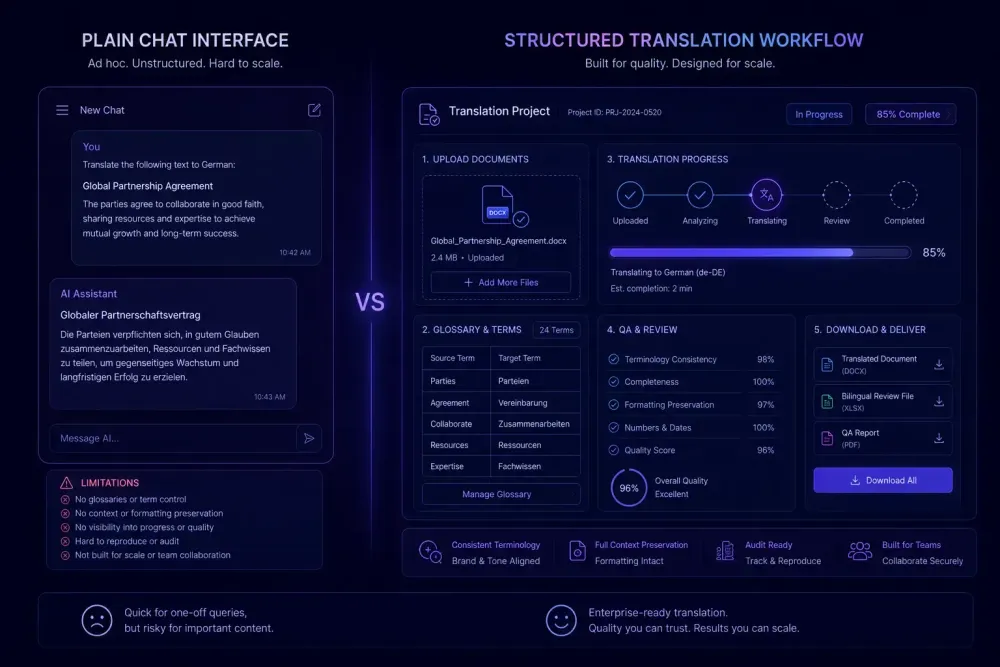
The question comes up constantly — SnapIntel vs ChatGPT translation — from agencies and freelancers who've already run the experiment, gotten a surprisingly fluent result, and started wondering whether a structured workflow is just overhead. Often it is. For a two-paragraph internal note or a product listing where format doesn't matter, ChatGPT is fast and adequate. The problem appears when the document is longer, a client will review the output, and the output needs to come back as a properly formatted file. That's a different situation, and the gap is larger than a quick test suggests.
The case for using ChatGPT as a translation tool
ChatGPT is a genuinely capable translation tool for short content. This isn't a concession — it's the accurate starting point.
For texts under 500 words where format doesn't matter, it's fast, requires no setup, and often produces output that needs minimal editing before internal use. Translating a brief email thread, checking a foreign-language clause, doing a rough pass on short copy — these are all reasonable use cases for paste-and-translate. We'd tell anyone to use it when it fits.
The appeal also extends to one-off requests with no repeat client, no established terminology, and no downstream CAT tool integration. Setting up a formal workflow for a single 200-word document can genuinely take longer than doing it by hand. That's not a workflow problem — it's an accurate read of the friction involved.
All of this breaks down when the content is long, format matters, or terminology consistency is required across multiple documents or sessions. The moment any of those conditions change, direct ChatGPT translation tends to create extra work rather than eliminate it.
One more thing worth naming: ChatGPT's translation quality for well-resourced language pairs is often quite strong. English-German, English-French, English-Spanish — the raw linguistic output is frequently usable. The problem with using ChatGPT for professional document translation isn't the quality of the base translation. It's everything else around it.
What happens when you paste a DOCX into ChatGPT
Most translators run into the first structural problem quickly: you cannot upload a DOCX and get back a properly formatted translated DOCX.
With file upload enabled, ChatGPT will extract visible text and translate it. What comes back is that text — usually as plain paragraphs or markdown. Tables may be flattened or partially preserved. Heading hierarchy is lost. Tracked changes are invisible to the model. Footnotes may or may not survive, depending on how the extraction handled them.
To produce a delivery-ready file, you rebuild it manually: paste translated text into the original document or a copy, reformat headings, reconstruct table contents, fix whatever layout broke in transit. For a two-page document, that's ten minutes. For a twenty-page technical manual with embedded tables, styled headings, and numbered lists, it's hours of reformatting stacked on top of the translation itself.
This cost doesn't appear when you evaluate ChatGPT's output in isolation. The translated text can be excellent while the delivery artifact is completely unusable without significant post-production work.
SnapIntel handles this at import. When you upload a DOCX, the import process normalizes supported visible blocks into an internal bilingual template, translates at the segment level, and reassembles output back into a formatted delivery DOCX. What you download is a translated file — not a block of text you have to paste back somewhere. You can also export a neutral source/target XLSX for translation memory import into any CAT tool you're already working in.
Glossary control and terminology consistency
Terminology consistency is where direct ChatGPT translation breaks most visibly on longer or multi-file work.
Take a technical manual where "control panel" should consistently translate as "Bedienfeld" in German, not "Kontrollpanel" or "Steuerfeld." Within a single ChatGPT session, the model may be internally consistent. Or it may not — there's no glossary enforcement mechanism. If your prompt doesn't explicitly list every approved term with its target translation, the model makes its own choices. Those choices may drift over a long document, across different files, or between separate sessions.
For a single internal document with no downstream review, this often doesn't matter. For a product manual going to an enterprise client with specific approved terminology, inconsistent rendering tends to come back as a revision request. For legal documents where specific terms carry precise meanings, inconsistency is a more serious problem.
Structured workflows fix this by requiring a glossary before translation starts. In SnapIntel, glossary and prompt are both required before any translation job can begin — the approval gate is enforced in the UI and at the server level. That gate exists because we've seen what happens when translation runs without controlled terminology input: the output is fluent and confidently inconsistent in ways that are easy to miss on a quick read, and catching them after delivery is a slow, unpleasant process.
If you're working in a domain with established terminology — medical, legal, financial, technical — glossary-controlled translation isn't optional overhead. It's the step that makes output consistent enough to actually deliver.
Context, continuity, and long documents
Context is the other structural difference that surfaces when document length goes up.
ChatGPT can process long files within its context window, and that window has expanded substantially. For many documents, it's sufficient. But for genuinely long source texts — fifty or more pages — you'll often need to split the file and work in chunks manually. That means tracking which sections have been processed, stitching output together, and checking terminology and style consistency across chunk boundaries.
There's also no progress visibility in direct ChatGPT translation. You see when a job finishes or fails, but there's no per-section progress, no partial result access if something times out midway, and no record of what was processed and when. For a single short file, none of this matters. For an agency processing ten files in one batch project, or any situation where a client needs a status update, the absence of tracking creates coordination friction that eats into the speed advantage.
A workflow product handles this at the infrastructure level — job queuing, per-file progress visibility, status tracking across queued, running, and completed states, and cancellation support. These aren't advanced features; they're what you need when translating at volume.
SnapIntel vs ChatGPT translation: a workflow comparison
Here's what the same document job looks like through each path.
Direct ChatGPT path: Upload or paste DOCX text → receive translated text → manually rebuild the formatted document → review manually → deliver.
SnapIntel path: Upload DOCX or XLSX → run optional domain analysis (recommended — the UI surfaces a visible hint) → generate and approve glossary and prompt (both required before translation can start) → run translation job → download translated DOCX, neutral XLSX export, and QA report → review flagged segments and quality rating → deliver.
The extra steps — domain analysis, glossary, prompt approval — take time upfront. For a three-page document with no repeat client and no established glossary, the setup may not pay off on that first run. For a ten-page document in a domain you've handled before, with a glossary that carries over to the next project from the same client, it pays off quickly. For an agency running similar document types for repeat clients, the glossary and prompt are built once and reused across projects.
The output structure also differs. SnapIntel returns a delivery DOCX (formatted, not raw text), a neutral XLSX export that can be imported as a translation memory base into any CAT tool, a QA report, and a quality rating. ChatGPT returns text. Getting from translated text to a deliverable file is the translator's problem in the ChatGPT workflow; in a structured workflow, the product handles it.
QA visibility: what you're missing without a quality report
When you translate directly in ChatGPT, you get translated text. No quality rating, no report, no flagged segments — nothing structured to orient your review. Everything after the output is manual. For a short document, that might mean skimming through once. For a long technical document with complex terminology, it means carefully comparing every segment against the source, which is slow.
Translation QA isn't only error-catching. For agencies, it's also documentation. Being able to show that a translation went through a controlled review process matters for enterprise clients and in regulated industries. A QA report attached to a delivery creates a paper trail and gives the client a basis for structured feedback rather than general objections.
SnapIntel returns a quality rating and QA report alongside the translated DOCX and neutral XLSX export. The report doesn't replace careful human review, but it gives review a structure — flagged segments, a quality rating, and a record that the translation ran through a controlled process. For translators who want to post-edit the output in a CAT tool, the neutral XLSX provides a clean source/target spreadsheet that imports into any system as a translation memory base.
This combination — structured input through glossary and prompt, structured output through delivery DOCX and QA report — is what makes the workflow practical for client-deliverable work rather than internal rough drafts.
When direct ChatGPT translation is the right call
There are genuine situations where ChatGPT is the better choice.
If you need a translation in ten minutes to answer a client question, ChatGPT is faster. If the content is short and internal, format doesn't matter, and no one is checking terminology against a glossary, the setup overhead of a structured workflow isn't worth it. ChatGPT is also useful during project scoping — if you're reading a source document to decide whether to take on a project, paste-and-translate is appropriate.
The line we draw in practice: if the output goes to a client, the document has domain terminology, or you need to deliver a properly formatted file — run it through a structured workflow. If it's internal, short, and format-agnostic — ChatGPT is fine.
You can try SnapIntel on a real document through the free plan at snapintel.io, which covers 2,000 words per month and 2,000 words per document. The Pro plan handles 60,000 words per month for $20. If your agency runs its own OpenAI key, the Agency plan supports BYOK — the per-word cost goes directly to your API usage rather than a subscription quota. For teams that want to understand the full workflow before uploading a live project, the docs walk through each step from import to delivery.
Takeaway
Match the tool to the specific document. For short, internal, format-agnostic content, ChatGPT is fast and adequate. For client-deliverable documents with domain terminology, a formatting requirement, and a QA component, a structured workflow pays for the setup time on the second project — and the glossary you build on the first carries over to every project after. The simplest check: measure the time from "received file" to "delivery-ready file" with each approach. The gap tends to be larger than expected.