How SnapIntel fits into your existing CAT tool workflow
How the SnapIntel CAT tool workflow sits beside Trados or memoQ: DOCX translation, a neutral XLSX export for TM, and a QA report before review.
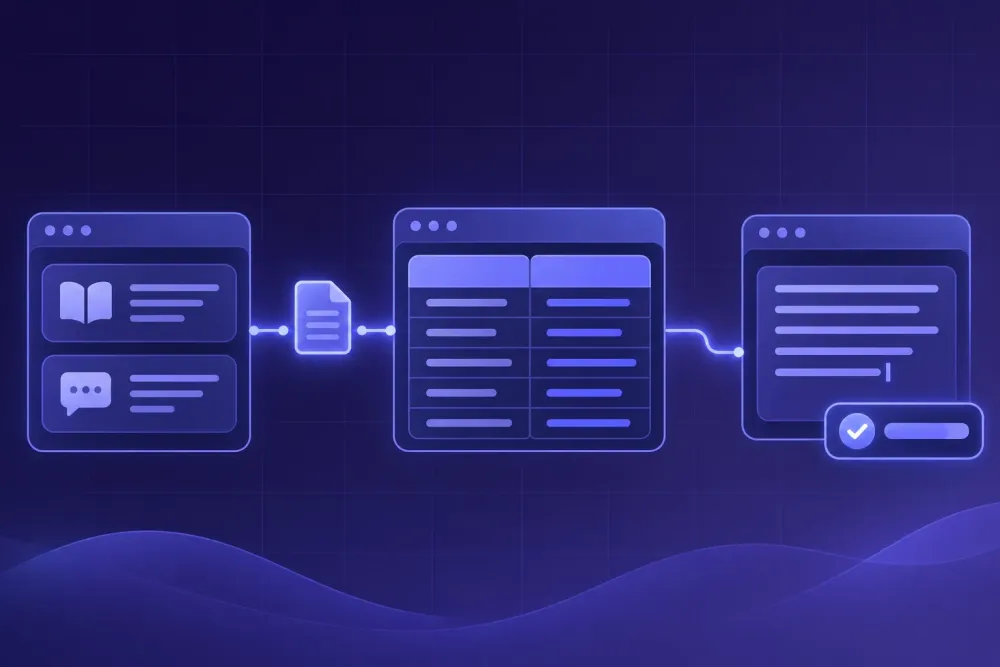
Most translators we talk to are not shopping for a new CAT tool. They have one, they paid for it, and their reviewers know where every button is. What they want is for the AI translation step to stop being the part of the chain nobody trusts. That is the gap the SnapIntel CAT tool workflow is built for: Trados, memoQ or whatever else you already run stays where it is for review and delivery, while the preparation and first draft of a DOCX, XLSX or PPTX happens in a separate step you can inspect before it runs. We have watched enough teams try to bolt a chat window onto a Trados project to be fairly sure the order of operations matters more than which model does the translating.
Where the AI step actually belongs in a CAT tool workflow
The common move is to put AI translation inside the CAT tool, as a pre-translation pass over segments the import filter has already chopped up. It works. It also produces exactly the kind of output that makes reviewers stop believing in machine translation: every segment translated in isolation, terminology wandering off between paragraph four and paragraph forty, and no record anywhere of what the engine was actually told to do.
We get better results treating AI translation as a stage before the CAT tool rather than inside it. The document goes in whole. The glossary and the instructions are written once, for that specific document, and applied across all of it. What comes back is a translated file plus a bilingual table, and the CAT tool then does the thing it is genuinely good at: putting source and target side by side for a human, pulling TM matches from previous jobs, and running whatever checks the client contract demands.
There is a cost to this ordering and it is worth naming out loud. You are running two tools instead of one, and there is a file handoff between them. For a 400-word certificate the handoff is not worth the trouble; open your CAT tool and type. For a 60-page manual where the terminology decisions are the hard part, that handoff is maybe twenty minutes of file work set against several hours of post-editing you do not have to do. Our rough break-even sits somewhere around ten to fifteen pages, and it shifts depending on how repetitive the source is and how much TM you can already throw at it.
What the SnapIntel CAT tool workflow looks like from upload to download
The shape of it is deliberately boring. You create a project at snapintel.io and upload one or more DOCX documents, XLSX workbooks or PPTX presentations. Source and target languages are picked by hand, not guessed. Then comes the preparation stage, which is the part that actually determines what you get.
Domain analysis runs first if you want it. It is optional and the interface recommends it rather than forcing it, which is the right call: on a contract you have translated eleven times you already know the domain. After that you generate, edit or paste a glossary, and generate, edit or paste the translation prompt. Both have to contain something before translation can start. There is no pre-filled default prompt sitting there for you to click past, and the approval save is enforced on the server as well as in the browser, so an empty glossary gets the start request rejected rather than quietly translated with nothing.
This is the step professional users tend to actually use, and the step everyone else wants to skip. SnapIntel has an auto mode for the second group, where domain analysis, glossary and prompt are prepared in one pass and translation starts without manual steps, and a manual mode where you control each one. Agency work usually wants manual mode. A one-off supplier manual for a department with no linguists usually wants auto.
Once the job runs you get progress per file rather than a spinner: queued, running, completed, failed, cancelled, partial, with percent complete and rows translated, and cancellation available while it is still working. On completion you download the translated DOCX, XLSX or PPTX, a neutral source/target XLSX export, a QA report with a quality rating, and a QA PDF if you want one. The original filename basename is preserved across the artifacts, which sounds trivial until you have sorted forty files called document(1)_final_FINAL.docx at eleven at night.
Moving the translated content into Trados or memoQ
The piece that makes this fit a CAT tool workflow at all is the neutral XLSX export: a plain source and target spreadsheet, one segment per row, no vendor-specific wrapper. We built it neutral on purpose. It is not an integration and we do not claim it is one. Nothing pushes into Trados or memoQ automatically, and nothing writes to your TM behind your back.
What you do with it is the normal bilingual Excel import your CAT tool already supports. In Trados you set up a bilingual Excel file type and map which column is source and which is target. memoQ takes it through its multilingual delimited text or Excel import with the same column mapping. Phrase handles it similarly. The first time you do this you will spend half an hour reading your own tool's documentation and getting the header row right. After that it is a saved file type and takes about ninety seconds. We wrote up the import side in more detail in how to import a bilingual Excel file into Trados, memoQ and Phrase, and the neutral XLSX export itself has its own walkthrough.
A concrete case. One of the agencies we work with handles equipment manuals for an industrial client, roughly 50 to 70 pages each, arriving as DOCX with embedded tables and a lot of warning labels. Their reviewers are Trados people and nobody was going to change that. Their arrangement now: the DOCX goes through preparation with the client glossary pasted in, translation runs, and two things come out. The delivery DOCX goes to the project manager for a formatting sanity check, since the layout has to survive. The neutral XLSX goes into a Trados project for the reviewer, who post-edits with the client TM attached. The reviewed Trados output is what gets delivered and what updates the TM. The AI draft never touches the TM directly.
If your reviewers prefer working in the document, you can skip the export entirely and hand them the translated DOCX. Several freelancers we know do exactly that, and in that case the CAT tool only comes out when the client specifically asks for a bilingual deliverable.
What this does to your translation memory
This is where we see teams make a decision they later regret. The temptation, once you have a bilingual table of AI output, is to import it straight into the TM. It is right there, it is formatted correctly, and it would bulk up a thin memory nicely.
Do not do that, or at least do not do it without marking it. A TM is a record of translations somebody stood behind. Fill it with unreviewed AI output and every future fuzzy match carries unknown provenance, which means your reuse statistics start lying to you and your reviewers stop trusting matches they used to accept on sight. We have seen an agency spend a week cleaning a 90,000-segment TM for exactly this reason.
The practice that holds up: the TM gets updated from the reviewed file, after a human has been through it, exactly as it always did. If you want the AI draft in a memory for reference, put it in a separate TM with a penalty applied so matches from it are visibly ranked below your confirmed content. Most CAT tools let you attach several memories with different penalties, and this is a good use of that.
One more thing on this. If your TM already covers most of a given client’s content, say 70% or more of segments, an AI first draft adds much less than it does on fresh content, because most of the document is already answered by exact and fuzzy matches. In that situation the sensible setup is to pre-translate from TM in your CAT tool first, and send only the genuinely new segments out for AI translation. We would rather tell you that than pretend the workflow helps equally everywhere.
Reading the QA report before you open the translated file
The QA report and quality rating that come with a completed job are triage instruments, not verdicts. We are careful about how we describe them because quality estimation in general is easy to oversell: a numeric score tells you where to look, and it does not tell you the translation is correct.
Used as triage, though, it saves real time. The habit we recommend is to read the report before opening the translated document. If the rating is where you expect for that language pair and content type, you start post-editing at the top and work down normally. If it comes back lower than usual, the useful question is almost never "is the model bad" but "what did I feed it". In our experience the answer is usually one of three dull things: the source had a messy layout and segmentation went sideways, the glossary was thin or had entries pulling against each other, or the prompt did not say anything about register and the output came back formal where the client wanted plain.
A second concrete case, this one a freelancer. She translates product registers for a retail client, XLSX workbooks of 2,500 to 3,000 rows, mostly short product names and attribute values. Her first run came back with a lower rating than she expected. The cause was that the workbook used the same five-word description in dozens of near-identical variants and her glossary had two different accepted targets for one of the attribute terms, left over from a previous client. She fixed the glossary entry, re-ran, and the second rating matched what she was used to. Twenty minutes of glossary work, and the QA report is what pointed her at it instead of her finding the inconsistency on row 1,900.
The limitation to keep in mind: the report does not know your client's preferences, and it cannot flag a mistranslation that is fluent and plausible. That is still your job, and it is why the CAT tool stage exists at all.
Where this arrangement does not fit
Some honest boundaries, because a workflow article that claims universal fit is not much use to anyone.
Ingestion is DOCX, XLSX and PPTX. That is the actual list. Scanned PDFs, InDesign packages, XLIFF files and SDLPPX project packages are not inputs, so if a client sends you a Trados package and requires the same package back, the handoff is awkward enough that you are better off working in Trados and treating AI as a segment-level helper there.
Heavily tagged content is the other weak spot. Documents where inline formatting carries meaning on nearly every segment are the hardest thing in this space for anyone, us included, and a format-preserving pipeline does better on prose and tables than on a document that is 40% inline tags.
Volume matters too. The Pro plan covers 60,000 words a month with unlimited documents, which comfortably fits a freelancer or a small team's AI-assisted share. A busy agency month runs past that, so the realistic pattern for larger shops is to route specific clients or document types through this workflow rather than everything.
And if you are a single translator working mostly on short, high-touch, creative texts, this adds a step without buying you much. Terminology-dense, repetitive, structured documents are where the preparation stage earns its time back.
How to test it on one project without reorganizing anything
Here is the cheapest way to find out whether this fits your work, and it does not involve changing anything about how you already operate.
Pick one document from a client you know well, between 3,000 and 4,000 words, structured rather than creative, and not due tomorrow. The trial gives you 5,000 words over seven days with no card, which is enough for one real job and some room for a second attempt. Before you start, note how long post-editing normally takes you per thousand words on that client's material. Without that number the comparison afterwards is just a feeling.
Then run it properly rather than clicking through. Paste the client glossary you already maintain instead of only generating one, and write two or three sentences in the prompt about register and anything the client is fussy about. Approve, run, and when it finishes read the QA report before the file. Import the neutral XLSX into your CAT tool with the client TM attached, post-edit as usual, and time it.
Compare that number against your baseline. If post-editing took meaningfully less time and the terminology held up across the whole document, run a second file and start thinking about which clients belong in this pipeline. If it did not, the glossary and prompt are the first things to change, not the tool. And if the second attempt still does not beat your normal process on that kind of content, you have learned something useful for the price of a few hours, and nothing in your existing setup has moved.