5 CAT tool workflow mistakes that slow down your translation projects
The five most damaging cat tool workflow mistakes, from translation memory neglect to poor file prep, and what to do about each one before the next project.
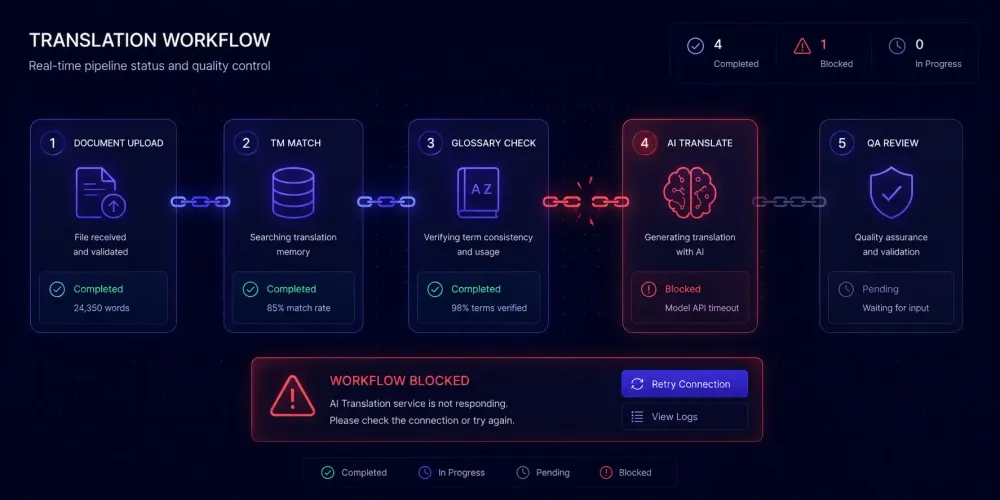
Most translation teams that consistently underperform aren't using bad tools. They're using good tools badly. CAT tool workflow mistakes tend to be invisible in the short term — a translation memory that slowly accumulates stale entries, a glossary left out of the project setup, segmentation settings nobody has reviewed since initial install. None of these feels like a crisis in the moment. Over a few months, though, they add up to slower delivery, TM match rates that fall short of their theoretical value, and revision rounds that eat into margins that were supposed to improve when the team started using AI pre-translation.
We work with agencies and freelancers across a range of CAT tools — Trados, memoQ, Smartcat, Phrase — and the same five problems show up regardless of which platform people are on. The tool itself rarely causes them. The workflow around it does.
TM maintenance: the CAT tool workflow mistake that compounds fastest
A translation memory is only as useful as the content it holds. When TM quality degrades — through accepting rushed translations under deadline pressure, through skipping updates after a client terminology change, or through letting old projects accumulate without cleanup — the database gradually becomes a source of suggestions translators have to read and reject rather than accept.
This is one of the most consistent problems we see across teams, and also the hardest to spot from the outside, because TM match rates can look healthy on paper while the match quality has dropped substantially. We worked with one agency on a long-running technical account where senior translators were consistently working at the same pace as newer team members, despite higher TM match rates. When we looked at what was happening, the TM reflected a client style guide from two years earlier. The account had undergone a terminology overhaul, but the TM had never been audited. Translators were reading every suggested segment and rewriting it rather than accepting, because the suggestions required more editing than writing from scratch would have.
The fix requires process discipline, not new software. Schedule a TM review every quarter for active clients. Mark segments from projects that predate a major client terminology change. Delete or archive content from completed one-off projects that won't generate future matches. Confirm that when translators modify TM suggestions, those corrections feed back into the TM — some CAT tool configurations need explicit setup for this, and it's easy to miss during initial deployment.
For teams working across multiple CAT environments, TMX export is the mechanism for syncing memories between tools. Most major CAT tools support TMX import and export. The caveat: a merged TM built from low-quality sources is still low quality. Consolidation is worth doing, but only after clearing out content that shouldn't be recycled.
One metric worth tracking on repeat clients: what percentage of TM suggestions are accepted without modification? If that number is below 50% consistently, the TM maintenance process has a gap worth addressing before the next project cycle starts.
Treating glossaries as optional project setup
Glossaries sit at the intersection of quality and consistency, and they're among the most consistently skipped steps in CAT tool workflows. Project managers under deadline pressure skip them "just this time." Freelancers working without a client brief skip them because there's nothing to build from. Over a few projects, terminology drifts, clients notice inconsistency, and revision rounds go up.
The mistake isn't having no comprehensive 500-term database. It's having nothing at all. A list of 30 to 50 approved terms for a new client — covering product names, domain-specific vocabulary, and any terms the client has flagged before — is enough to anchor consistency across a project team. CAT tools apply glossary matches automatically during translation, flagging when a source term appears without its approved target equivalent. Even a small glossary reduces the likelihood of inconsistent terminology appearing in delivered files.
The second failure point is building a glossary for one project and not connecting it to the next. CAT tools allow you to associate specific glossaries with clients, language pairs, or project templates. That association should be part of a standard project setup routine, not something a project manager remembers partway through translation.
In higher-stakes domains, the consequences of skipping this step are concrete. One agency we've spoken with that handles pharmaceutical content described a case where an untranslated term — not in any glossary, the translator made an assumption about domain equivalence — triggered a full revision cycle and a client complaint. The term wasn't obscure; the assumption simply wasn't correct for that client's specific context. A single glossary entry would have prevented it. In legal translation, similar patterns produce contract ambiguities that are expensive to resolve after delivery.
A workable starting point for any new client: extract 40 to 60 terms from their source materials, previous translations, or project brief. Confirm them with the responsible translator or a client contact. Add them to the client's glossary before the first file goes out. This takes 15 to 20 minutes and consistently replaces hours of revision work later.
Segmentation mismatches and where TM savings disappear
Segmentation rules determine how source text gets broken into units for TM matching — typically at sentence boundaries, though the exact behavior depends on tool settings and file format. When segment boundaries shift between projects, matches that should score 85% or 90% show up as 50% or 60% fuzzy matches, because the surrounding characters changed. This is one of the primary reasons TM savings fall below expectations on projects where the content has barely changed.
Here is a scenario we encounter regularly. A technical documentation team translates a product manual using standard sentence-level segmentation. Eighteen months later, the client sends an updated version of the same manual. Between those two projects, someone reformatted the source file and adjusted a few list structures. The segmentation now produces slightly different unit boundaries in the updated version. Paragraphs that should recycle as near-exact matches are coming back as lower-confidence fuzzy matches that require translator review rather than simple confirmation — even though the underlying content hasn't changed much.
File format interactions compound this. DOCX files with mixed list items and running prose, XLSX cells with multi-sentence content treated as single segments, HTML files where inline tags interrupt phrase boundaries — each of these affects how the TM matches against future projects. The effects aren't always visible until a project that should have strong match rates comes back with weak ones.
The preventative step is documentation. Keep a record per client of the segmentation settings and file formats used on their projects. When a new version arrives, verify those settings match before import. Some agencies build client-specific project templates in their CAT tool that encode the right TM, glossary, and segmentation combination by default — this removes the per-project decision entirely and prevents errors introduced under deadline pressure.
SRX (Segmentation Rules eXchange) files let you export segmentation settings and share them across tools or team members. If your team runs more than one CAT environment, standardizing on shared SRX rules for common file types resolves most TM consistency gaps without requiring manual coordination per project.
Starting AI pre-translation on unprepared source files
AI pre-translation is now a default step in many professional workflows. Run the AI pass, hand the pre-translated file to a post-editor, and reduce total time per word. When it works well, it produces high-quality output that needs light review. When the source hasn't been prepared, the AI pass produces output that costs more to fix than a clean source would have required in the first place.
The most common failure points:
Source text with uncorrected errors. AI translation tools produce confident output regardless of whether the input is correct. A fragmented sentence in the source becomes a grammatically coherent mistranslation in the target. A product name with a typo in the original is faithfully reproduced wrong in every language. Post-editors catch these, but each one requires figuring out what the source was supposed to say — which costs time that wouldn't exist with a clean source file.
Terminology inconsistency in the source. If the source document uses three different terms for the same interface element, the AI output will mirror that inconsistency or arbitrarily standardize on one. Either way, the post-editor has to resolve it. A brief source terminology scan before the AI pass prevents this and takes less time than the resolution does.
Missing domain context. Without domain anchoring, AI translation defaults to general language patterns. For pharmaceutical, legal, or technical content, that default produces fluent but imprecise output. A glossary, a translation prompt with domain instructions, or a domain analysis step before the job starts is where quality gets locked in — the translation itself is fast, but it can only produce output consistent with what the preparation established.
This preparation step matters more for AI-assisted workflows than for purely human translation. A human translator notices when something looks wrong and raises it; an AI pre-translation job processes whatever it receives. For structured DOCX or XLSX projects where this preparation is built into the workflow, SnapIntel requires domain analysis, glossary review, and prompt approval before translation begins. Even if you're not using the tool, the preparation model is worth applying manually to your own intake process.
File handling errors before the file reaches translation
CAT tools handle clean source files well. The problems typically come from what happened to the file before it arrived.
Tracked changes are one of the most consistent issues. A client sends a DOCX with revisions that weren't accepted before export. The CAT tool imports revision metadata alongside the actual content. Translators work through a file that includes change markers, and the delivered document may contain translated revision text rather than clean target content. The fix is one step: accept all tracked changes before import. Making this a standard part of the file receipt process costs nothing and prevents a whole category of redelivery requests.
OCR quality issues arise when agencies accept scanned PDFs and run optical character recognition before CAT import. When OCR quality is poor — which happens with complex page layouts, low-resolution scans, or documents with mixed text and graphics — the source text the translator sees contains character recognition artifacts. Translators either translate the errors or spend time cleaning them first, neither of which is the intended workflow. The right intervention point is before the file reaches translation: review OCR output for obvious artifacts, request a native digital source version when possible, and build OCR review into the intake process rather than leaving it for translators to encounter mid-job.
Nested DOCX formatting is subtler. Styles, section breaks, and tables within tables can make a document look straightforward in Word while the CAT tool's segmentation produces unexpected results underneath. Opening the file in the CAT tool's preview mode before assigning it takes a few minutes and catches most import issues before they become translator questions or redelivery conversations.
A practical two-minute pre-import review on every incoming file: accept tracked changes, confirm OCR quality where applicable, open in CAT tool preview and spot-check segmentation. This addresses the majority of file-handling problems before they enter the translation pipeline at all.
Turning these into consistent practice
The five mistakes above share a pattern: each one is low-risk in a single instance and accumulates cost over time. Skipping TM maintenance on one project doesn't break anything visible. Skipping it across a year of projects produces a TM that's working against you. Skipping glossary setup once is recoverable. Skipping it consistently means every client relationship is built on drifting terminology that nobody has explicitly approved.
The practical solution is a documented project intake process — a written checklist that makes the right behavior automatic rather than dependent on any one person's discipline or memory under pressure. A checklist that addresses all five: file review before import (tracked changes, OCR, format check), project template selection with the correct TM and glossary attached, segmentation setting verification against the client record, and pre-translation preparation that includes a source spot-check and domain context. On a standard project, none of this adds more than ten minutes. What it prevents — revision rounds, redelivery requests, TM remediation work — takes substantially longer to fix after the fact.
For AI-assisted projects specifically, the front-end preparation carries more weight than it does in purely human translation workflows. A human translator is a quality gate who notices problems and raises them. An AI pre-translation job processes what it receives without asking questions. The intake checklist and a structured pre-delivery QA check are the two brackets that determine how much rework happens in between. Getting both right reduces post-editing costs and keeps the efficiency gains from AI translation where they belong.
Your next move
Pick the one mistake from this list that matches your team's most frequent pain point. If TM match rates are lower than expected on repeat clients, schedule a one-session audit and flag everything from projects over eighteen months old. If revision rounds keep recurring over terminology, set up glossary templates for your top three clients this week. If AI pre-translation output is requiring more post-editing than the time savings justify, add a five-minute source review to the intake process before the next AI job starts.
Most CAT tool productivity problems don't require new software or a major workflow redesign. They require closing the gap between what the tool can do and what the workflow consistently asks of it. That gap is usually smaller than it looks from inside a deadline.